

Summary
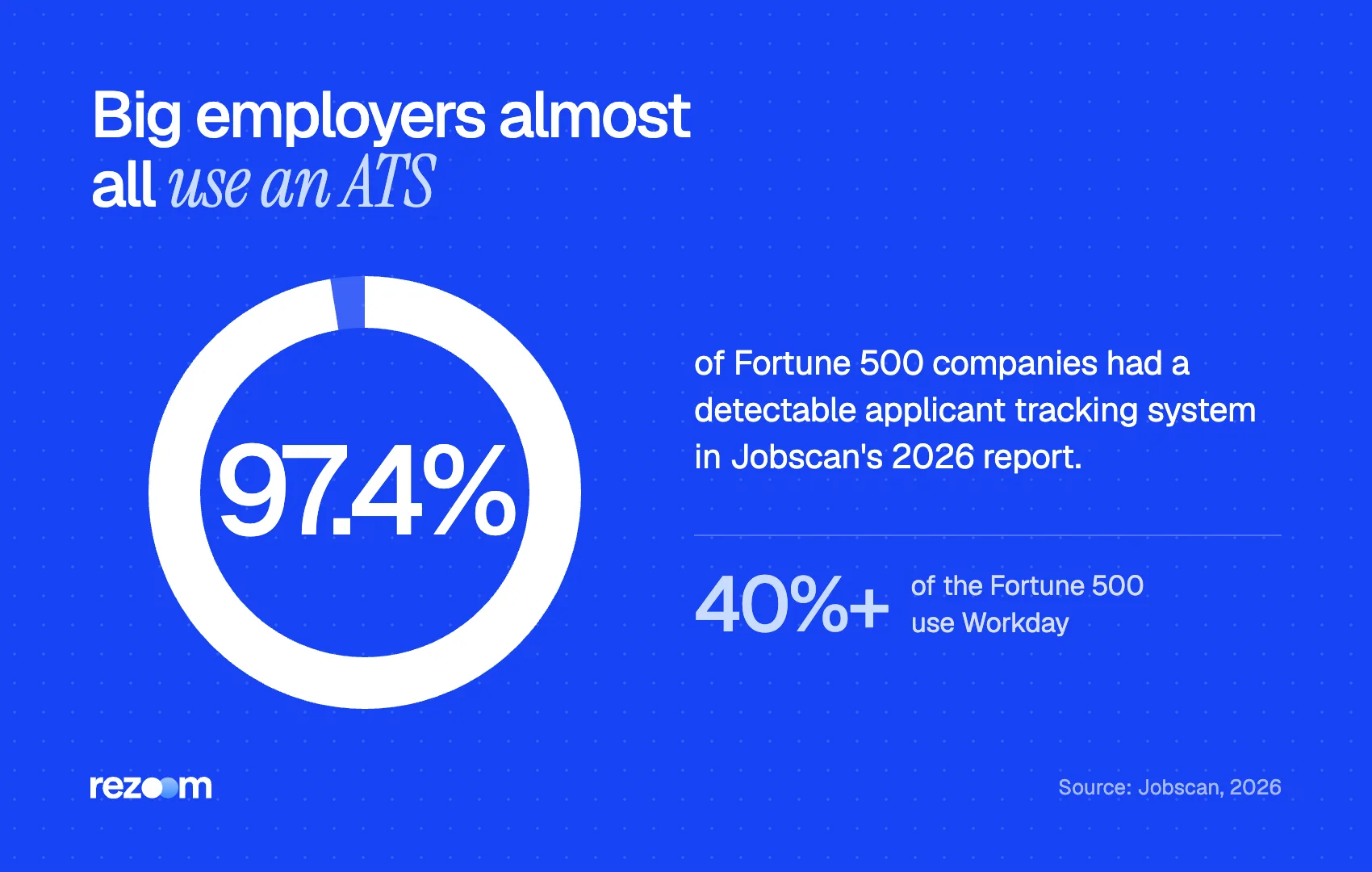
An ATS resume format is a single-column document with your name and contact details in the main body, standard section headings, plain bullets, consistent dates and full job titles, saved as .docx or a text-based PDF. Greenhouse and iCIMS both document that headers, footers, tables, text boxes and columns cause parsing errors. With 97.4% of Fortune 500 companies using a detectable ATS, these rules apply to almost every large-employer application.
The ATS resume format is simple: one column, your contact details in the body of the page, standard section headings, plain bullets and consistent dates, saved as .docx or a text-based PDF. Anything that hides text in a header, table, text box or graphic risks a broken parse.
These rules are not guesswork. Greenhouse and iCIMS publish help articles telling recruiters why resumes fail to parse, and the causes line up almost exactly with the rules below.
That matters because almost every large employer uses one. Jobscan detected an ATS at 97.4% of Fortune 500 companies in its 2026 report. Looking for a ready-made layout? Our ATS-friendly resume template gives you one. This guide explains the rules behind it.
What is an ATS resume format?
An ATS resume format is a resume layout an applicant tracking system can convert into clean, searchable text. It uses one column, standard headings, plain text in the main body, consistent dates and a .docx or text-based PDF file. It is a set of rules, not a design, so it works in any template.
When you apply online, the system extracts the text from your file and maps it into fields: name, contact details, jobs, dates, education and skills. Recruiters then search and filter those fields. Our explainer on how ATS works walks through the whole process.
The ATS resume format exists to make that extraction accurate. It does not need to look plain. Bold headings, a clean font and good spacing all survive parsing. What fails is structure that separates text from the main reading flow.
Jobscan's report found that over 40% of Fortune 500 companies use Workday for talent acquisition. Greenhouse, Lever and iCIMS are common at smaller firms. You rarely know which one you face, so format for all of them.
What layout rules does the ATS resume format require?
Use a single column. Keep your name and contact details in the main body, never in the page header, footer or a text box. Skip tables, graphics, photos and word art. Greenhouse and iCIMS both list these elements as causes of failed or inaccurate resume parsing.
These six layout rules come straight from vendor documentation.
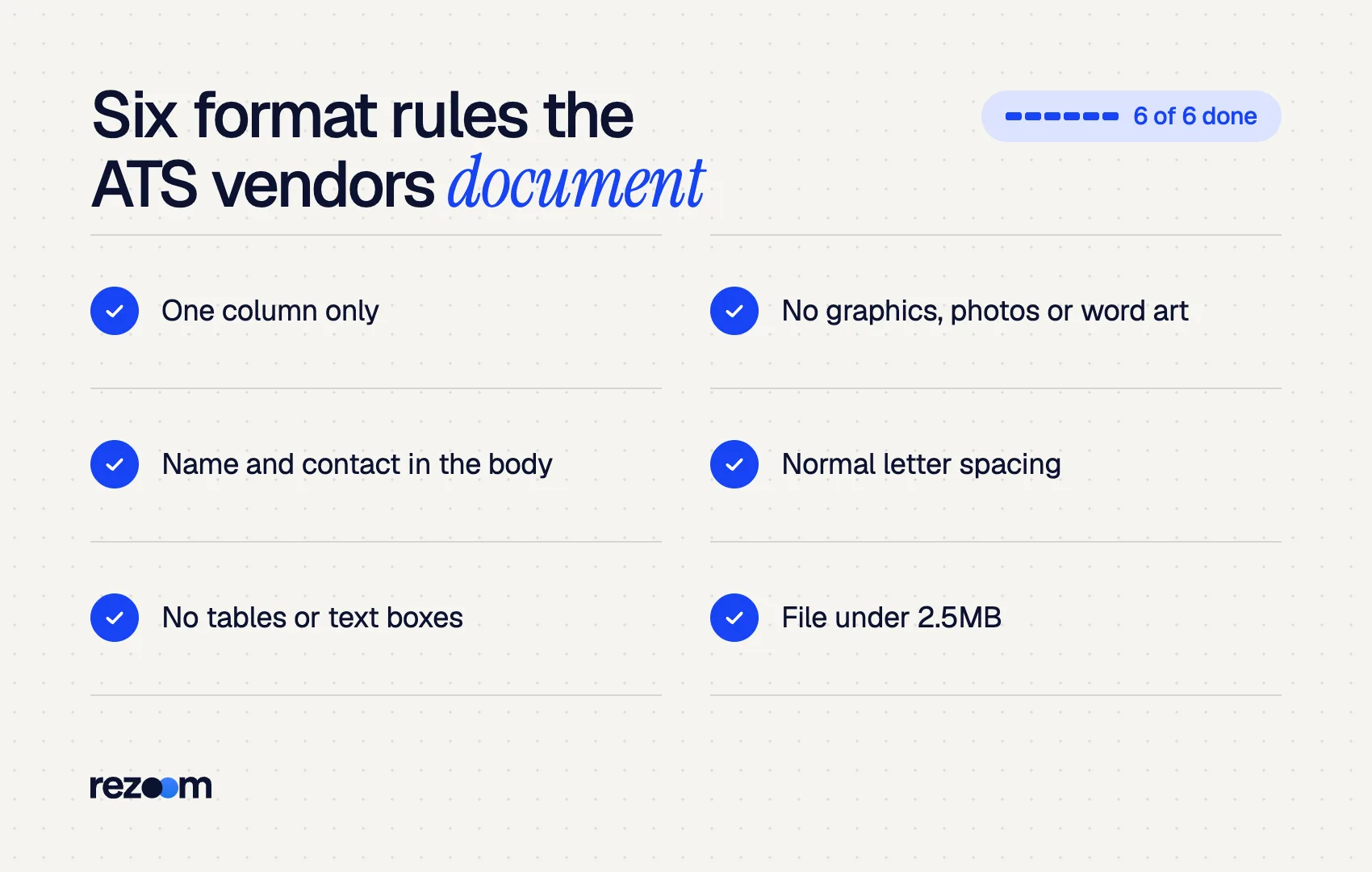
- One column. Greenhouse lists resumes that have a columned layout as a formatting issue. See our guide on two-column resumes and ATS for why.
- Contact details in the body. Greenhouse flags a name and contact information in the header, footer or a text box. iCIMS says a name in the document header means the system will not be able to parse the information.
- No tables. Greenhouse names "complex resumes with tables, headers, and footers."
- No graphics, photos or word art. All three appear on the Greenhouse list. Skill bars and logos fall in the same group.
- No text boxes. University of Missouri–St. Louis career services tells students not to insert tables, textboxes, graphs or columns.
- Normal letter spacing. Greenhouse warns that letters separated by spaces are not read as one word. Spaced-out names are a common design trick that breaks this.
ALEX RIVERA
Austin, TX | (512) 555-0183 | [email protected] | linkedin.com/in/alexrivera
Which section headings and order should an ATS resume use?
Use plain, expected headings: Summary, Experience, Education, Skills, and Certifications if needed. Avoid creative labels like "Where I've Made an Impact." Greenhouse lists resumes without clear sections as a parsing issue. For most people, the order is contact, summary, experience, skills, then education.
Parsers look for familiar words to know where a section starts. The University of Pittsburgh's career center recommends using the word Experience in your headings, such as Related Experience or Leadership Experience.
| Section | Safe heading | Avoid |
|---|---|---|
| Summary | Summary, Professional Summary | About Me, My Story |
| Experience | Experience, Work Experience | Where I've Worked, Career Journey |
| Skills | Skills, Technical Skills | Toolbox, What I Bring |
| Education | Education | Learning, Academic Path |
| Certifications | Certifications, Licenses | Credentials Wall |
Order follows your strengths. Experienced candidates lead with Experience. Students and recent graduates can put Education first. Either order parses fine, as long as the headings are standard.
How should dates, job titles and company names look?
Write full job titles, such as Senior Account Executive, not Sr. Account Exec. Include the company's legal suffix where natural, like Inc. or LLC. Keep one date style throughout, such as Jan 2023 – Mar 2025. Greenhouse documents incomplete job titles and missing company identifiers as parsing problems.
This rule is the one most guides miss. Greenhouse lists resumes with incomplete job titles as a formatting issue, with the example "Sr. Account Exec" instead of "Senior Account Executive." It also flags company names that lack identifying words such as Inc., Co., LTD or LLC.
Greenhouse also lists "differing formats throughout each section." That covers dates. Pick one date style and use it everywhere. Our guide on how to write dates on a resume compares the options.
Senior Account Executive | Brightline Software, Inc. | Austin, TX | Jan 2022 – Present
- Closed $1.4M in new annual contract value in 2024, 118% of quota
- Built a 40-account outbound sequence that booked 26 discovery calls in one quarter
If your official title is unusual, such as "Customer Happiness Hero," see our guide on job title vs actual title for how to show both.
Which fonts, bullets and file types fit the ATS resume format?
Use a common font like Arial, Calibri or Times New Roman at 10 to 12 point. Use standard round bullets, not icons or symbols. Save as .docx or a text-based PDF exported with Save as PDF. Keep the file under 2.5MB, the limit Greenhouse documents for parsing.
UMSL advises a common font (Times New Roman, Arial, Calibri) and no mixing of typefaces. It also suggests limiting styling to bold, caps and bullet points. Our resume font size guide covers sizes for each section.
Greenhouse adds that resumes can fail when they include characters the parser does not recognize. Icon fonts for phone and email symbols are a frequent cause.
For file type, iCIMS accepts .doc, .docx, .odt, .pdf, .rtf and .txt. Either .docx or PDF works, provided the PDF holds real text. Our guide on whether ATS reads PDF files explains which PDFs fail. Pitt's career center adds one export rule: save as PDF, do not print to PDF.
Use one column and put contact details in the main body do: Use standard headings like Experience, Education and Skills do: Write full job titles and one consistent date style do: Save as .docx or a text-based PDF under 2.5MB
Place your name or email in the page header or footer dont: Use tables, text boxes, skill bars or photos dont: Use icon fonts, symbol bullets or spaced-out letters dont: Invent creative section names
What does a complete ATS resume format look like?
A complete ATS resume format runs top to bottom in one column: name and contact line, a three-line summary, experience with full titles and consistent dates, a skills list in plain text, and education. Every word sits in the main body, so a parser reads it in the same order a person does.
Here is the full structure in plain text. Copy it into Word or Google Docs and replace the details.
ALEX RIVERA Austin, TX | (512) 555-0183 | [email protected] | linkedin.com/in/alexrivera
SUMMARY B2B account executive with 6 years in SaaS sales. Closed $1.4M in new contract value in 2024.
EXPERIENCE Senior Account Executive | Brightline Software, Inc. | Austin, TX | Jan 2022 – Present - Closed $1.4M in new annual contract value in 2024, 118% of quota
SKILLS Salesforce, HubSpot, Outbound Prospecting, Contract Negotiation, Forecasting
EDUCATION BBA, Marketing | University of Texas at Austin | 2019
Notice what is absent: no icons, no sidebar, no table for skills, no header block. Bold and capital letters do the visual work.
Format first, then tailor
Lock the ATS resume format once in a master file. Then tailor only the words for each job: summary, top bullets and skills. Changing layout per application is how stray text boxes and mixed date styles creep in.
How do you check your ATS resume format before you apply?
Copy your whole resume and paste it into a plain text editor. If every line appears in order, with your name first and dates beside the right jobs, the format parses. Then run it through an ATS checker against the job description to catch missing keywords and hidden layout problems.
Run this check on the final file you will upload.
- Paste the full text into a plain editor and read it top to bottom.
- Confirm your name, phone and email appear in the first lines.
- Check that each job title sits next to its company and dates.
- Search the file for two or three keywords from the posting.
- Confirm the file is under 2.5MB.
The free Rezoom ATS resume checker automates this. It parses your file, flags formatting issues and shows which job description keywords are missing. If you face a specific system, the guides on how Greenhouse works and how Workday parses resumes add system-level detail.

Frequently asked questions
What is the best resume format for ATS?
A reverse-chronological layout in one column, with standard headings and contact details in the body. Functional resumes that hide dates are harder for both parsers and recruiters to read.
Can an ATS read bold and italic text?
Yes. Bold, italics and capital letters are character styling, not layout, so they parse normally. Use them for headings and job titles.
Are two-page resumes ATS-friendly?
Yes. Page count does not affect parsing. Keep the same single-column format on both pages, and see our guide to the [two-page resume](https://rezoom.io/two-page-resume/) for when it fits.
Can I use color in an ATS resume format?
Yes, in moderation. Colored headings or names parse as normal text. Avoid light text on dark backgrounds and colored shapes behind text.
Should I use a resume template for ATS?
Use one only if it follows these rules. UMSL warns against built-in templates because many rely on tables and text boxes. A tested single-column template is fine.
Do ATS systems read headers and footers?
Often not reliably. Greenhouse and iCIMS both document header and footer text as a parsing problem, so keep everything important in the main body.



Comments