Greenhouse Resume Parsing: Can It Read Tables and Columns?
What Greenhouse resume parsing does with tables, columns, headers, footers and graphics, per Greenhouse's own support docs, plus a format fix and a test.
On this pageWhat is Greenhouse resume parsing, according to Greenhouse?
- What is Greenhouse resume parsing, according to Greenhouse?
- Can Greenhouse read tables and columns on a resume?
- Do headers, footers, text boxes and graphics break the parse?
- Which file types does Greenhouse accept and parse?
- How should a software engineer format a resume for Greenhouse?
- How can you test your resume before applying on Greenhouse?
- What do Greenhouse's docs not say about parsing?
- FAQ
- Sources
Greenhouse's own support docs list tables, headers, footers, columned layouts, text boxes, graphics, photos and word art as causes of an unsuccessful resume parse. Image files and files over 2.5MB also fail to parse. A failed parse does not delete your file, but a recruiter then has to type your details by hand. A single-column .docx or text PDF avoids all of it.
Greenhouse resume parsing can stumble on tables and columns. Greenhouse's own support page lists "complex resumes with tables, headers, and footers" and "a columned layout" as causes of a failed parse. So a single-column file with real text is the safe choice.
This guide sticks to what Greenhouse itself publishes, with a fix for each layout feature. We also mark what Greenhouse does not cover.
Quick answers by situation
| Your situation | What Greenhouse's docs say | What to do |
|---|---|---|
| Two-column template | Columned layouts can cause a failed parse | Rebuild it as one column |
| Skills in a table | Complex resumes with tables may not parse | Use a plain comma-separated line |
| Name and email in the header | Contact details in a header, footer or text box cause problems | Put them in the body, line 1 and 2 |
| Icons, photo or charts | Graphics, photos and word art cause problems | Remove them; use text labels |
| Scanned or image file | Image uploads may not parse | Export a text .docx or PDF |
| File over 2.5MB | Greenhouse can't parse files that large | Compress images or drop them |
What is Greenhouse resume parsing, according to Greenhouse?
Greenhouse resume parsing reads an uploaded resume and fills some candidate profile fields automatically. Greenhouse's support site says that when the system can't import the information, it is an "unsuccessful resume parse," and the details then need to go in by hand. Layout, file type and file size can all cause it.
Greenhouse's guide to adding candidates says you can upload a resume to have Greenhouse Recruiting automatically enter some candidate information3. It does not list which fields it fills. But it tells recruiters to check the result, because layout can throw it off.
Embedded images or other resume layouts may cause the candidate's information to be uploaded incorrectly.
Greenhouse Support, Manually adding candidates (2026)
The main page, Unsuccessful resume parse1, was last updated in March 2026. It sorts the causes into three groups: a file that is too large, fake resumes and formatting issues. It also notes a parse can be "partially successful," so some fields stay blank.
Where this fits in the hiring flow
Our explainer on how Greenhouse ATS works covers the stages, scorecards and recruiter review around parsing. Other systems behave differently. For example, our guide to how Workday parses resumes shows a parser that fills a long form you must then check.
Greenhouse also offers recruiters a full text search of resumes5. That page does not say how it handles images or odd layouts. Still, text the system can't read is text a search is unlikely to find.
Can Greenhouse read tables and columns on a resume?
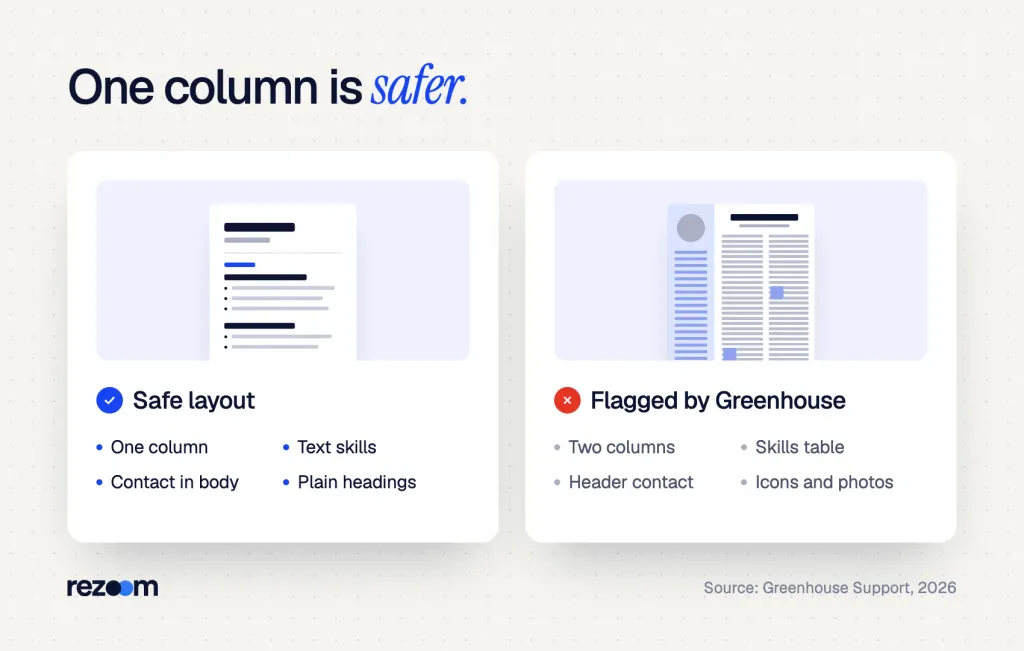
Greenhouse's support docs list both as risks. "Complex resumes with tables, headers, and footers" and "resumes that have a columned layout" appear under formatting issues that can cause an unsuccessful parse. The docs don't promise every table fails, but they give no safe table format either, so one column is the safe bet.
The Greenhouse page names both in plain words under formatting issues. But it doesn't claim every table breaks, and it doesn't give a failure rate. So treat columns and tables as a known risk, not a guaranteed rejection.
Why columns confuse a parser
A parser reads text in order. When two columns sit side by side, the reading order can mix them. Roche's careers FAQ puts it simply: ATSs read left to right8, so "some will read columns straight across." Your job title can then land next to a skill from the sidebar.
Tables add the same problem in a grid. Our deep dive on the two-column resume and ATS shows these mix-ups line by line.
Can ATS read a two column resume? See what Greenhouse and Textkernel say, what parsing tests found, a 5-minute test, and when to switch to one column.
A two-column header, before and after
[Left column] [Right column]
SAM CARTER SKILLS
Software Engineer PythonGoAWS
EXPERIENCE KubernetesSQL
Backend Engineer, Brightline Data, 2022 to now
SAM CARTER
Software Engineer | Austin, TX | sam.carter@email.com | (512) 555-0147
SKILLS
Python, Go, AWS, Kubernetes, PostgreSQL, Terraform
EXPERIENCE
Backend Engineer, Brightline Data Inc., Austin, TX | 2022 to now
The second version reads top to bottom in any parser. It also adds "Inc." to the company name. Greenhouse lists company names that "don't include identifying words such as Inc., Co., LTD, or LLC" as another cause of a weak parse.
Do headers, footers, text boxes and graphics break the parse?
They can. Greenhouse's page lists "resumes with the name and contact information in the header, footer, or text box" as a formatting issue. It also lists "resumes that include graphics, photos, or word art." Move contact details into the body and swap icons for plain text labels.
Many templates put your name and email in the Word header, so it looks fine on screen. But Greenhouse names that exact setup as a cause of parsing problems. If the parser skips your header, your profile may have no name or email.
Text boxes cause the same issue. A career center handout from Utah Valley University says to skip headers, footers, and text boxes7 for better compatibility. That advice matches what Greenhouse lists.
Graphics, icons and photos
Greenhouse lists "graphics, photos, or word art" in the same group. That covers skill bars, star ratings, logo icons and headshots. If a skill only shows as five filled dots, a parser has no text to read.
Greenhouse also says many high-quality images can push a file over its parse size limit. Design-heavy templates from tools like Canva often do both, as our guide to Canva resumes and ATS explains.
Do
- Put your name, city, email and phone as the first lines of the body.
- Use plain section titles such as Experience, Skills and Education.
- Write skills as words, separated by commas.
- Add Inc. or LLC to company names when it is part of the name.
Don’t
- Put contact details in the Word header, footer or a text box.
- Use skill bars, star ratings or icons in place of words.
- Space out letters, as in "S A M C A R T E R."
- Use a photo; US resumes should skip it anyway.
The spaced-letter rule comes from Greenhouse's list, which includes "a resume with spaces between the letters."
Which file types does Greenhouse accept and parse?
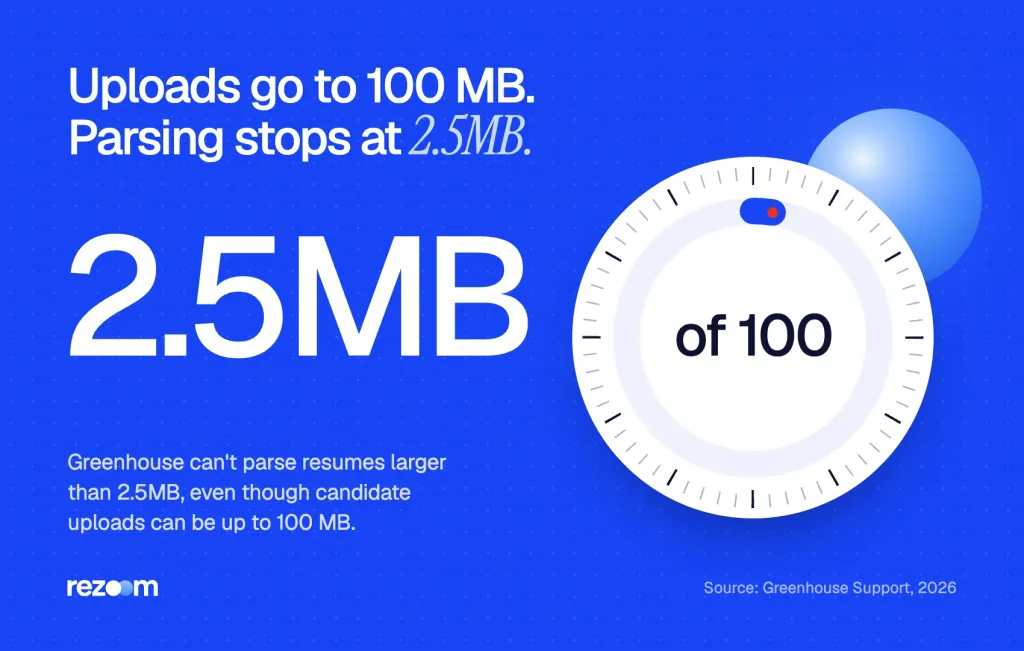
Greenhouse's supported formats page lists .doc, .docx, .pdf, .rtf and .txt for resumes and cover letters, with uploads up to 100 MB. But its parsing page says it "can't parse resumes larger than 2.5MB," and image uploads may not parse. So send a text-based .docx or PDF well under 2.5MB.
Greenhouse's supported file types page2 says candidate uploads can be up to 100 MB. Yet its parsing page says Greenhouse Recruiting can't parse resumes larger than 2.5MB. So a large file can upload fine and still fail to parse.
| File type | Accepted by Greenhouse? | Parsing notes from Greenhouse's docs |
|---|---|---|
| .docx / .doc | Yes | No special warning; layout rules still apply |
| .pdf (text-based) | Yes | No special warning; layout rules still apply |
| .pdf or image (scanned) | Upload yes, as noted | Image uploads may not parse |
| .rtf | Yes | Not addressed on the parsing page |
| .txt | Yes | Not addressed; plain text has no layout to break |
| Any file over 2.5MB | Upload yes, up to 100 MB | Can't be parsed |
PDF or Word?
Greenhouse does not rank .docx above PDF in the pages we opened. Roche's FAQ says the .docx format is the most accurately parsed8 by ATSs, but that is a general claim, not a Greenhouse test. Our guide on whether ATS can read PDF files covers the trade-offs.
Language matters too. Greenhouse's page on non-English resume parsing4 says full parsing works in 28 listed languages, including regional forms such as Canadian French.
Free ATS score, the text the software extracts and your missing keywords. No sign-up.
How should a software engineer format a resume for Greenhouse?
Use one column, real text and plain headings: contact lines first, then Summary, Skills, Experience, Projects and Education. List tools as comma-separated words, give each job a clear title and company name, and save as a text .docx or PDF under 2.5MB. That layout matches every rule in Greenhouse's docs.
Greenhouse is common at tech companies, where dense two-column templates with skill bars are popular. That is the exact layout Greenhouse's docs flag.
Greenhouse lists "resumes without clear sections and differing formats throughout each section" as a cause too. So use the same date format and bullet style in every job. Also delete template filler such as "Company 1," because Greenhouse says the parser may skip fake-looking data.
A full single-column layout
SAM CARTER
Software Engineer | Austin, TX | sam.carter@email.com | github.com/samcarter
SUMMARY
Backend engineer with 5 years in Go and Python building data APIs.
SKILLS
Go, Python, AWS, Kubernetes, PostgreSQL, Kafka, Terraform, CI/CD
EXPERIENCE
Backend Engineer, Brightline Data Inc., Austin, TX | Mar 2022 to now
Cut p95 API latency from 480 ms to 190 ms by adding a Redis cache.
Software Engineer, Northpine LLC, Dallas, TX | Jun 2019 to Feb 2022
EDUCATION
B.S. Computer Science, University of Texas at Dallas, 2019
For more layouts by role, browse our IT resume examples. Each one uses a single column with text a parser can read. If you want a full page to copy, open our software engineer resume example and match its section order.
Software engineer resume example
A one-column engineer resume with plain headings and text skills, built to parse cleanly.
Fill-in-the-blank header
[FULL NAME, NO SPACED LETTERS]
[JOB TITLE] | [CITY, STATE] | [EMAIL] | [PHONE OR GITHUB/LINKEDIN URL]
SKILLS
[TOOL], [TOOL], [TOOL], [TOOL], [TOOL]
Type your GitHub or portfolio address as visible text, not as an icon with a hidden link. Greenhouse's file types page says it does not load externally linked images when it converts a resume to PDF for preview. A text URL shows up in every view.
Your cover letter follows the same rules. Our IT cover letter examples use plain one-column layouts that upload cleanly next to your resume.
How can you test your resume before applying on Greenhouse?
Copy all the text out of your file and paste it into a plain text editor. If the order is wrong or lines vanish, a parser may struggle too. Then check the file size, run it through an ATS checker and, if the form offers autofill from your resume, compare each filled field with your file.
Greenhouse does not publish a candidate-facing test. But the UVU handout suggests you copy text from your PDF and paste it into Word7; if everything selects and keeps its order, the file is likely fine. A plain text editor is even stricter.
- Copy and paste the textSelect all in your PDF or .docx and paste it into a plain text editor. Check that your name and email come first and that jobs read in order.
- Look for missing linesIf your contact details or skills vanished, they probably sit in a header, text box or image. Move them into the body.
- Check the file sizeMake sure the file is well under 2.5MB, the size Greenhouse says it can't parse past.
- Run an ATS checkUpload the file to a resume checker and compare the parsed fields with your file.
- Review the autofillIf the application form fills fields from your resume, read every field before you submit.
Our free ATS resume checker shows the fields a parser pulls out, so you can spot a missing email or a mixed-up job title. It is not Greenhouse's own parser, so treat it as a close check. For a stripped version to paste into form boxes, see our guide to the plain text resume.
What to say if they push back
- "Your profile is missing your email." Reply with your email and attach a single-column copy of your resume.
- "Your work history looks out of order." Say your old file used two columns and offer the clean version.
- "Can you fill in the application fields by hand?" Say yes, and copy each value from your resume so they match.
Recruiter: "Your application came through, but I can't find your phone number."
"Thanks for checking. It was in my file's header, so it may not have imported. It's (512) 555-0147."
Recruiter: "Got it. Can you send an updated resume too?"
"Yes. I'll send a single-column version today so every field reads cleanly."
If an autofill comes out wrong, fix the fields and then fix the file. The same layout will break again at the next Greenhouse company.
What do Greenhouse's docs not say about parsing?
The pages we opened don't name the parsing vendor, list the exact fields filled, give failure rates or say parse errors lower your ranking. They also don't say the parser auto-rejects anyone. A failed parse means a recruiter types your details by hand, so the risk is a messy profile, not a hidden rejection.
In the Greenhouse pages we opened, we could not confirm any of these claims:
- A named parser vendor. None of the pages name the company behind the parser.
- A field list. The docs say "some candidate information," with no list of fields.
- Failure rates. No page gives a percentage for tables, columns or PDFs.
- Auto-rejection. No page says a failed parse rejects you. The Greenhouse AI features page6 lists Talent Matching, which "compares candidate resumes" to a calibration, but it doesn't describe an automatic rejection.
In short, Greenhouse resume parsing has known weak spots, and Greenhouse names them. If your file avoids all of them, the parse is unlikely to hold you back. For other ways parsers go wrong, read our guide to common resume parsing errors.
Resume parsing errors explained: what an unsuccessful resume parse means in Greenhouse, the 8 layout causes like columns and tables, and the fix for each.
Final check before you apply
Before you upload to Greenhouse
Free ATS score and your missing keywords. No sign-up.
Frequently asked questions
Can Greenhouse read tables on a resume?
It may not. Greenhouse's support page lists "complex resumes with tables, headers, and footers" as a cause of an unsuccessful parse. Write skills and dates as plain lines instead.
Can Greenhouse read a two-column resume?
Columns are a known risk. Greenhouse lists "resumes that have a columned layout" as a formatting issue that can break the parse. A single column is the safe format.
Does Greenhouse read the header and footer?
Not reliably. Greenhouse names contact details in the header, footer or a text box as a parsing problem, so put your name and email in the body.
What file types does Greenhouse accept?
Greenhouse lists .doc, .docx, .pdf, .rtf and .txt for resumes and cover letters, with uploads up to 100 MB. Parsing stops at 2.5MB, and image files may not parse.
Does a failed parse mean Greenhouse rejects my resume?
Greenhouse's docs don't say that. They say a recruiter then has to enter your details by hand. A messy profile can still hurt, so fix the layout.
Who makes the Greenhouse resume parser?
Greenhouse resume parsing pages don't name a vendor. We could not confirm the parser's maker from Greenhouse's own docs.
Sources
We opened and read each page below. The small numbers in the text point here. Pages that carry no publication date show n.d.
- Greenhouse Support2026
Greenhouse can't parse resumes over 2.5MB and lists tables, headers, footers, columns, text boxes, graphics and image uploads as causes of a failed parse
- Greenhouse Support2026
Candidates can upload .doc, .docx, .pdf, .rtf and .txt files up to 100 MB, and linked images do not load in the PDF preview
- Greenhouse Support2026
Uploading a resume fills some candidate information, and embedded images or layouts may cause errors
- Greenhouse Support2026
Full resume parsing works in 28 listed languages, including regional forms such as Canadian French
- Greenhouse Support2022
Recruiters can run a full text keyword search of resumes from the All Candidates page
- Greenhouse Support2026
Talent Matching compares candidate resumes against a calibration, with no automatic rejection described
- Utah Valley University Career & Internship Centern.d.
Career advisers say to skip headers, footers, text boxes and two-column layouts and to test by copying PDF text into Word
- Roche Careersn.d.
Some ATSs read columns straight across, and .docx is described as the most accurately parsed format
Mohammad has spent more than ten years designing consumer products and leads product at Rezoom, deciding what gets built and what gets left out. His guides cover the whole job search, from resume sections and cover letters to interview answers and career moves.
Goodi, M. (2026, October 31). Greenhouse Resume Parsing: Can It Read Tables and Columns?. Rezoom. https://rezoom.io/greenhouse-resume-parsing-tables-columns/