
Summary
Yes, applicant tracking systems read PDF files. Greenhouse, iCIMS, Oracle Taleo and Workable all list .pdf as a supported resume format in their own documentation. What fails is a PDF resume with no real text layer, such as a scan or photo, plus layouts parsers struggle with: columns, tables, text boxes and contact details in the header. Export from Word or Google Docs with Save as PDF, then check that you can select and copy every line.
Yes, an ATS reads PDF files. Every major applicant tracking system we checked lists .pdf as an accepted format, so a PDF resume is not rejected for being a PDF.
The catch is what sits inside the file. A PDF can hold real, selectable text, or it can hold a picture of text. Parsers handle the first kind well and often fail on the second. Layout choices like columns and headers cause the rest of the trouble.
This guide covers what the ATS vendors themselves document, the PDF types that break, and a quick test you can run before you hit submit. If your question is only which file to send, our guide on PDF or Word for a resume answers that. This article is about what happens to the PDF after you upload it.
Does ATS read PDF files at all?
Yes. Greenhouse, iCIMS, Oracle Taleo and Workable all document .pdf as a supported resume file type. A text-based PDF resume uploads and parses like a Word file. Problems start when the PDF holds an image instead of text, or when the layout uses columns, tables or headers that confuse the parser.
The myth that ATS software cannot open PDFs dates from older systems. Current vendor documentation says otherwise.
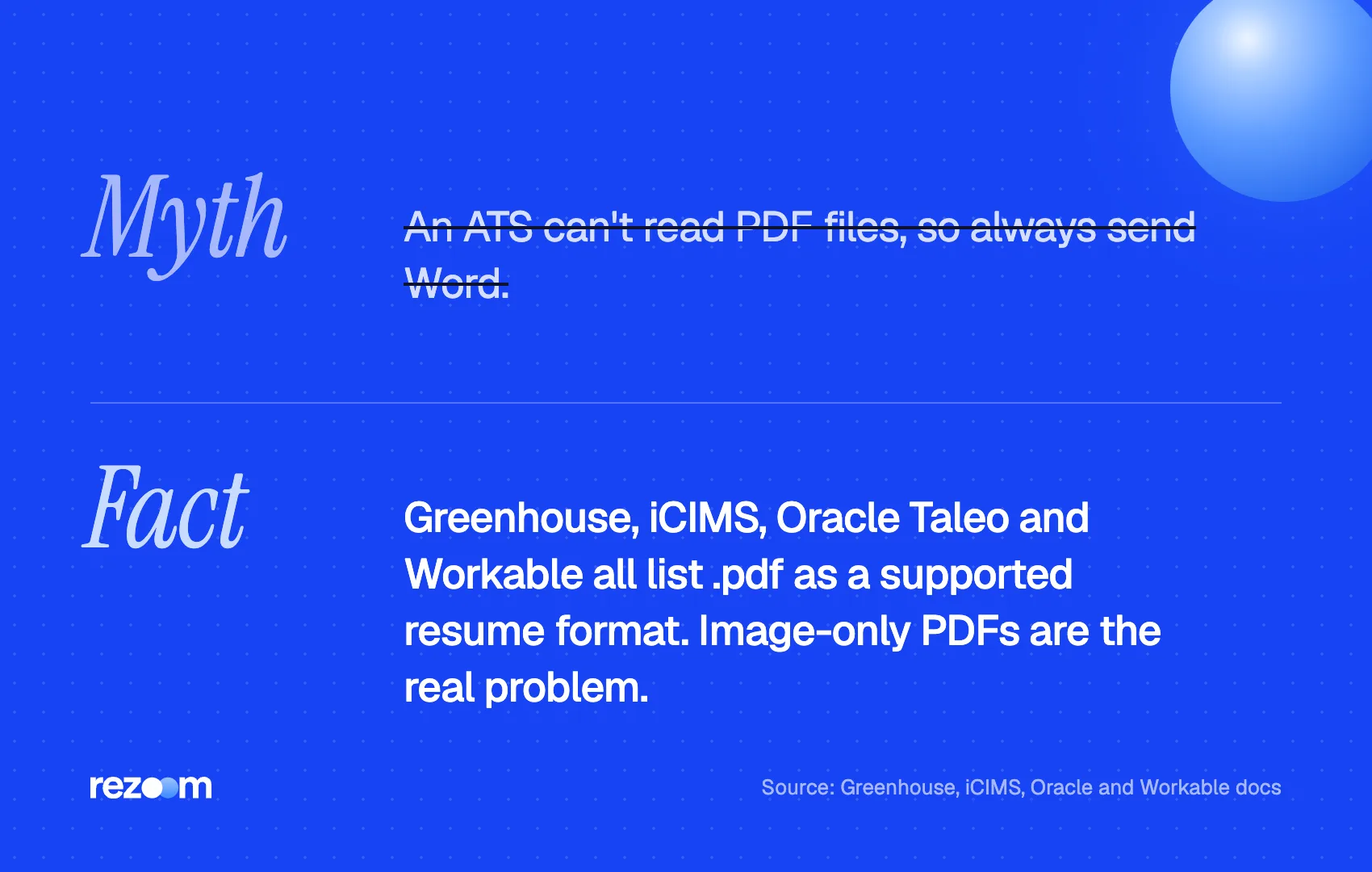
| ATS | What its documentation says about PDF |
|---|---|
| Greenhouse | Resumes should be uploaded as a document (such as a .docx or .pdf), not as an image |
| iCIMS | Accepts .doc, .docx, .odt, .pdf, .rtf and .txt |
| Oracle Taleo | Lists Portable Document Format (.pdf) among supported attachment formats |
| Workable | Accepts .doc, .docx, .pdf, .rtf and .odt |
One nuance matters. Taleo's documentation notes that system administrators decide which formats each employer allows. So a specific job posting can still ask for Word only. When it does, follow the posting.
If you want the bigger picture of what these systems do with your file, read how ATS works. It explains parsing, search and ranking in plain terms.
Which PDF resume files does ATS fail to read?
An ATS fails on a PDF resume that has no text layer, such as a scanned page or a photo saved as PDF. It also misreads text placed in headers, footers, text boxes, tables or columns. Spaced-out letters, unusual characters and files over the size limit cause errors too.
Greenhouse publishes the clearest list. Its help article on unsuccessful resume parses names these causes:
- Resumes uploaded as an image rather than a document
- Graphics, photos or word art
- Tables, headers and footers
- Name and contact details in the header, footer or a text box
- Columned layouts
- Letters separated by spaces, which the parser cannot read as one word
- Files larger than 2.5MB
A second Greenhouse article adds that a resume can fail when it includes characters the text parser does not recognize. Decorative icon fonts and symbols used as bullets are common culprits.
iCIMS documents the same header problem: if your name sits in the document header, the system will not be able to parse the information. It also warns that scanned resumes saved as images may not parse correctly.
Notice what is missing from these lists. None of them says "PDF." The file format is the container. The failures come from what you put in it.
Is a scanned or image PDF resume readable by ATS?
Sometimes, but do not count on it. Some parsers, such as Workable and Textkernel, run optical character recognition on image files. Greenhouse lists image uploads as a cause of failed parses, and iCIMS warns that scanned resumes may not parse correctly. A text-based PDF resume removes the risk.
Optical character recognition (OCR) turns a picture of words into machine-readable text. Some vendors advertise it. Workable says image-based CVs are parsed, and Textkernel, a parsing engine many tools license, says its OCR lets recruiters upload and parse resumes in any format, whether it's a scan, a photo, or a PDF.
Other vendors are more cautious. Greenhouse tells recruiters that image uploads fail, and iCIMS recommends using an original digital document for best results.
You cannot see which parser a given employer uses. So treat OCR as a safety net that may not exist, not as a plan.
Text-based PDF (exported with Save as PDF): Jordan Lee | Operations Analyst | [email protected] Skills: SQL, Tableau, Excel (Power Query), Process Mapping
Scanned PDF (photo of a printout) with no OCR: [no text found]
The second file looks identical to a human. To a keyword search, it may be empty.
How do you know if your PDF resume is ATS-readable?
Open the PDF resume, press Ctrl+A or Cmd+A, copy, and paste into a plain text editor. If every line appears in reading order, with your name, contact details, headings and dates intact, a parser can read it. Missing, jumbled or garbled text means the layout needs fixing.
This copy-paste test is the closest thing to seeing what a parser sees. It takes about two minutes.
- Try to select text. Click and drag over a bullet. If you cannot highlight words, the PDF is an image.
- Copy everything into a plain text editor. Use Notepad, TextEdit in plain text mode, or a blank email.
- Read the result top to bottom. Check that your name and email appear first and that job titles sit next to the right dates.
- Look for broken characters. Boxes, question marks or merged words point to symbol fonts or spaced letters.
- Search for one keyword. Press Ctrl+F in the PDF and search for a skill. If the search finds nothing, neither will a recruiter.
For a fuller check, the free Rezoom ATS resume checker parses your file, flags formatting problems and compares your keywords against a job description.
Test the exact file you upload
Run the copy-paste test on the final PDF, not your Word draft. Export settings, fonts and online editors can change the text layer during conversion. A file that looked fine in Google Docs can paste back with merged columns or missing bullets.
How should you save a resume as PDF for ATS?
Write the resume in Word or Google Docs, then use Save as PDF or Download as PDF. Do not print to PDF, scan a printout or export a design file as an image. Keep the file under 2.5MB, skip passwords, and name it with your first and last name.
The University of Pittsburgh's career center gives a specific rule: Convert/Save as PDF, do not print to PDF before you upload. A direct export keeps the text layer that parsers depend on.
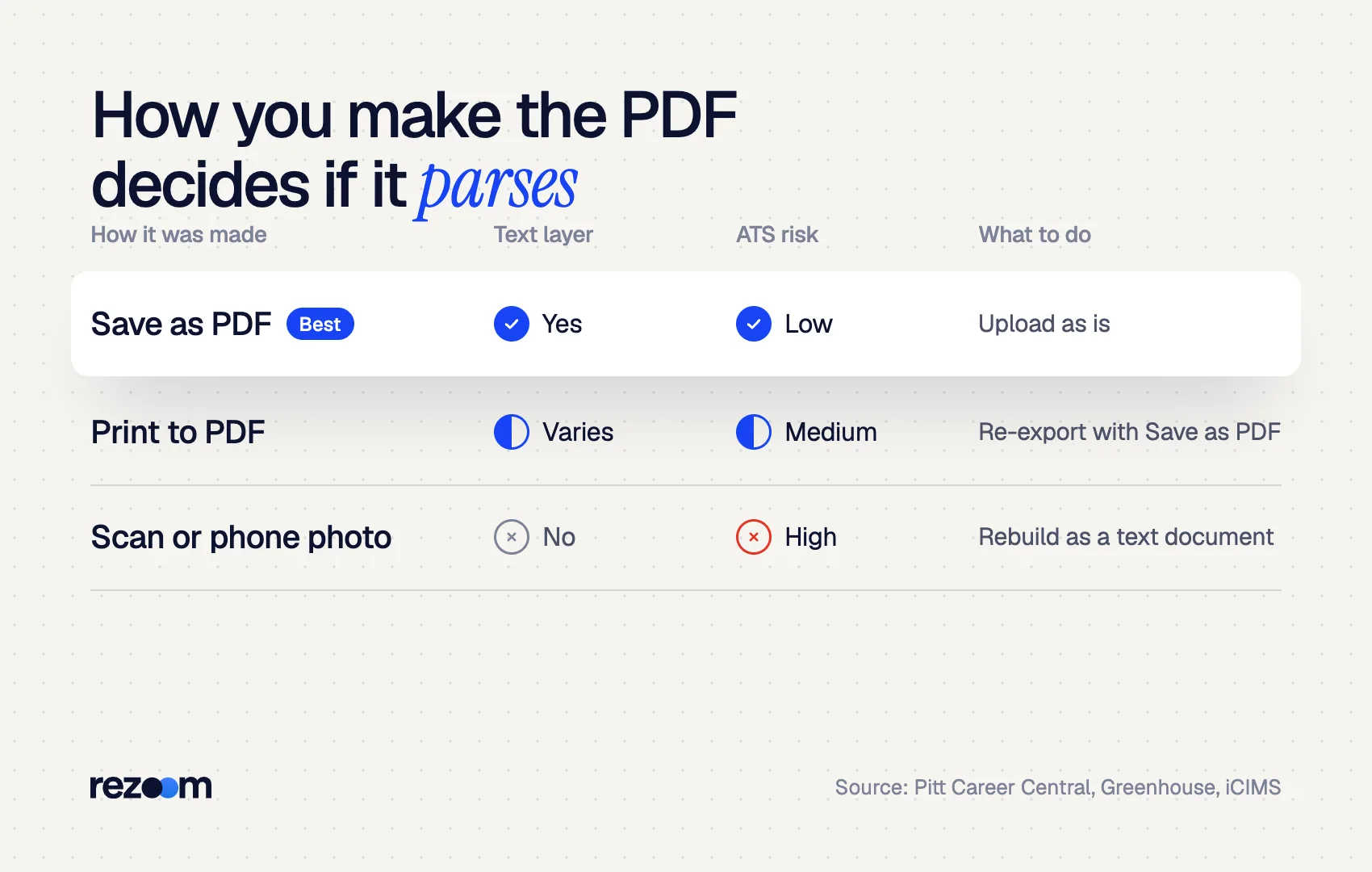
Use this table to judge the PDF you already have.
| How the PDF was made | Text layer | ATS risk | What to do |
|---|---|---|---|
| Save as PDF from Word or Google Docs | Yes | Low | Upload as is |
| Print to PDF | Usually, but can vary | Medium | Re-export with Save as PDF |
| Design tool export (graphic-heavy) | Varies by export | Medium to high | Run the copy-paste test |
| Scanned page or phone photo | No | High | Rebuild as a text document |
Also watch the details. Greenhouse cannot parse resumes larger than 2.5MB, so compress or remove images if your file is heavy. A clean file name helps the human reader too; see our guide to resume file names.
JORDAN LEE
Denver, CO | (303) 555-0147 | [email protected] | linkedin.com/in/jordanlee
Export with Save as PDF or Download as PDF do: Put your name and contact line in the main body do: Use one column with standard headings like Experience and Skills do: Keep the file under 2.5MB
Upload a scan or a phone photo of your resume dont: Use print to PDF or password-protect the file dont: Use icon fonts, symbols or spaced-out letters dont: Put key details in text boxes, tables or the page header
Should you send a PDF resume or a Word file to an ATS?
Send what the posting asks for. If it asks for nothing specific, a text-based PDF resume is fine for modern systems like Greenhouse, iCIMS, Taleo and Workable, which all accept .pdf. Choose .docx when the posting requests Word or when you apply through a staffing agency that edits resumes.
The file choice matters far less than the layout inside it. A single-column PDF resume parses cleanly. A two-column Word document with a text-box sidebar can fail in either format, as our guide to two-column resumes and ATS shows.
If you are building from scratch, start with the ATS resume format rules, then follow the system-specific notes in how Workday parses resumes if that is the portal you face.
The Rezoom AI resume builder exports a single-column, text-based PDF by default, so the copy-paste test passes without extra work.
Frequently asked questions
Can Workday read a PDF resume?
Workday does not publish a candidate-facing parsing spec, so apply the same safeguards: real text, one column and contact details in the body. Our guide to [how Workday parses resumes](https://rezoom.io/how-workday-parses-resumes/) covers its autofill step in detail.
Is a Canva PDF resume ATS-friendly?
It depends on the design. Many design templates use columns, text boxes and icons that parsers misread. Run the copy-paste test, and see our guide to [Canva resumes and ATS](https://rezoom.io/canva-resume-ats/).
Does ATS read hyperlinks in a PDF?
Parsers read the visible text, so type the full URL, such as linkedin.com/in/yourname. A word like "LinkedIn" with a hidden link may lose the address in the parsed profile.
Why did my PDF resume autofill the wrong information?
Autofill errors usually come from columns, tables, header text or unrecognized characters. Greenhouse and iCIMS both list these as parsing problems. Fix the layout, re-export and test again.
Does a password-protected PDF work with ATS?
Do not use one. Protection can block text extraction, and recruiters often need to open, search and forward your file without friction.
Does hidden white text in a PDF help with ATS?
No. Parsers extract white text as normal text, and a recruiter who sees the parsed profile will notice stuffed keywords. Use real keywords in real bullets instead.
Comments