
Summary
To add a hyperlink to a resume, select the text, press Ctrl+K (Cmd+K on Mac), paste the full URL, and apply it. Use a short, visible URL such as linkedin.com/in/yourname as the clickable text, so the link still works when printed or parsed by an ATS. Export with Save As PDF or Download as PDF, not a print driver, then click every link in the final file before you apply.
To add a hyperlink to a resume, highlight the text, press Ctrl+K (Cmd+K on a Mac), paste the full web address, and click Apply or OK. The best link text is a short, readable URL, such as linkedin.com/in/janedoe, so the link works on screen, on paper, and inside an applicant tracking system.
The mechanics take ten seconds. The mistakes happen later: a link that dies when you export to PDF, anchor text like "Portfolio" that means nothing on a printout, or a URL hidden in a page header the ATS scrambles.
This guide covers each step, plus a simple rule for link text and a final test that catches broken links before a recruiter does. If you are still deciding which links to include, start with our sibling guides on putting GitHub on a resume and adding a portfolio link. This one covers how.
How do you add a hyperlink to a resume in Word?
In Microsoft Word, select the text you want to link, press Ctrl+K or go to Insert > Link, paste the full URL into the Address box, and click OK. Word also turns a typed web address into a live link automatically when you press Space or Enter after it.
Microsoft documents two methods. The fast one: Word converts a web address into a link when you press Enter or the spacebar right after typing it. The manual one gives you more control.
- Select the text you want to make clickable.
- Press Ctrl+K, which Microsoft lists as the shortcut to insert a hyperlink. You can also use Insert > Link, or right-click and choose Link.
- Paste the full address, including https://, into the Address box.
- Check the "Text to display" field. This is what the reader sees.
- Click OK.
To change a link later, right-click it and choose Edit Hyperlink. Word styles links in blue with an underline by default. You can recolor them to match your text, but keep the underline or a subtle color so a reader knows the text is clickable.
For email, type your address and Word links it automatically with mailto:. A recruiter who clicks it opens a new message addressed to you.
How do you add a hyperlink to a resume in Google Docs?
In Google Docs, highlight the text, press Ctrl+K (Cmd+K on Mac) or choose Insert > Link, paste the URL in the Link field, and click Apply. Links normally stay clickable when you download the document as a PDF, but always test them in the exported file.
Google's steps are almost identical to Word's. According to Google Docs Editors Help, you:
- Highlight the text you want to link.
- Press Ctrl+K on Windows or Cmd+K on a Mac, or select Insert > Link.
- Enter the URL or email address in the Link field.
- Click Apply.
Google Docs gives you two ways to make a PDF. You can use File > Download > PDF Document, or, as Google's help page on downloading files describes, File > Print with "Save as PDF" as the destination. Whichever path you use, open the finished PDF and click each link.
The same shortcut, Ctrl+K or Cmd+K, works in most resume builders and design tools. If a template tool does not support live links, type the visible URL anyway. A recruiter can still copy it.
What text should you use when you add a hyperlink to a resume?
Use a short, visible URL as the clickable text, such as linkedin.com/in/janedoe or github.com/janedoe. Drop the "https://www." prefix from the display text but keep it in the link itself. This works on screen, on paper, in an ATS, and for screen readers.
Career advice splits on this. A University of Houston career center post recommends hyperlinked words instead of long URL strings. Other guides tell you to paste raw URLs so the address survives printing.
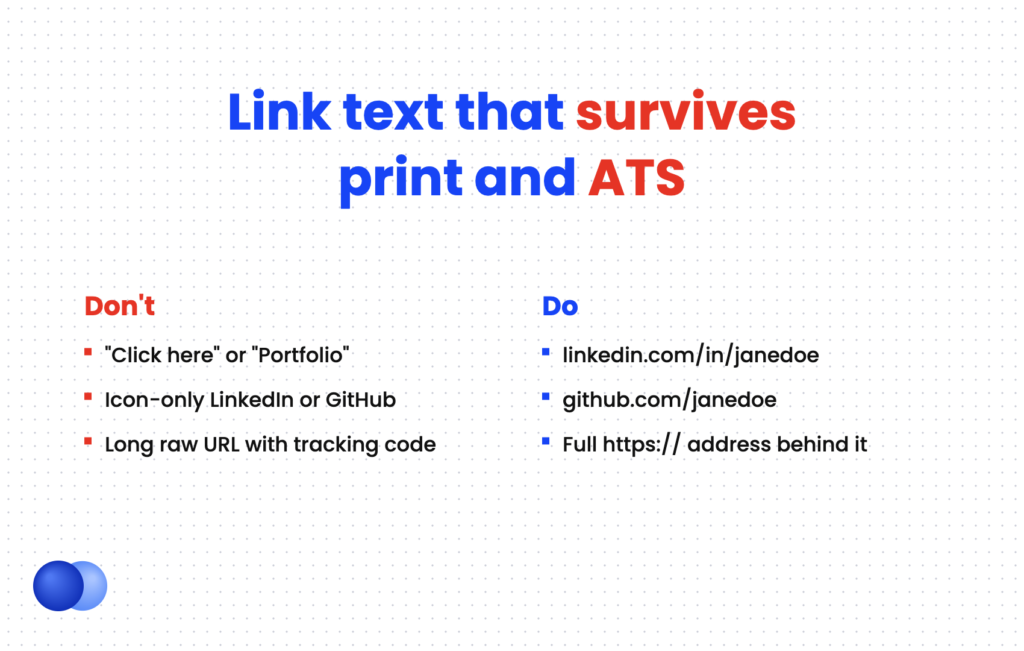
Both camps have a point. Hidden links vanish on paper. Long raw URLs look cluttered, and the U.S. government's Section 508 guidance notes that long URLs are hard for screen readers to follow and says link text should make sense out of context.
The fix is a hybrid. Make the visible text a clean, short URL, and link it to the full address. Here is how that compares with the alternatives.
| Link text style | Example on the page | On screen | Printed | ATS text | Verdict |
|---|---|---|---|---|---|
| Short visible URL | linkedin.com/in/janedoe | Clickable | Readable | Captured | Best default |
| Full raw URL | https://www.linkedin.com/in/jane-doe-4a7b92c1/ | Clickable | Readable, cluttered | Captured | Shorten it first |
| Descriptive word | Clickable | Lost | Only the word | Avoid | |
| "Click here" | Click here | Clickable | Lost | Meaningless | Never |
| Icon only | LinkedIn logo | Clickable | Lost | Often dropped | Never |
A short URL also forces you to clean up your profiles. Most platforms, including LinkedIn, let you set a custom profile address. Our guide to LinkedIn on your resume walks through it.
Jane Doe Chicago, IL | (312) 555-0147 | [email protected] linkedin.com/in/janedoe | github.com/janedoe | janedoe.dev
Each URL above is the visible text. Behind it, the link points to the full address, for example https://www.linkedin.com/in/janedoe.
Where should a hyperlink go on a resume?
Put profile links in the contact line at the top of the page body, not in Word's header or footer area. Put links to specific work under the job or project they support. Keep the total to about three to five links so each one gets noticed.
Most links belong in your resume header, next to your email and phone. That is where recruiters look for them.
There is one trap. In Word, the "header" is also a special page region that repeats on every page. Workable's guide to how an ATS reads resumes warns that text in headers and footers often gets mixed into the main body during parsing. Type your contact block in the normal page body instead, so the parser reads it in order.
Links to individual work can sit under a job or project. For example, a writer can link one published article under the role that produced it.
Content Marketing Manager | Northwind Health | Mar 2023 – Present
- Wrote and managed a 40-article guide series that became the site's top organic entry point
- Published a patient FAQ hub cited in the company's 2025 annual report: northwindhealth.com/faq
Keep inline links rare. Two or three strong ones help. A link on every bullet reads like clutter and splits the reader's attention.
Will a hyperlink on a resume work in a PDF and an ATS?
Links survive a PDF if you export correctly. In Word, use File > Save As or Export to PDF, and on Mac choose "Best for electronic distribution." Printing to PDF can strip links. For ATS parsing, the visible text matters most, which is why a readable URL beats hidden anchor text.
The export step breaks more links than anything else. In a Microsoft Q&A thread, a user's links failed because they used Print to PDF instead of Save As. The accepted answer notes that Word for Mac needs the Best for electronic distribution option to keep hyperlinks.
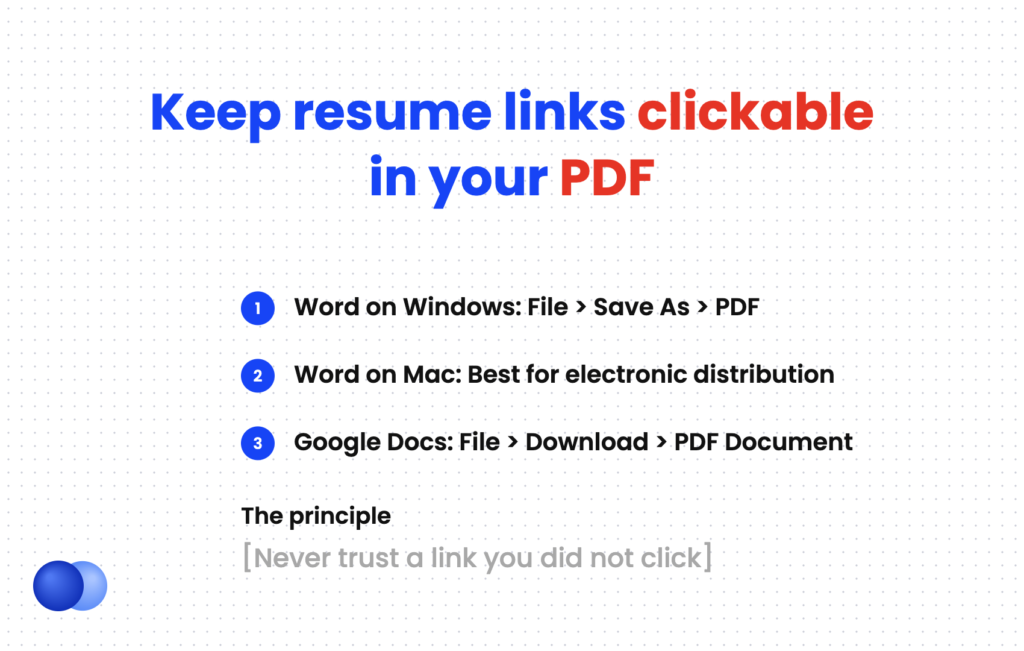
Use this order:
- Word on Windows: File > Save As, then choose PDF as the file type.
- Word on Mac: File > Save As, choose PDF, then select "Best for electronic distribution."
- Google Docs: File > Download > PDF Document.
- Any tool: open the PDF and click every link.
ATS behavior varies by vendor, so plan for the worst case. A parser pulls text from your file into fields a recruiter reads on screen. If your URL only exists inside a hidden link target, it may never reach that recruiter. A visible URL is plain text, so it comes through either way. Learn more in our guide to how an ATS works.
Should you send PDF or Word at all? Follow the posting first. Our PDF vs. Word guide covers the edge cases.
Run the three-screen link test
Before you apply, open your final PDF on a laptop, click every link, and confirm each opens the right page. Then open the same file on your phone and repeat. Finally, print one page or view it in grayscale and check that every URL is still readable. A link that fails any of the three needs fixing.
What mistakes break a hyperlink to a resume?
The most common mistakes are exporting with Print to PDF, linking a word like "Portfolio" with no visible URL, leaving an old or private link in place, and placing links in the page header or footer region. Each one is easy to catch with a final click test.
Every link on your resume is a promise that there is something worth seeing. Keep that promise.
Use a short, visible URL as the clickable text do: Include the full https:// address in the link itself do: Export with Save As PDF or Download as PDF do: Click every link in the final file on two devices
Hide links behind words like "Click here" or "Portfolio" dont: Rely on icons alone for LinkedIn or GitHub dont: Place contact links in Word's header or footer area dont: Link to private repos, drafts, or pages that need a login
A few more checks are worth the minute they take:
- Outdated destinations. Open your LinkedIn and portfolio. Make sure they match the resume's titles and dates.
- Typos in the address. A hyperlink to a resume destination with one wrong letter leads to an error page.
- Tracking or shortener links. Generic shorteners hide where a link goes, which can look suspicious to cautious readers. Custom profile URLs are cleaner.
- Email formatting. Use a plain, professional address, and let it link as mailto:.
When you email a resume, you can also paste your key links in the message body. Our template for the email to send a resume shows where they fit.
Once your links are set, run the file through Rezoom's ATS resume checker to confirm your contact details and URLs come through as readable text.
Frequently asked questions
Should I hyperlink my email on my resume?
Yes. A mailto link lets a recruiter open a message to you in one click. Word and Google Docs usually link an email address automatically when you type it.
Is it better to use a hyperlink or the full URL on a resume?
Use both at once. Make a short, visible URL the clickable text, and point it to the full address. That way the link works on screen and stays readable on paper.
Why did my resume hyperlinks stop working in the PDF?
The most common cause is using Print to PDF instead of Save As or Export. On Word for Mac, choose "Best for electronic distribution" when saving to PDF.
Can an ATS read hyperlinks on a resume?
Many systems extract the visible text of your resume, and support for embedded link targets varies. A visible URL is safe in every case because it is plain text.
How many links should I put on my resume?
Three to five is plenty for most people. Typically that means email, LinkedIn, and one or two work samples such as a portfolio or GitHub profile.
How do I remove a hyperlink from my resume in Word?
Right-click the link and choose Remove Hyperlink. The text stays, but it is no longer clickable.

Comments