Excel Expert Resume: When You Qualify and How to Prove It on Paper
Excel expert resume guide: a test for when you can claim expert level, how employers check it, and word-for-word examples for analyst and accounting jobs.

On this pageWhat makes an Excel expert resume different from a basic Excel skills list?
- What makes an Excel expert resume different from a basic Excel skills list?
- When can you honestly call yourself an Excel expert?
- How do employers test Excel expert claims?
- How do you show expert Excel skills on a resume?
- What do Excel expert resume examples look like by role?
- What should you not write on an Excel expert resume?
- How do you check your Excel expert resume before you apply?
- FAQ
- Sources
Call yourself an Excel expert only if you can build tools other people use: Power Query clean-ups, data models, PivotTables on big data, XLOOKUP and dynamic array formulas, and simple macros. On the resume, name the exact tools, tie each one to a result, and add proof such as the MO-211 Excel Expert certification or a test score. Skip vague labels like "Excel guru."
An Excel expert resume names the exact tools you use, such as Power Query, PivotTables and XLOOKUP, and ties each one to a result. Claim "expert" only if you build tools that other people rely on, and back it with a test score or the MO-211 certification.
Many employers now test Excel before they hire. So the word "expert" is a promise you may have to keep in a timed test. This guide shows when you qualify, how to prove it and what to write, line by line.
Quick answers by situation
| Your situation | What to say/do | Example line |
|---|---|---|
| You use Power Query and data models weekly | Claim "advanced" or "expert" and name the tools | "Excel (expert): Power Query, Power Pivot, DAX" |
| You know VLOOKUP and basic PivotTables | Say "advanced," not "expert" | "Excel (advanced): PivotTables, VLOOKUP" |
| You passed the MO-211 exam | List it under Certifications with the year | "Microsoft Office Specialist: Excel Expert, 2025" |
| You wrote macros that save team time | Put the time saved in a bullet | "Wrote VBA macro that cut a 3-hour report to 10 minutes" |
| The job ad asks for an Excel test | Practice the tools you list, then add your score | "Advanced Excel assessment: 92nd percentile" |
| You have no work proof yet | Build a sample model and link it | "Portfolio: budget model with Power Query refresh" |
What makes an Excel expert resume different from a basic Excel skills list?
A basic list says you know Excel. An Excel expert resume proves you build things with it: automated reports, data models and tools that other people use. It names exact features, shows a result for each, and adds proof such as a certification, a test score or a sample file. Employers in finance often ask for this level.
A basic skills list stops at "Microsoft Excel." That works for many jobs. But some roles want more, and they say so in the ad.
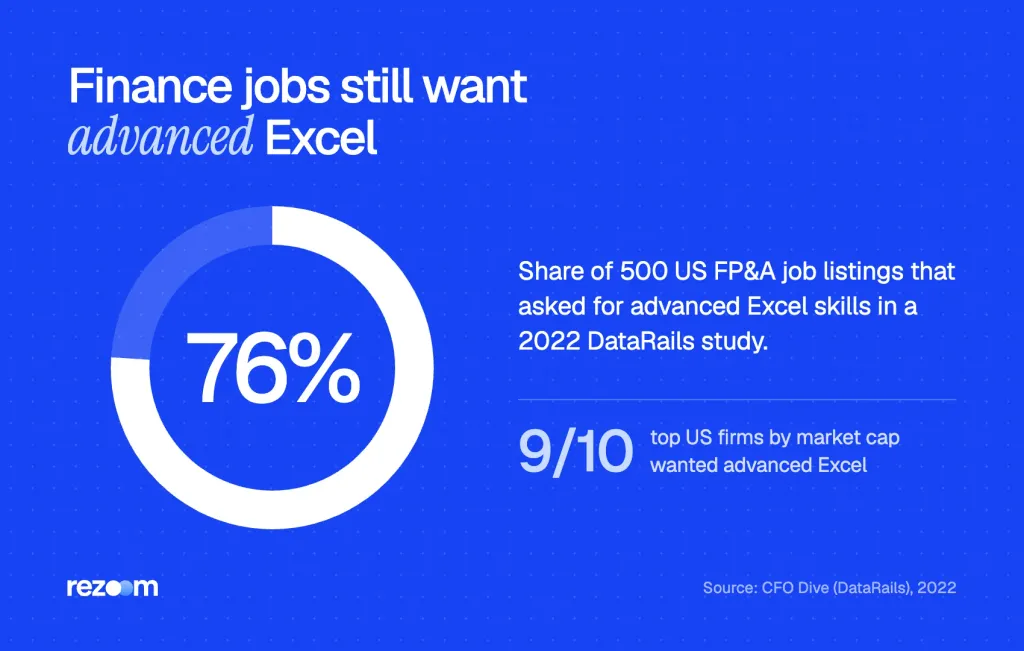
Finance is the clearest case. A 2022 DataRails study of 500 US planning and analysis job ads found that 76% of open FP&A roles3 asked for advanced Excel. Nine of the top 10 US companies by market cap wanted it too.
Excel demand also reaches far past finance. Indeed's Hiring Lab found that Microsoft Excel ranks in the top 10 skills4 listed in US job postings (2024). So a plain "Excel" line rarely stands out on its own.
Where this page fits
If you want to describe beginner or mid-level skills, start with our guide to Excel skills for resume lines. This page covers the top level only. It is for people who build models, automate reports or manage large data sets.
Excel skills for your resume by level: the functions to list, how to show Excel skill levels, an Excel expert resume sample and bullets that prove it.
When can you honestly call yourself an Excel expert?
You can call yourself an Excel expert if you can clean messy data with Power Query, build a data model, write XLOOKUP and dynamic array formulas, run PivotTables on large data and record or edit macros, all without a tutorial. If you rely on search for each step, write "advanced" instead.
Use a simple test: could you build a working report from raw data while a manager watches? If so, you likely qualify. If not, "advanced" is the safer word.
The expert toolkit
Here are the tools that mark expert-level work. Microsoft's own docs describe each one.
- Power Query: Microsoft says it lets you import or connect to external data8, then shape it and refresh it. Experts use it to replace manual copy and paste.
- Power Pivot and DAX: Power Pivot lets you import millions of rows of data9 from many sources. DAX is its formula language for data models.
- XLOOKUP: It searches a range or an array10 and returns the first match. Experts use it in place of older VLOOKUP chains.
- Dynamic arrays: Formulas like FILTER and SORTBY return values to neighboring cells11, which Microsoft calls spilling.
- LET and LAMBDA: These name parts of a formula or turn it into a custom, reusable function.
- VBA and macros: Experts record, edit and debug macros to automate repeat tasks.
Expert vs. advanced at a glance
| Skill area | Advanced user | Expert user |
|---|---|---|
| Lookups | VLOOKUP, INDEX/MATCH | XLOOKUP, FILTER, LET |
| Data prep | Sorts, filters, removes duplicates | Builds Power Query steps that refresh |
| Analysis | PivotTables from one table | Data models with DAX measures |
| Automation | Runs macros others wrote | Records and edits macros in VBA |
| Charts | Bar and line charts | Waterfall, combo and dual-axis charts |
If most of your answers sit in the right column, you can use the word "expert." If they sit in the middle, write "advanced" and list the tools you do know.
Copy the job ad's exact level word into your skills line. If it says "advanced Excel," write "advanced," even if you are stronger. Then let your bullets show the expert work.
How do employers test Excel expert claims?
Many employers give a timed online test or a live task. A test might ask you to fix formulas, build a PivotTable or clean data in a few minutes. Some ask you to share your screen and build a report. Certifications like MO-211 help, because a proctor already checked your skills.
Your resume gets you to the test. Then the test checks your claim. So list only the tools you can use under a clock.
Online assessments
Test vendors sell ready-made Excel tests to employers. TestGorilla's advanced test runs 10 minutes6. It covers organizing data, advanced formulas, reports and visuals, and advanced features.
Another vendor, eSkill, notes that many hiring leaders see simulations as the best Excel tests7 (2024). In a simulation, you build a PivotTable or a macro inside a live workbook.
The MO-211 certification
The Microsoft Office Specialist: Excel Expert exam, coded MO-211, is the official expert credential. Microsoft says candidates should have about 150 hours of instruction1 and hands-on practice.
Have proven your proficiency at an industry expert level.
Microsoft Learn, MO-211 exam page
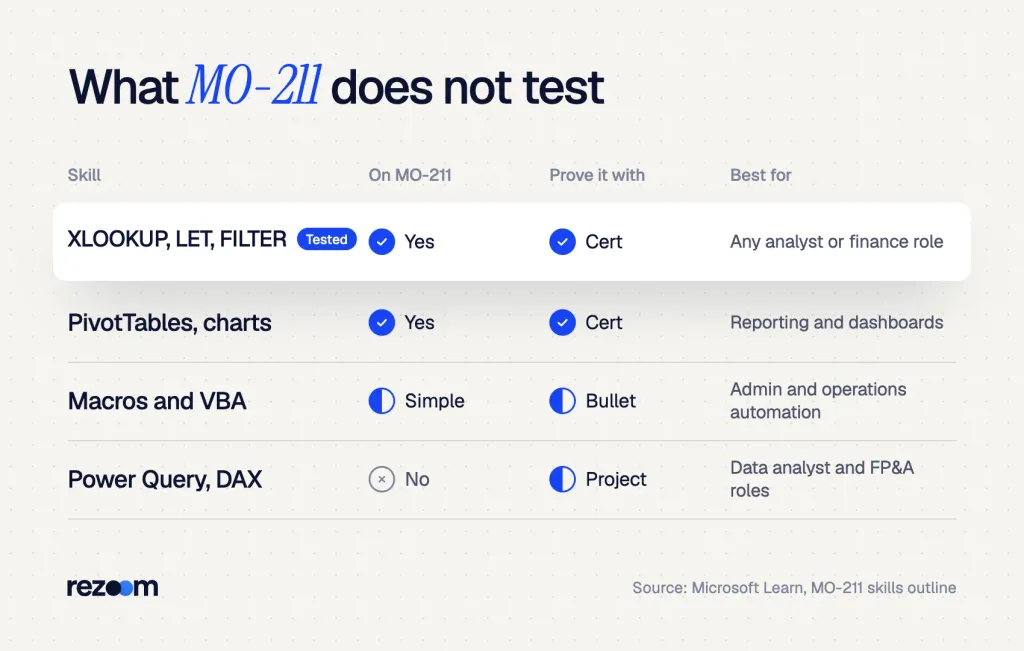
But the exam has limits, because its official skills outline2 covers XLOOKUP, LET, FILTER, Goal Seek, PivotTables and simple macros. It does not test Power Query or Power Pivot. So if a job wants those, show them in your bullets or a sample file.
How do you show expert Excel skills on a resume?
Show it in four places. Put exact tools in your skills line, prove each with a result in your bullets, list MO-211 or another test under Certifications, and link a sample file if you have one. One vague "Excel expert" label does less than three bullets that show what you built and what it saved.
The goal is proof, not labels. A recruiter should see the tool, the task and the result in one line.
- Name the toolsWrite "Excel (expert): Power Query, Power Pivot, DAX, XLOOKUP, VBA" in your skills section, using only tools you can use under a clock.
- Add one result per toolTurn each tool into a bullet with a number, such as hours saved or errors cut.
- List your proofAdd MO-211 under Certifications, or a test score if the employer shared it.
- Link a sampleShare a clean model with fake data, so a hiring manager can open it.
Write bullets with results
A strong bullet says what you built, which tool you used and what changed. If you are not sure how to find your numbers, our guide on how to quantify your resume shows simple ways to estimate time and money saved.
Built [report or model] in Excel using [Power Query / Power Pivot / VBA], cutting [task] from [X hours] to [Y minutes]
Automated [weekly or monthly report] for [team or number of users] with [tool], removing [number] manual steps
Created [dashboard] with [PivotTables / DAX measures] that tracked [metric] across [number] [stores, clients, SKUs]
Where to put the certification
Put MO-211 in a Certifications section with the issuer and year. Our resume certifications guide covers how to format it next to other licenses. If you hold the broader MOS Expert credential, list both lines.
Free ATS score, the text the software extracts and your missing keywords. No sign-up.
What do Excel expert resume examples look like by role?
Each role uses Excel differently, so tune your bullets. A financial analyst shows models and forecasts. A data analyst shows cleaning and dashboards. An admin or operations role shows time saved through automation. An accountant shows faster closes and fewer errors. Use the word-for-word lines below as a starting point.
Here are Excel expert resume lines you can adapt. Change the numbers to your own, and keep only tools you truly use.
Financial analyst
Financial analysts use software and models to forecast and value deals. The BLS lists5 a median pay of $103,570 for the role in 2025. For full layouts, browse our financial analyst resume examples.
Financial analyst resume example
See how a finance resume shows models, forecasts and Excel tools on one page.
JORDAN LEE
Financial Analyst | Chicago, IL | jordan.lee@email.com
Built a 3-statement model in Excel with XLOOKUP and LET, used by 4 regional teams for yearly budgets
Replaced 12 linked workbooks with one Power Query model, cutting month-end prep from 2 days to 3 hours
Created waterfall and combo charts for the CFO deck, used in 6 board meetings
Data analyst
Data analysts show cleaning, joining and dashboards. If you want a full page to copy the layout from, see this data analyst resume example.
SAM CARTER
Data Analyst | Austin, TX | sam.carter@email.com
Joined 5 sales tables in Power Pivot and wrote 20 DAX measures for a weekly KPI dashboard
Cleaned 400,000 rows of CRM data with Power Query steps that refresh in under a minute
Used FILTER and SORTBY formulas to build a self-updating top-50 accounts list for sales leads
Admin and operations
Admin and operations roles care about time saved. So lead with automation, then the hours you gave back to the team.
ALEX RIVERA
Operations Coordinator | Columbus, OH | alex.rivera@email.com
Wrote a VBA macro that formats and emails the daily shipping report, saving 5 hours a week
Built a PivotTable tracker with slicers for 300 open orders, used by 3 shift leads
Added data validation and drop-down lists that cut entry errors on the intake sheet by half
Accountant
Accountants show faster closes and clean reconciliations. For more ideas, scan our accounting and finance resume examples.
TAYLOR BROOKS
Staff Accountant | Denver, CO | taylor.brooks@email.com
Summary: CPA candidate and Excel expert (MO-211) who automates reconciliations and cuts close time.
Automated bank reconciliations with Power Query, cutting the monthly close by 2 days
Built a SUMIFS and XLOOKUP accrual schedule that flagged 30 posting errors before audit
What should you not write on an Excel expert resume?
Skip vague labels like "Excel guru," "Excel wizard" or "expert in all Office tools." Don't list features you can't use under a clock, and don't use star ratings or skill bars. Each one invites a test you may fail, or tells a recruiter nothing. Name the tool, the task and the result instead.
Vague claims hurt more at expert level, because the bar is higher. If you write "expert" and then stall on a PivotTable in a test, you lose trust fast.
- "Excel guru" or "wizard": These words say nothing a scanner or recruiter can check. Write the tool names instead.
- "Expert in Microsoft Office": Few people are expert in every Office app. Our guide on how to list Microsoft Office skills shows how to split them by level.
- Skill bars and star ratings: A bar at 90% has no clear meaning. And some resume parsers may skip graphics, so the skill can vanish.
- Tools you used once: If you watched a VBA video but never wrote a macro, leave VBA off.
Do
- Name exact tools like Power Query, DAX and XLOOKUP.
- Tie each tool to a number, such as hours saved.
- List MO-211 with the year you passed.
Don’t
- Call yourself an "Excel guru" or "wizard."
- Rate yourself with stars or skill bars.
- List features you can't use in a timed test.
Build one clean model with fake data and keep it in a shared folder. If a hiring manager doubts your claim, send the link. A working file proves more than any label.
Learn how to quantify your resume even without sales numbers. Use 4 questions, honest estimates, and copy-ready bullets you can defend in an interview.
How do you check your Excel expert resume before you apply?
Before you apply, match your Excel level word to the job ad, confirm every tool you list is one you can use in a test, and check that each tool has a result. Then run the resume through an ATS checker to make sure your Excel keywords read correctly, and send a cover letter that names one Excel win.
A final pass catches the small gaps. It takes five minutes and can save you a failed screen.
Run the file through our free ATS resume checker to see if it reads "Power Query" and "XLOOKUP" as keywords. Then add one Excel win to your letter. These finance cover letter examples show how to fit a model or report into two lines.
Before you send your Excel expert resume
Free ATS score and your missing keywords. No sign-up.
Frequently asked questions
Should I write "Excel expert" on my resume?
Only if you can build tools like Power Query clean-ups, data models and macros without help. If you mainly use VLOOKUP and PivotTables, write "advanced Excel" instead.
What counts as expert-level Excel?
Most hiring managers mean Power Query, Power Pivot with DAX, XLOOKUP, dynamic array formulas, advanced charts and VBA macros. Basic formulas and charts count as intermediate.
Is the MO-211 certification worth it for a resume?
It helps, because a proctor checked your skills. Microsoft suggests about 150 hours of practice first. Note that it does not test Power Query or Power Pivot.
How do employers test Excel skills?
Many use short online tests or simulations where you build a PivotTable, fix formulas or clean data. Some ask you to share your screen and build a report live.
Where do Excel skills go on a resume?
Put the tools in your skills section, prove them in your work bullets and list any certification under Certifications. A summary line can mention your top Excel win.
What should I use instead of "Excel guru"?
Name the tools and results. For example, "Automated weekly sales report with Power Query, saving 4 hours a week" tells a recruiter far more.
Sources
We opened and read each page below. The small numbers in the text point here. Pages that carry no publication date show n.d.
- Microsoft Learnn.d.
MO-211 candidates should have about 150 hours of instruction and hands-on experience and proven proficiency at an industry expert level.
- Microsoftn.d.
The MO-211 skills outline covers XLOOKUP, LET, FILTER, SORTBY, Goal Seek, PivotTables and simple macros.
- CFO Dive2022
A DataRails study of 500 US job listings found 76% of open FP&A roles require advanced Excel skills.
- Indeed Hiring Lab2024
Microsoft Office and Microsoft Excel both rank in the top 10 skills listed in job postings.
- U.S. Bureau of Labor Statistics2025
Financial analysts earned a median pay of $103,570 in 2025 and use software to forecast and measure risk.
- TestGorillan.d.
The TestGorilla advanced Excel test takes 10 minutes and covers data, advanced formulas, reports and advanced features.
- eSkill2024
Many business leaders see simulations as the best Excel assessment tests.
- Microsoft Supportn.d.
Power Query lets you import or connect to external data, shape it and refresh it.
- Microsoft Supportn.d.
Power Pivot can import millions of rows of data from multiple sources and uses DAX formulas.
- Microsoft Supportn.d.
XLOOKUP searches a range or an array and returns the item for the first match it finds.
- Microsoft Supportn.d.
Formulas that return an array spill their values into neighboring cells.
Mohammad has spent more than ten years designing consumer products and leads product at Rezoom, deciding what gets built and what gets left out. His guides cover the whole job search, from resume sections and cover letters to interview answers and career moves.
Goodi, M. (2026, November 17). Excel Expert Resume: When You Qualify and How to Prove It on Paper. Rezoom. https://rezoom.io/excel-expert-resume/