Unsuccessful Resume Parse in Greenhouse: What It Means + Fixes
Got an unsuccessful resume parse in Greenhouse? Learn what it means, the 2.5MB limit and layout causes, and how to re-upload a resume that parses cleanly.
On this pageWhat does "unsuccessful resume parse" mean in Greenhouse?
- What does "unsuccessful resume parse" mean in Greenhouse?
- Why does a Greenhouse resume parse fail?
- What should you do when your resume won't parse?
- Does an unsuccessful resume parse hurt your chances?
- How do you build a resume that Greenhouse parses cleanly?
- What should you check before you upload again?
- FAQ
- Sources
An unsuccessful resume parse in Greenhouse means the system could not read your file into profile fields, so it only attached the resume. Your application still goes through. The usual causes are files over 2.5MB, scanned images, tables, columns, text boxes and headers. Fix it by uploading a simple one-column .docx or text PDF, then filling or checking each field by hand.
An unsuccessful resume parse in Greenhouse means the system could not pull your name, jobs and dates out of the file. It attached the resume but left the profile fields empty. Your application still counts, but you should fix the file and fill the fields yourself.
The message is mostly a recruiter-side notice. But candidates hit the same problem when the apply form fails to autofill. Both cases have the same causes and the same fixes.
Quick answers by situation
| Your situation | What to say/do | Example line |
|---|---|---|
| The apply form didn't autofill from your resume | Type each field by hand, then submit | "I filled in my work history manually after the upload." |
| Your file is over 2.5MB | Remove photos and logos, then re-export | "I cut my PDF from 4MB to 300KB by removing the photo." |
| You used a scanned or image PDF | Export a text PDF or .docx from your editor | "I re-saved the resume from Word as a text PDF." |
| Your resume uses tables, columns or text boxes | Switch to a one-column layout | "I moved my skills out of the sidebar into a plain list." |
| Only some fields filled in (a partial parse) | Check every field and fix the wrong ones | "I corrected two job dates the parser got wrong." |
| You already applied with a broken file | Email the recruiter a clean copy, once | "I've attached a text version of my resume in case the first upload didn't parse." |
What does "unsuccessful resume parse" mean in Greenhouse?
It means Greenhouse Recruiting could not fill the candidate's profile fields from the uploaded resume. When parsing works, a success message appears. When it fails, Greenhouse says the resume was only attached. The file is still on the profile, so a recruiter can open it, but the name, jobs and education fields stay blank.
Parsing is the step where software reads your resume and copies each part into a field. Greenhouse runs it when a recruiter adds a candidate or prospect. Greenhouse's own unsuccessful resume parse help page1 covers what happens next.
If the parse fails, the recruiter sees a note that the resume was only attached to the candidate. So the file is there, but the structured profile is empty.
If a resume fails to parse, you'll need to manually input the candidate's details into the fields.
Greenhouse Support, 2026
Recruiter side vs candidate side
The help page speaks to recruiters, not job seekers. You won't always see the words "unsuccessful resume parse" when you apply. Instead, you may see blank or garbled fields after you upload.
- Recruiter side: a recruiter adds you and gets the "only attached" notice. They then type your details in or work from the file.
- Candidate side: the apply form or your MyGreenhouse profile doesn't autofill, or it fills the wrong boxes.
- Partial parse: some fields fill in and others don't. Greenhouse says to check and correct these by hand.
For a full picture of the system, read our guide on how Greenhouse ATS works.
Why does a Greenhouse resume parse fail?
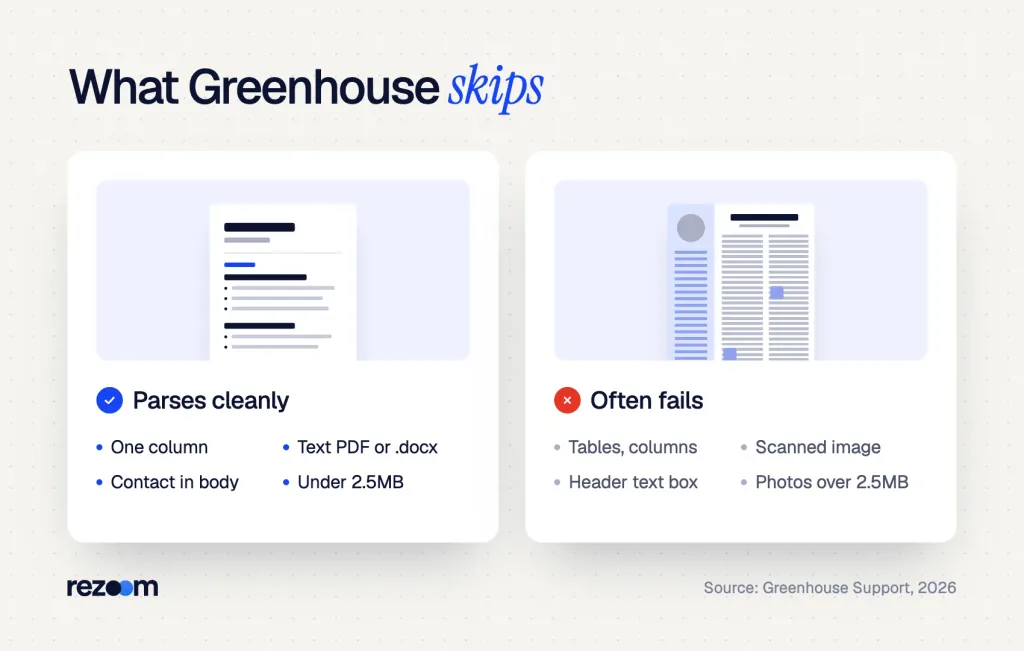
Greenhouse lists three main causes: a file over 2.5MB, fake or placeholder details, and layout problems. Layout problems include images, scanned pages, tables, headers, footers, columns and text boxes. Its other help pages add odd file types and characters the parser can't read.
The size limit is the easiest one to miss. Greenhouse says it can't parse resumes larger than 2.5MB, and high-quality images often push a file over that line. Yet Greenhouse accepts uploads up to 100MB, so a big file can upload fine and still fail to parse.
The documented causes
| Cause | What Greenhouse says | The fix |
|---|---|---|
| File over 2.5MB | Can't parse it; images often cause it | Remove photos and logos, compress the PDF |
| Scanned image | A picture of a page, not a document file | Export a text PDF or .docx |
| Tables, headers, footers | Listed as common formatting problems | Move text into the main body |
| Columns and text boxes | Text boxes with contact details cause trouble | Use one column; put contact details at the top |
| Fake or placeholder data | Obviously fake names or companies may be skipped | Replace "Company Name" and sample text |
| Odd file type or characters | Non-standard types and unknown characters may fail | Use .docx or .pdf with standard fonts |
Greenhouse lists a few smaller triggers, too. Company names without "Inc." or "LLC," short-form job titles and letters spaced apart can confuse it. So write "Senior Software Engineer," not "Sr. SWE."
Greenhouse resume parsing fails on tables, columns, headers and large files. See what an "unsuccessful resume parse" means in Greenhouse's docs, plus fixes.
Which file types does Greenhouse accept?
Greenhouse's supported file types page2 lists .doc, .docx, .pdf, .rtf and .txt for resumes and cover letters. It doesn't say which of those parse best. The parse help page suggests a standard .docx or .pdf instead of an image, and the MyGreenhouse candidate FAQ says to upload a PDF for best results.
Greenhouse does not publish a list of every layout its parser can handle. So treat these causes as the documented ones, not the only ones.
What should you do when your resume won't parse?
First, fill in the application fields by hand so your details are right. Then fix the file: cut it under 2.5MB, export a text PDF or .docx, and switch to one column. Re-upload it where you can. If you already sent the bad file, email the recruiter one clean copy.
Don't panic and don't apply twice. A blank profile isn't a rejection. It just means a person or the form needs your details typed in.
- Fill the fields by handType your name, contact details, jobs and education into the form so the profile is right even if the file is not.
- Shrink the fileRemove photos, logos and icons, then re-export until the file is well under 2.5MB.
- Export real textSave from Word or Google Docs as .docx or PDF, not from a scan or a phone photo.
- Flatten the layoutMove sidebars, tables and text boxes into one column with standard headings.
- Re-upload and checkUpload the new file, then read each autofilled field before you submit.
Test the file before you upload
Open your PDF and try to select a line of text with your cursor. If you can't highlight words, the file is an image, and the parser sees nothing. Next, copy all the text into a plain text editor and read it top to bottom.
Paste your resume into Notepad or TextEdit. If the jobs come out of order, or the dates land far from their titles, a parser will likely scramble them too. Fix the source file until the pasted text reads in order.
A plain text resume is a good backup for forms with a paste box. Our guide to common resume parsing errors covers other systems with the same problems.
What to say if you already applied
If you sent a file that didn't parse, one short note fixes it. Keep it to two lines and attach the clean version.
"Hi Dana, I applied for the Software Engineer role on Monday. My first upload may not have parsed cleanly, so I've attached a text version of my resume. Thanks for your time."
"Hi [recruiter name], I applied for the [job title] role on [date]. My resume upload may not have parsed correctly, so I've attached a clean [.docx / PDF] copy. My details in the form are up to date."
What to say if they push back
- "We already have your resume on file." Say: "Thanks. I sent a cleaner copy in case the first one didn't fill in your system."
- "Why are the fields in your profile blank?" Say: "My first file had a two-column layout that didn't parse. The new one is one column."
- "Can you just apply again?" Ask first: "Happy to. Should I withdraw the first one so you don't get a duplicate?"
Interviewer: "Your profile here is mostly empty. Did you fill it in?"
"I did type it in, but my first upload didn't parse. I emailed a text copy on Tuesday."
Interviewer: "Got it, I see the attachment now."
"Great. It has the same jobs and dates, just in one column."
Does an unsuccessful resume parse hurt your chances?
Not by itself. Greenhouse still attaches your file, and its docs tell recruiters to enter details by hand. But blank or wrong fields can make you harder to find in a search or filter. So the fix matters most at companies where recruiters search their database for past applicants.
Greenhouse is common, so this problem is common. In a sample of over 13,000 companies with a detectable ATS, Greenhouse was the most-used system at 19.0%, according to Jobscan's 2026 ATS usage report5. Workday came next at 17.5% and Lever at 15.6%.
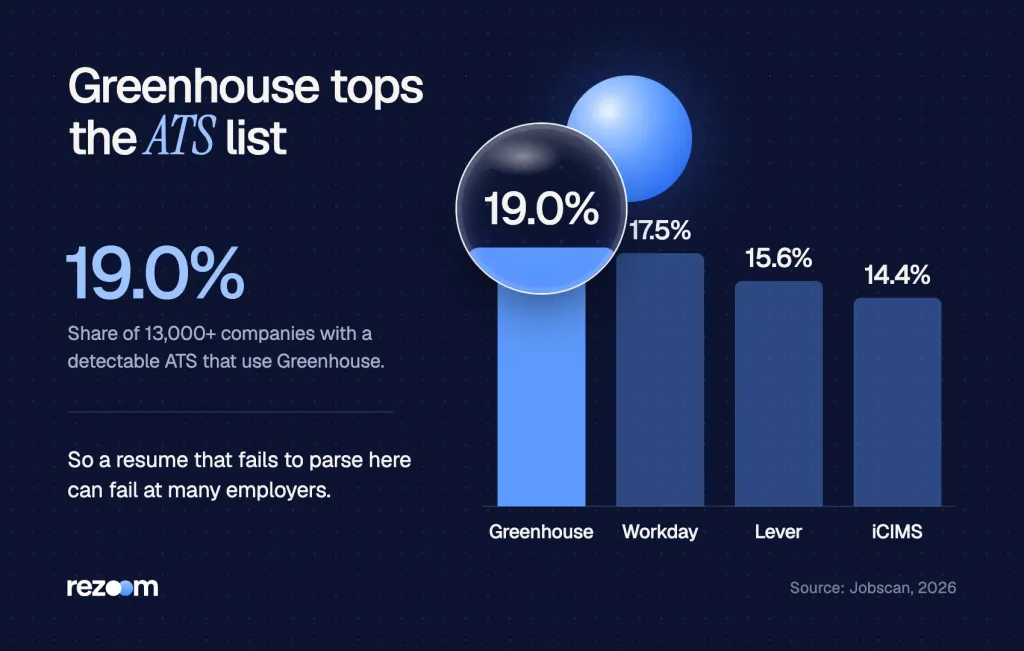
So a resume that fails here may fail at many of the companies you apply to. Jobscan also warns that text inside a table cell can come out scrambled or drop from the profile.
What a failed parse does and doesn't mean
- It doesn't mean rejection. Greenhouse attaches the file either way, and no doc says a failed parse rejects you.
- It doesn't mean a robot scored you. The parse fills fields; a person still decides. See whether Greenhouse uses AI for more on that layer.
- It can mean weaker search results. If your job titles and skills never reach the fields, a recruiter search may miss you.
- It can mean extra work for the recruiter. A clean profile is easier to review in a busy week.
Greenhouse doesn't publish how often parses fail or how recruiters treat blank profiles. Anyone who quotes a failure rate for Greenhouse is guessing.
Resume parsing errors scramble your name, dates and jobs in an ATS. See the 8 common causes, what an unsuccessful resume parse means and how to test a file.
Free ATS score, the text the software extracts and your missing keywords. No sign-up.
How do you build a resume that Greenhouse parses cleanly?
Use one column, standard headings like Experience and Education, and real text in a .docx or text PDF. Keep contact details in the body, not a header or text box. Write full job titles and company names. Then keep the file small by skipping photos and graphics.
Tech roles use Greenhouse a lot, so many of its applicants are engineers. Our IT resume examples show clean, single-column layouts for help desk, network and cloud roles.
For a closer match, these software engineer resume examples put skills in a plain list and dates on the same line as each title.
Software engineer resume example
A one-column layout that Greenhouse-style parsers read cleanly.
ALEX RIVERA
Austin, TX | (512) 555-0147 | alex.rivera@email.com | github.com/alexrivera
Senior Software Engineer, Brightline Data Inc., 2022 to present
Cut API response time 40% by moving reads to a Redis cache
Skills: Python, Go, PostgreSQL, AWS, Docker, Kubernetes
Do
- Use one column with Experience, Education and Skills headings.
- Put your name and contact line in the body at the top.
- Write full titles like "Senior Software Engineer."
- Keep the file well under 2.5MB.
Don’t
- Upload a scan, a phone photo or a design export saved as an image.
- Put skills in a table, a sidebar or a chart.
- Hide contact details in a header, footer or text box.
- Leave sample text like "Company Name" in the file.
Make the cover letter paste-ready, too
Many Greenhouse forms have a cover letter box or upload. Plain paragraphs paste cleanly, while bullets and bold text may not. This software engineer cover letter example uses short paragraphs that survive a paste.
Software engineer cover letter example
Plain text that pastes cleanly into an ATS cover letter box.
For other tech roles, browse our IT cover letter examples and keep the same plain format.
Keep a plain one-column .docx as your master resume. Export a fresh PDF from it for each application. Then a design version can live on your portfolio, where no parser has to read it.
What should you check before you upload again?
Before you re-upload, check that the file is under 2.5MB, that you can select its text, and that it uses one column with no tables or text boxes. Make sure your contact details sit in the body. Then read every autofilled field before you hit submit.
Before you re-upload to Greenhouse
A quick scan catches most of these before a recruiter does. Run your file through our free ATS resume checker to spot tables, columns and missing sections in about a minute.
Free ATS score and your missing keywords. No sign-up.
Frequently asked questions
What does "unsuccessful resume parse" mean in Greenhouse?
It means Greenhouse could not read the resume into profile fields, so it only attached the file. A recruiter can still open the resume, but the fields stay blank until someone types them in.
Does an unsuccessful resume parse mean I was rejected?
No. Greenhouse still attaches your resume to your profile. A failed parse can make you harder to find in a search, so fix the file and fill the fields by hand.
What is the file size limit for Greenhouse resume parsing?
Greenhouse says it can't parse resumes larger than 2.5MB. It accepts uploads up to 100MB, so a large file may upload but still not parse.
Should I upload a PDF or a Word file to Greenhouse?
Both work. Greenhouse's candidate FAQ suggests a PDF for best results, but it must be a text PDF, not a scan. A simple .docx is a safe backup.
Why are my Greenhouse application fields filled in wrong?
That is a partial parse. Tables, columns, text boxes and short-form titles often cause it. Fix each field by hand before you submit.
Should I re-apply if my resume didn't parse?
Usually not. Email the recruiter one clean copy instead, or ask before you re-apply so you don't create a duplicate.
Sources
We opened and read each page below. The small numbers in the text point here. Pages that carry no publication date show n.d.
- Greenhouse Support2026
Greenhouse Recruiting can't parse resumes larger than 2.5MB, and failed parses need details entered by hand.
- Greenhouse Support2026
Greenhouse accepts .doc, .docx, .pdf, .rtf and .txt resumes up to 100MB.
- Greenhouse Support2026
Resumes may not import when they lack information, use a non-standard file type or contain unrecognized characters.
- Greenhouse Support2026
MyGreenhouse suggests uploading a PDF and reviewing autofilled fields because parsing can make mistakes.
- Jobscan2026
In a sample of over 13,000 companies, Greenhouse was the most-used ATS at 19.0%, ahead of Workday at 17.5%.
- Jobscan2026
Text inside a table cell can come out scrambled or disappear from a Greenhouse profile.
Mohammad has spent more than ten years designing consumer products and leads product at Rezoom, deciding what gets built and what gets left out. His guides cover the whole job search, from resume sections and cover letters to interview answers and career moves.
Goodi, M. (2026, November 13). Unsuccessful Resume Parse in Greenhouse: What It Means + Fixes. Rezoom. https://rezoom.io/greenhouse-unsuccessful-resume-parse/