

Summary
Add a portfolio link to your resume header, on the same line as your email, phone, and LinkedIn, written as a short visible URL such as janedoe.design. Give it a clear label if the URL alone is vague. Deep-link a specific case study inside an experience or project entry only when it matches the job. Test every link before you apply, and put the password next to the link if the site is protected.
To add a portfolio link to a resume, put it in the header, on the contact line with your email, phone, and LinkedIn. Write it as a short, visible URL, such as janedoe.design, so it works on screen, on paper, and after parsing.
That placement works in most cases. The details that decide whether anyone clicks are less obvious: which page you link to, how you label it, and what happens when your best work sits behind an NDA.
This guide gives you a placement rule, label formats for different fields, copy-ready examples, and a pre-send checklist.
Who should add a portfolio link to a resume?
Add a portfolio link if your work can be seen, read, or tested: design, UX, writing, marketing, photography, video, architecture, software, and data roles. It also helps career changers and freelancers whose job titles undersell their work. If you have nothing public and relevant to show, skip the link rather than point to thin content.
Employers increasingly want evidence, not claims. In NACE's April 2026 update, President Shawn VanDerziel put it plainly: "It is not enough for candidates to simply list their skills: Employers want to see examples." A portfolio is a collection of those examples. If you are still deciding which document leads, compare a portfolio and a resume before you send either.
For some fields, it is expected. UC Davis's career center notes that many industries require a portfolio, including the arts, design, writing, computer science, and some engineering and tech roles. Santa Clara University adds that portfolios help in creative industries, technical fields, and roles that demand strong communication and writing skills.
| Field | Link to | Label |
|---|---|---|
| UX or product design | Personal site with 3–5 case studies | Portfolio |
| Graphic design, illustration | Personal site or gallery platform | Portfolio |
| Writing, content, journalism | Clips page or personal site | Writing Samples |
| Marketing | Campaign case studies with results | Case Studies |
| Software engineering | GitHub or a site with live demos | GitHub / Portfolio |
| Data analysis | Notebooks or dashboards with write-ups | Projects |
| Photography, video | Curated gallery or reel | Portfolio / Reel |
Developers often use GitHub as their portfolio. If that is you, our sibling guide on how to put GitHub on a resume covers profile prep in detail.
Where does a portfolio link go on a resume?
Your main portfolio link goes in the resume header, on the contact line. Links to individual case studies go inside the matching experience or project entry. Santa Clara University also allows an "Additional Information" section. Do not bury the only link at the bottom of page two.
The header is where recruiters look for ways to reach and assess you. The Ladders' eye-tracking study found an initial resume screen averaged just 7.4 seconds. A portfolio link at the top gets seen in that window. One at the bottom may not.
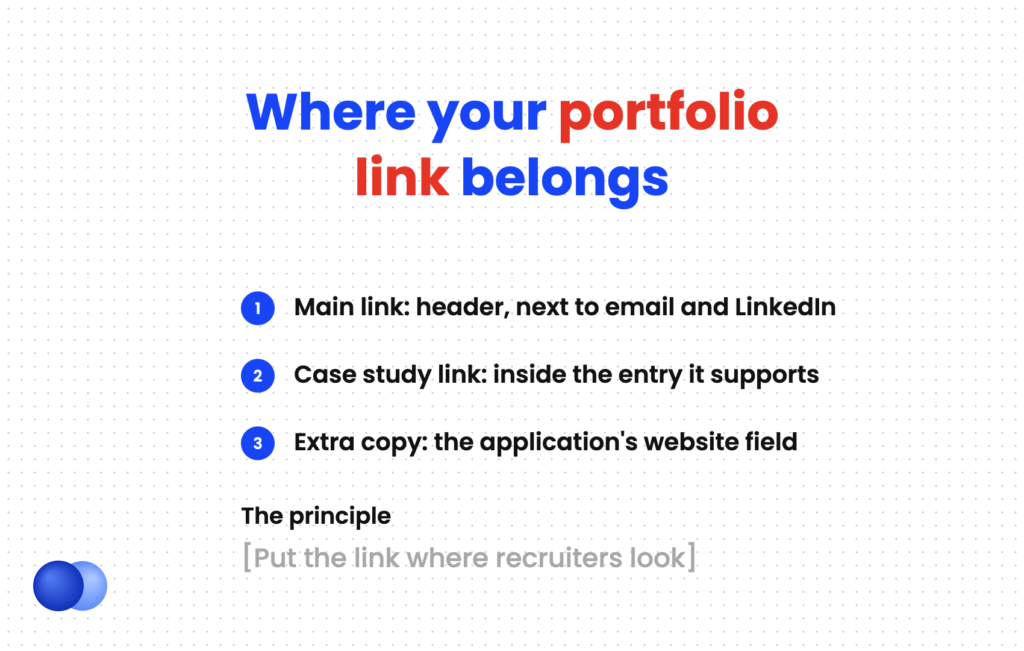
Santa Clara's career center recommends adding the URL in your contact information section or in a separate section such as "Additional Information." The header is the stronger choice for most people. Our resume header guide shows how to fit several links on one line.
Maya Patel
Chicago, IL | (312) 555-0192 | [email protected]
linkedin.com/in/mayapatel | Portfolio: mayapatel.design
Use a second, deeper portfolio link only when one case study fits the job unusually well. Place it in the entry it supports.
Product Designer | Brightline Health | Mar 2023 – Present
- Redesigned patient intake flow, cutting average form completion time from 9 to 5 minutes
- Ran 12 usability sessions with clinic staff and turned findings into a new design system
- Case study: mayapatel.design/intake-redesign
The same rule applies to a Projects section. Our guide on how to list projects on a resume shows where a link fits in each entry.
How should you format and label a portfolio link?
Show the URL as short visible text, without "https://" or "www." Add a one-word label, such as Portfolio or Writing Samples, if the domain does not explain itself. Use a custom domain or a clean platform URL. Avoid shortened links, QR codes alone, and icons with no visible address.
Format is the trickiest part of how to add a portfolio link to a resume. The link has to work in three places: on screen, on paper, and in an applicant tracking system. Visible text is the only format that works in all three.
Follow these formatting rules:
- Drop the prefix. "mayapatel.design" reads better than "https://www.mayapatel.design/".
- Label when needed. "Portfolio: mayapatel.design" is clear. A domain like "mpatel.site" needs the label more.
- Prefer your own domain. It is short and stays yours. A clean platform URL also works.
- Skip link shorteners. They hide the destination and can look like spam.
- Make it clickable too. For PDF and Word mechanics, see our sibling guide on how to add a hyperlink to a resume.
If you save as PDF, check that the link still works in the exported file. Our guide on whether to send a resume as a PDF or Word file covers when each format fits.
Use the application’s website field too
Many online applications have a "Website" or "Personal URL" field. Santa Clara's career center calls it a great place to link your portfolio. Fill it in even though the link is on your resume. It gives the recruiter a second path to your work if the link in your file does not carry over.
Which page should your portfolio link open?
Link to the page that proves fit fastest. Usually that is a homepage listing three to five projects, each with a clear title and outcome. If one project closely matches the job, link that case study directly. Never link to a login screen, a cluttered archive, or a page that loads slowly on a phone.
Reviewers skim. Nielsen Norman Group notes that hiring managers very rarely read a portfolio word for word, so the page should be scannable. NN/g recommends choosing three to five projects as detailed case studies.
Tailor what the link opens to. A landing page that works for every job may be too broad for a specific one. UC Davis puts the principle simply: a portfolio is not a chronology of your work. Select only your best, most relevant pieces.
Tufts's career center also advises you to include work directly related to what the employer needs. If you apply to a fintech role and a health-tech role, consider a different case study link for each.
How do you share NDA or password-protected work?
Show process instead of final screens, blur or remove client names and data, or recreate the work with new branding. If a page must be password protected, write the password on the resume next to the link. Never publish confidential work you do not have permission to share.
Confidentiality is the top reason people hesitate to add a portfolio link. NN/g offers three workable options for handling NDA work: show your process rather than polished screens, blur identifying information, or recreate designs with different styles and branding.
If you password-protect a case study, remove the friction. Put the password right beside the link so no one has to email you for it.
Portfolio: mayapatel.design (password for NDA case studies: intake26)
Freelancers have an extra step: ask clients before publishing. Our freelance resume guide covers how to present client work on the page itself.
What mistakes make a portfolio link hurt you?
Broken links, outdated work, slow-loading pages, and portfolios packed with every project you have done all weaken your application. So do links hidden behind icons, URLs with tracking codes, and credit-free team projects. Test the link on a phone and in a private window before every application.
A portfolio link is a promise that the work is worth a click. Keep it.
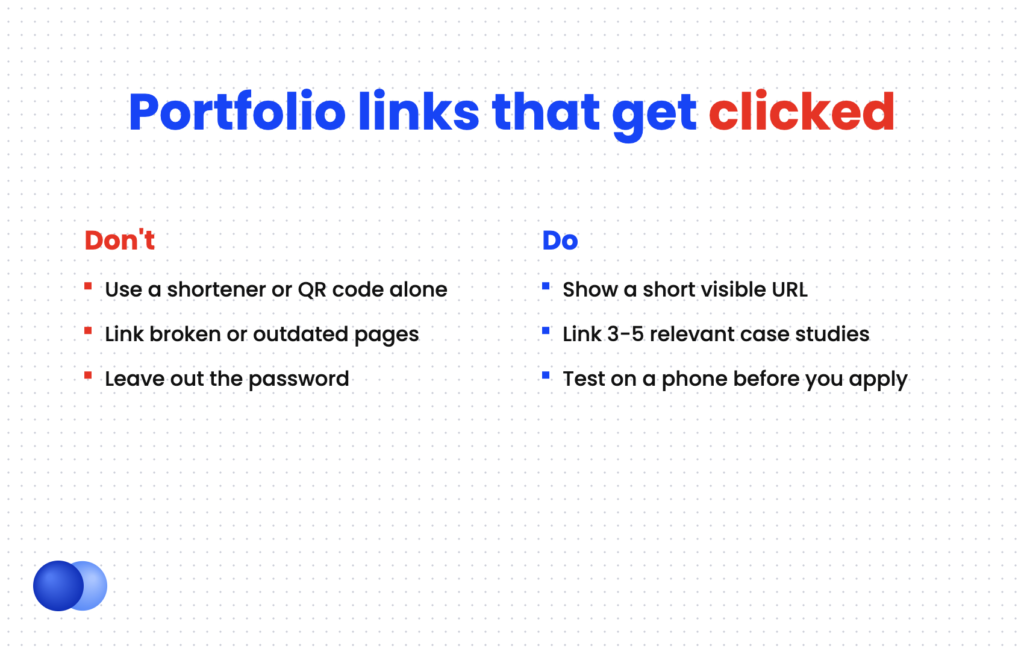
Put the main link on your header's contact line do: Show the short URL as visible text do: Link 3–5 strong, relevant case studies do: Credit teammates on team projects
Link a site with broken pages or placeholder text dont: Use a link shortener or a QR code with no URL dont: Hide the password or leave it out dont: Publish client work you have no permission to share
UC Davis also reminds you to credit others' work when a portfolio piece was a team effort. Say what you did, the same way you would in a resume bullet.
Finally, keep your links consistent. The portfolio link on your resume should match the one on your LinkedIn profile. Our guide to LinkedIn on your resume covers the same setup for that URL. Rezoom's AI resume builder can then help you build a header and entries that point to the right work for each job.

Frequently asked questions
Where do I put my portfolio link on my resume?
Put it in the header, on the contact line with your email, phone, and LinkedIn. Add a deeper case study link inside a specific entry only when it closely matches the job.
Should I write "Portfolio" before the link?
Yes, if the URL does not explain itself. A label like "Portfolio" or "Writing Samples" tells the reader what they will find before they click.
Can I use a Behance or Google Drive link as my portfolio?
Yes, if the link is public, loads quickly, and shows curated work. A personal domain looks more polished, but a clean platform link beats no link.
Should I put a QR code on my resume for my portfolio?
Only alongside the written URL, never instead of it. Most resumes are read on screen, where a QR code is awkward to scan.
How many portfolio links should a resume have?
One main link in the header is enough for most people. Add one or two case study links in specific entries only when they match the role.
Do I need a portfolio link if I am not a designer?
Not always. Writers, marketers, developers, and data analysts benefit too. If your work is mostly confidential or not visual, strong resume bullets may do the job on their own.

Comments