
Summary
Write dates on a resume as month and year, such as "Mar 2021 – Jun 2024", with a spaced dash between them and "Present" for a job you still hold. Use one format everywhere and right-align the dates. For degrees, list only the graduation date. Skip exact days, and avoid year-only ranges for short jobs because they hide real tenure and can make resume parsers assume January start dates.
To write dates on a resume, use the month and year for every start and end point, such as "Mar 2021 – Jun 2024". Put a spaced dash between the two dates, write "Present" for a job you still hold, and use the same format in every section.
That is the whole rule. Career centers such as Boston University's College of Engineering teach it, and resume parsing software is built to read it.
What most guides skip is the edge cases: seasonal work, degrees in progress, jobs that lasted three months, and what a parser does with "2019 – 2020". This guide covers each one with copy-ready lines.
What is the best format for dates on a resume?
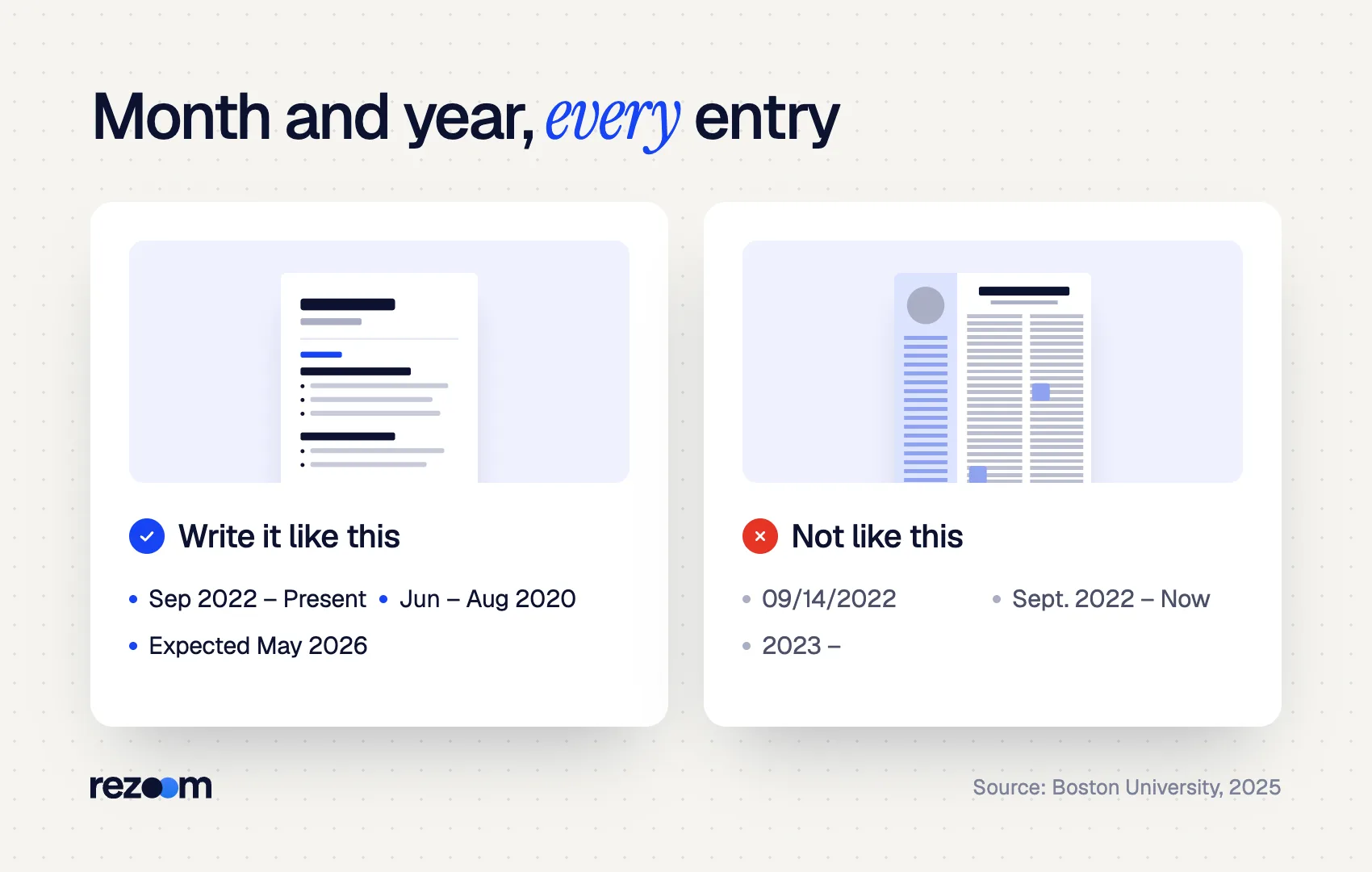
Month and year is the best format for dates on a resume. Write "Sep 2022 – Jun 2024" or "September 2022 – June 2024", not exact days. Abbreviate months to three letters with no period, keep one style throughout, and right-align the dates so job titles stay the first thing a reader sees.
Boston University's date guide sets four rules that cover most resumes. Use a "space-dash-space" between dates, keep the same dash style throughout, abbreviate months to the first three letters with no period, and align dates on the right margin.
Brown University's career blog gives the same advice in 2026: right-align dates so they do not crowd the organization and position, which matter more.
| Format | Example | Use it? |
|---|---|---|
| Abbreviated month and year | Sep 2022 – Jun 2024 | Yes, the best default |
| Full month and year | September 2022 – June 2024 | Yes, if space allows |
| Numeric month and year | 09/2022 – 06/2024 | Acceptable, less readable |
| Season and year | Summer 2023 | Only for seasonal or term work |
| Year only | 2022 – 2024 | Only for older roles or long tenures |
| Full date with day | 09/14/2022 – 06/30/2024 | No |
Whether you write "Sep" or "September" matters less than using one style in every section.
Marketing Coordinator | Brightline Health, Denver, CO        Sep 2022 – Present
Marketing Assistant | Brightline Health, Denver, CO        Jun 2021 – Aug 2022
Social Media Intern | Peak Outdoor Co., Boulder, CO        Jun – Aug 2020
Notice the last line. When both dates fall in the same year, you can write the year once: "Jun – Aug 2020". Boston University uses exactly this pattern for summer roles.
How do you write a current job and a date range?
For a current job, write the start month and year, a spaced dash and "Present", as in "Jun 2024 – Present". Never leave the end date blank. For a finished job, write both month and year on each side of the dash. Use the same dash style, hyphen or en dash, everywhere.
"Present" is the standard word. Avoid "Current", "Now" or "Ongoing", and do not leave a dangling dash such as "2024 –". A blank end looks like a typo to a reader.
It also matters to software. RChilli, a resume parser used inside many applicant tracking systems, documents that it marks a job as current when it sees words like "till," "present," or "now". For an open-ended range like "2017 –", it assumes you still work there and sets the end date to the day it parsed the file.
On the dash itself, either works. A hyphen (-) and an en dash (–) both read fine, as long as you use one consistently with spaces around it. If you hold two roles at once, our guide on overlapping jobs on a resume shows how to stack the ranges.
Senior Analyst | Northfield Bank Jan 2024 – Present Analyst | Northfield Bank Mar 2021 – Dec 2023
Store Manager | Corner Market (part-time, concurrent) Feb 2023 – Present
Promotions get their own date range under one employer. Our guide to showing a promotion on your resume covers the layout options.
Should you use years only for dates on a resume?
Use years only when every role lasted several years or when listing older positions. For short or recent jobs, year-only dates hide real tenure: "2023 – 2024" could mean two months or two years. Recruiters notice the vagueness, and parsers fill the gap with default January dates.
Year-only dates are sometimes recommended to blur a gap. They rarely work. A recruiter reading "2022 – 2023" knows the job could have lasted anywhere from a few weeks to nearly two years, and will ask.
Parsers guess too. RChilli's documentation says a year-only entry gets a default start of January 1 of that year, and a month-year entry defaults to the first of that month. So the software calculates tenure from dates you never wrote.
There are two fair uses for years only:
- Long tenures. "2012 – 2021" for a nine-year role loses almost nothing.
- An "Earlier experience" line. Older roles can be summarized with years, or without dates at all. Our guide on how far back a resume should go explains where to draw that line.
If you are covering a gap, explain it instead. Our guide to explaining an employment gap shows short, honest ways to do it.
How do you write education dates on a resume?
List only the graduation date for a degree, with no start date: "May 2025" or "Expected May 2026". Use month and year, or year alone if that matches the rest of your resume. Date ranges belong to study abroad terms, short programs and transfer schools, not to the degree itself.
Boston University's guide states it directly: the date for a degree is your expected graduation date, with no start date. Brown's career team agrees and notes this differs from experience entries, where you give a range.
For a degree you are still earning, write "Expected" before the date. Our guide on listing an expected graduation date covers wording for delays and part-time study.
B.S. in Computer Science | University of Arizona        Expected May 2026
Study Abroad, Business Spanish | Universidad de Salamanca        Jan – May 2025
Certified Associate in Project Management (CAPM) | PMI        Issued Oct 2024
Certifications usually need one date, the month you earned them. If a credential expires, add it: "Issued Oct 2024, expires Oct 2027".
Can you leave graduation dates off your resume?
Yes. If you graduated many years ago, you can drop the graduation year and list only the degree and school. Experienced candidates often do this to keep the focus on recent work. Keep dates on all recent jobs, though, because missing work dates draw more attention than they hide.
The federal Age Discrimination in Employment Act protects people who are age 40 or older from age discrimination. The law exists because bias happens, and an old graduation year is an easy clue for a reader to calculate age.
Removing the graduation year is a widely accepted choice. Removing all work dates is not. A resume with no dates on recent jobs looks like it is hiding something, and it still breaks the chronological read recruiters expect. Our resume tips for candidates over 50 go further on age-proofing.
Do dates on a resume affect ATS parsing?
Yes. An applicant tracking system reads dates on a resume to build your work history and calculate years of experience. Month-and-year ranges in one consistent format parse most reliably. Dates in headers, text boxes or a separate column can get attached to the wrong job.
The parser behind many applicant tracking systems converts what you wrote into fixed fields. RChilli, for example, outputs a start date, end date and a current-employer flag, and returns an empty value when the date field contains symbols it cannot read.

Layout causes more trouble than format. Recruiterflow, which builds recruiting software, warns that complex layouts can leave dates attached to the wrong employer. Keep each date range on the same line as its job title or employer, in the main body, not in a table cell or sidebar.
Clean, consistent ranges fix the human problem and the machine problem at once. Compare "2020 – 2021" with "Nov 2020 – Feb 2021": the second shows a four-month role honestly and gives the parser real months to work with.
Write month and year on both sides of the dash do: Use "Present" for the job you hold now do: Keep each range on the same line as its job do: Use one date format across every section
Include the day of the month dont: Leave an end date blank or write "Current" dont: Put dates in a header, text box or separate column dont: Use years only to hide a short job
Right-align with a tab stop, not spaces
In Word or Google Docs, set a right-aligned tab stop at the right margin and press Tab once before each date. Spaces drift when fonts change or when the file is exported, so dates end up ragged. A single tab stop keeps every date flush right and parses as plain text.
If you want this handled for you, the Rezoom AI resume builder formats every date range the same way and exports a clean, parseable PDF. You can then run it through the ATS resume checker to confirm your work history reads correctly. For the wider layout rules, see today's guide to ATS resume format.
Frequently asked questions
Should I put months on my resume dates?
Yes, for most jobs. Month and year shows real tenure and is the format career centers recommend. Years alone suit only long tenures or older roles.
Is it Present or Current on a resume?
Use "Present". It is the standard term, and parsers recognize it as a current job. Avoid "Current", "Now" or a blank end date.
Should resume dates be on the left or right?
Right-align them. Career centers including Boston University and Brown recommend it so dates do not crowd the job title and employer.
Do I use a hyphen or en dash for resume dates?
Either works. Put a space on each side and use the same dash style throughout the resume.
How do I write dates for a summer job?
Write the months and the year once: "Jun – Aug 2024". You can also write "Summer 2024" if every seasonal role uses that style.



Comments