
Summary
Free resume templates are not all equal, and price has nothing to do with it. In Enhancv's test through Indeed's applicant tracking system, Canva templates averaged an 80% parse score against 96% for Google Docs, and Canva designs with infographics fell to 73%. The variable is layout: one column, real selectable text, contact details in the body, standard headings and month-and-year dates. Pick one of the 20 layouts below by your situation, not by its looks, and test the file before you send it.
Free resume templates come from three main places — Google Docs, Microsoft Word and Canva — and the one you pick can decide whether a portal reads your career history in the right order. The prettiest option is usually the riskiest one.
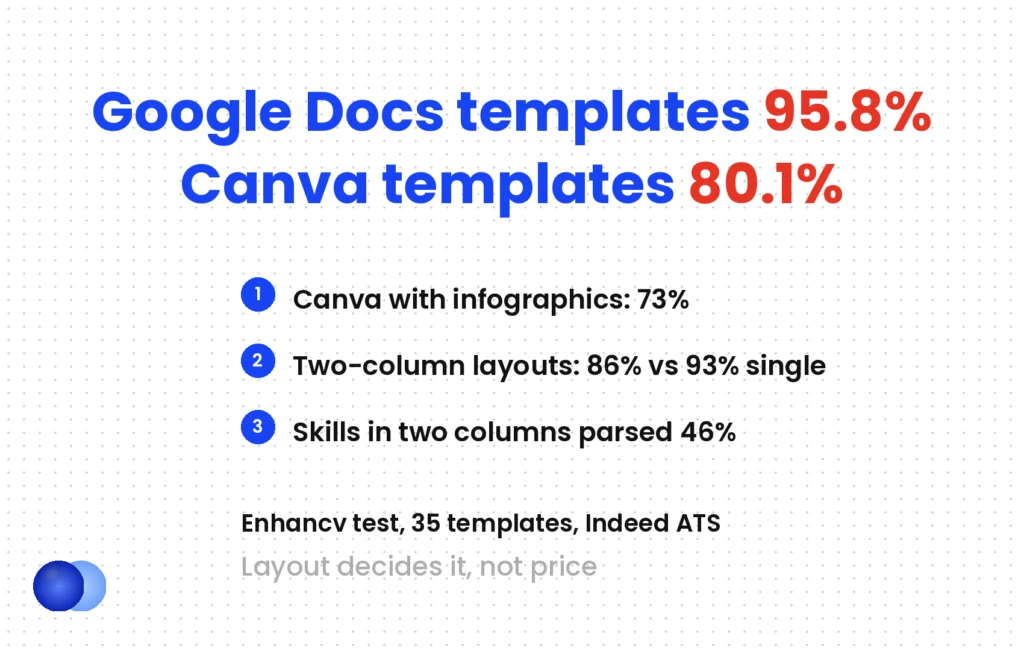
Enhancv ran 35 templates through Indeed's applicant tracking system and scored how much of each resume came out intact. Google Docs templates averaged 95.8%. Canva templates averaged 80.1%. Canva designs with infographics dropped to 73%, while plain Canva designs reached 85%.
So the real question is which layout survives extraction. Below: where free templates come from, six rules that make any template safe, and 20 layouts sorted by situation rather than colour scheme.
Where do free resume templates actually come from?
Mostly from three tools you may already have: Google Docs (a small built-in gallery), Microsoft Word (a large free library, some tagged "ATS") and Canva (hundreds of designs, many built on columns and text boxes). Resume builders offer free templates too, usually with a paywall on download.
Every "free template" site draws from the same handful of sources.
| Source | What you get | Parse risk | Where to learn more |
|---|---|---|---|
| Google Docs gallery | A few built-in designs; exports to PDF or .docx | Low if you keep one column | Google Docs resume template |
| Microsoft Word / Create | Dozens of free designs; several labelled "ATS" | Mixed — some use tables, photos, graphic headers | Word resume template |
| Canva | Hundreds of design-led layouts | High — columns, floating boxes, icons | This article |
| Resume builders | Structured templates generated from fields | Low to mixed; check the export | Best free resume builder |
Microsoft's own library shows the mix. Its free gallery tags a handful of designs "ATS" — an ATS simple classic resume, for one — right next to designs with a photo nameplate or a graphic header. The structure inside the file matters more than the label on the gallery page.
Canva is the outlier. It exists to make things look designed, and most of its resume layouts rely on sidebars, independent text boxes, skill bars and icons. They look polished and give a parser little to work with.
Do free resume templates pass ATS?
The single-column ones generally do; the designed ones often do not. In Enhancv's test, two-column layouts averaged 86% against 93% for single-column, and skills extracted correctly only 46% of the time in double-column designs. Free or paid is irrelevant — layout decides it.
One caveat first: Enhancv sells a resume builder, and its own templates topped the table. Treat the platform ranking as one vendor's test through one system. The layout findings are more useful, because they match how parsers work.
| Template group (Enhancv test, Indeed ATS) | Average parse score |
|---|---|
| Google Docs templates | 95.8% |
| Microsoft Office templates | 84.9% |
| Canva templates | 80.1% |
| Canva "simple" (no infographics) | 85% |
| Canva "modern" (with infographics) | 73% |
| Single-column layouts overall | 93% |
| Two-column layouts overall | 86% |
| Skills section, single-column | 65% |
| Skills section, two-column | 46% |
The last two rows matter most. Many free templates put your keywords in a sidebar skills section — the part that went missing most often.
Why do columns break?
A PDF stores each character at a fixed position on the page, not in reading order. An extractor guesses the order from coordinates, and a side-by-side layout gives it two plausible answers. Your sidebar skills end up spliced into the middle of a job description, with no error message to warn you.
That is why the rule is single column, every time. Two columns scramble extraction whether you export a PDF or a Word file. How does ATS work covers the parsing step in more detail.
What makes a free template safe to use?
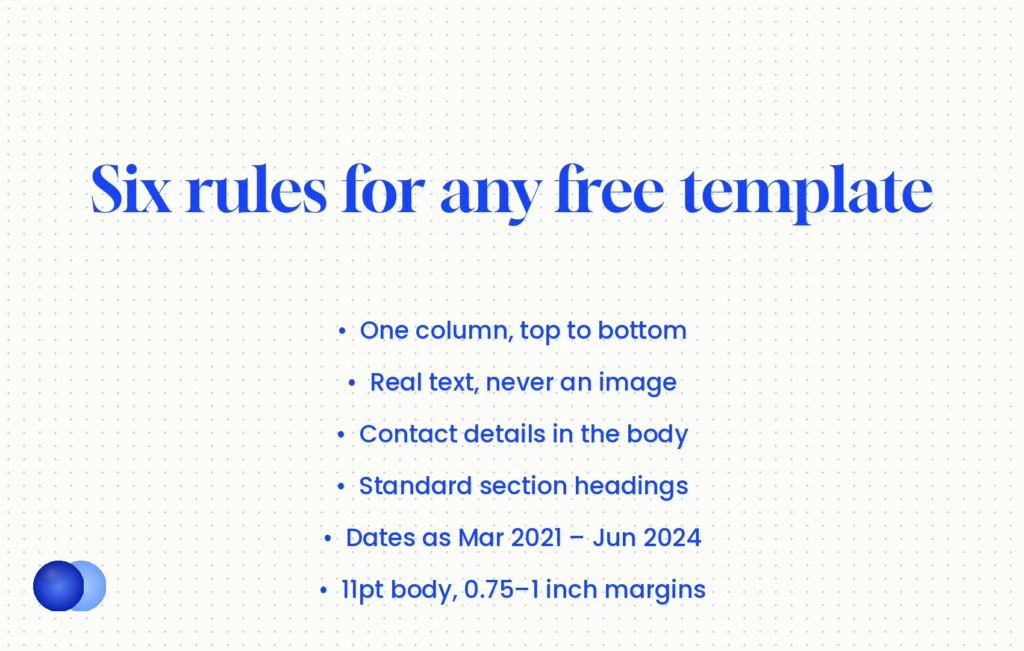
Six rules. One column; real selectable text, never an image; contact details in the body, not the header; standard section headings; month and year on every date; 11pt body text with 0.75 to 1 inch margins. A template that meets all six will parse whether you send PDF or Word.
1. One column, top to bottom. No sidebar, no table used for layout, no text boxes side by side.
2. Real text. If you cannot select and copy a line, a parser cannot read it. Image-based PDFs fail completely; text-based PDFs parse fine. Once the layout is right, PDF or Word becomes the small variable.
3. Contact details in the body. Word stores headers and footers in separate files inside the document, and one parser analysis rates Workday and Taleo as high risk for skipping them. Plenty of free templates put your name and email in the header by default. Move them into the first lines of the page.
4. Standard headings. "Experience", "Education", "Skills". Icons in place of labels give the software nothing to anchor a section to.
5. Month and year dates. Write Mar 2021 – Jun 2024. Year-only ranges fail on at least three of eight major parsers.
6. Readable size. 11pt body, 0.75 to 1 inch margins, never below 10pt or 0.5 inch. Cut content before you shrink the layout — resume margins has the full spacing guide.
Search Canva for the plain ones
If you like Canva's editor, you do not have to leave it. Search "ATS" inside Canva's resume templates and pick a plain one-column layout, as LoopCV suggests. Delete every icon, skill bar and photo frame, and check that each section sits in one text flow rather than separate boxes. Then export a standard PDF and run the copy-paste test below.
Which 20 free resume templates should you use?
Pick by situation, not by style. Every layout below is single column and differs only in what comes first and what it emphasises. Build any of them in Google Docs, Word or a resume builder; the structure is the template, and the fonts are a matter of taste.
These are layout specifications rather than downloads: a section order plus the one feature that fits the use case. All twenty follow the six rules above, and chronological and hybrid structures parse at 92–97%. There is no functional template here on purpose: functional layouts parse at 70–85% and recruiters read them as concealment, which resume format types explains.
By experience level (1–5)
1. Classic chronological. Contact, summary, experience (newest first), education, skills. The default for a steady track record.
2. Graduate one-page. Education first, then projects, internships and part-time work. One page suits this audience; that does not contradict the two-page preference for experienced candidates.
3. Student and internship. Coursework, societies and a short skills line, with a single relevant project described in results.
4. Mid-career hybrid. A three-line summary, a skills block of 8–12 keywords from the posting, then full chronology. The most flexible of the twenty free resume templates.
5. Senior two-page. Recruiters preferred two pages 2.3 times as often in ResumeGo's study, but page one must stand alone — put your best two roles and headline results there. See two page resume.
By situation (6–10)
6. Career change hybrid. A skills block that translates old results into the new field's vocabulary, then honest chronology. The career change resume guide shows the translation step.
7. Returning to work. A dated career-break entry in the experience section, listing courses, volunteering or projects, so the timeline stays continuous.
8. Over 50. The last 10–15 years in full, earlier roles compressed to one line each, with recent dated evidence near the top.
9. Military to civilian. Civilian job titles in place of ranks and codes, with the original rank kept in brackets.
10. Recently laid off. Standard chronology with the strongest bullets directly under the most recent end date.
By industry (11–15)
11. Technology and engineering. Skills grouped by category (languages, tools, platforms) above experience, with a short projects section.
12. Healthcare and nursing. Licences and certifications with numbers and expiry dates directly under the summary.
13. Sales and account management. Every bullet leads with a figure: quota attainment, revenue, pipeline.
14. Creative and design. A plain resume plus a portfolio link. The portfolio carries the visual work, so the resume does not have to.
15. Trades and operations. Certifications, safety tickets and equipment near the top; shorter bullets.
By channel and format (16–20)
16. Remote roles. A location and time-zone line with your contact details at the top of the body, plus one bullet per role proving async or distributed work.
17. Part-time and hourly. An availability line under your contact details and a compact one-page structure.
18. Freelance and contract. One entry per client or grouped under a single "Independent Consultant" role with dates.
19. Plain-text paste version. No bold, bullets as hyphens, for portals that ask you to paste into a box.
20. Minimal modern. One column with a stronger typeface and more white space — modern typography, never modern columns. Modern resume template covers the design choices.
Canva-style two-column: left sidebar holds photo, contact, skill bars for "Python ●●●●○" and "SQL ●●●○○"; right column holds experience. After extraction, "Python" and "SQL" appear between two bullets of a 2022 role, the skill bars vanish, and the email, sitting in its own text box, can come out last or go missing.
Template 4, mid-career hybrid: contact on line two of the body; a skills line reading "Python, SQL, dbt, Looker, A/B testing"; then roles with
Mar 2021 – Jun 2024dates. Same content, same page count, and every keyword lands in the skills field where recruiters search for it.
How do you test a free template before you apply?
Copy and paste. Open your exported PDF, select all, copy, and paste into a plain text editor. If sections come out in order and your contact details survive, a parser can read it. Then run it against a real posting to check the keywords.
The copy-paste test. Select all text in the PDF and paste it into Notepad or TextEdit. You want your name first, then sections in the order you wrote them. Interleaved lines, missing contact details or blank output all point to the same problem: the layout, not your content.
The keyword check. A clean parse only means the text arrived intact. It says nothing about whether the words match the job. An AI resume checker against a live posting answers that part.
The length check. Keep it under 600 words where you can; TalentWorks found 43% fewer hires above that line across 6,000 applications.
Using grids or side-by-side columns causes text-layer scrambling, which turns your information into unreadable 'word salad.'
Choose free resume templates by structure — one column, body-text contact details, standard headings — and change the font afterwards if you want personality.
Choose a template for its sidebar, skill bars or photo frame, then spend an evening trying to make the parser cope with it.
Should you pay for a resume template?
Rarely. A paid template buys you design, and design is the part that parsers penalise. The safe structure is free in Google Docs and Word. Pay only for time savings — a builder that formats, exports and checks the file for you — not for a look.
A marketplace design and a free Google Docs layout differ mostly in decoration, and paying more tends to buy more of what breaks extraction: graphics, columns, custom fonts.
A builder is the exception worth considering. You type into fields and the tool generates a clean single-column file. Some builders show templates free and charge at download; best free resume builder compares which ones genuinely let you export without paying. If you want to skip the formatting step entirely, the Rezoom resume builder produces single-column files with body-text contact details by default.
What can a free template not fix?
Content. A template controls order and readability, but it cannot choose your results, match your keywords to the posting or decide what to cut. A perfectly parsed resume with generic bullets still loses to a plainer one with specific numbers.
Every one of the 20 layouts above will get your text into an applicant tracking system in the right order. None of them will make that text persuasive.
Nor can a template stop you filling the space it gives you. Free resume templates ship with placeholder sections — "Hobbies", "References", a long summary — and the instinct is to fill every one. Delete what does not earn its place.
Pick the layout that matches your situation, check it once with the copy-paste test, and spend the time you saved on the bullets. That part decides the interview.
Frequently asked questions
Are free resume templates ATS-friendly?
The single-column ones generally are. In Enhancv's vendor test through Indeed's ATS, Google Docs templates averaged 95.8% while Canva templates averaged 80.1%, and layouts with infographics scored lowest.
Where can I find free resume templates?
Google Docs has a small built-in gallery, Microsoft Word a large free library with several "ATS" designs, and Canva hundreds of design-led options. Builders offer them too, sometimes charging at download.
Are Canva resume templates bad for ATS?
Many are, because they rely on columns, floating text boxes, icons and skill bars. A plain one-column Canva design with real text can parse well; the problem is the layout, not the tool.
Is a two-column resume template ever safe?
Not by this site's standard. In Enhancv's test, two-column layouts averaged 86% against 93% for single-column, and skills sections extracted correctly only 46% of the time.
Should I put my contact details in the header?
No. Word stores headers separately from the body, and some parsers — Workday and Taleo in particular — are rated high risk for skipping them. Put your name, email and phone in the first lines of the page.
Should I save my resume as PDF or Word?
Either works once the layout is right. Text-based PDFs parse fine; image-based PDFs fail completely. File type is the small variable, and layout is the large one.
How long should a resume built from a template be?
Under 600 words where you can. Two pages suit experienced candidates as long as page one stands alone; one page suits students and recent graduates.
Is it worth paying for a resume template?
Rarely. Paid templates mostly add design, which is the part parsers penalise. Pay for a builder only if it saves you formatting time and exports a clean single-column file.


Comments