
Summary
A Word resume template passes ATS when it is single column, keeps contact details in the body rather than the page header, and uses no layout tables or text boxes. Microsoft labels five gallery templates "ATS" but publishes no parsing test, and several of its design-led templates rely on exactly those elements. Check any template with Show/Hide, View Gridlines and the Selection Pane, keep a .docx master, and send a text-based PDF unless asked for Word.
A Word resume template is still the most common starting point for a job application, and the file format is almost never what goes wrong. The skeleton underneath the design is.
Microsoft's own gallery now tags a handful of templates with "ATS" in the name. Open the others and you will find many built from layout tables, floating text boxes and a page header holding your name and phone number — three elements that parsers handle badly or skip entirely.
So the useful question is not "which template looks best?" It is "what did the designer hide inside this file?" This guide names the Microsoft templates an independent audit cleared and flagged, shows the three-minute check you can run on any template in Word itself, and covers the save settings that decide whether a recruiter sees what you wrote.
Which Word resume template should you download?
A single-column template with contact details in the body and no tables or text boxes. From Microsoft's gallery, the plainly named designs — Simple, Traditional, Timeless, Basic, Chronological — cleared an April 2026 audit, while Creative, Contemporary, Polished and Elegant CV did not.
Resume Optimizer Pro's April 2026 audit checked Microsoft's built-in templates for the three structures that break extraction. Its verdicts, in one table:
| Microsoft template | What the audit found | Verdict |
|---|---|---|
| Resume (Simple Design) | Single column, no text boxes | Safe |
| Resume (Traditional Design) | Single column, no text boxes | Safe |
| Resume (Timeless Design) | Single column, no text boxes | Safe |
| Resume (Basic Design) | Single column, no text boxes | Safe |
| Chronological Resume | Single column, no text boxes | Safe |
| Resume for College Student | Single column, no text boxes | Safe |
| Resume (Modern Design) | Mostly clean; verify before large-employer portals | Caution |
| Bold Resume | Text box in the header accent | Caution |
| Resume (Creative Design) | Multi-column, text boxes, header contact block | Avoid |
| Resume (Contemporary Design) | Multi-column, text boxes, header contact block | Avoid |
| Polished Resume | Multi-column, text boxes, header contact block | Avoid |
| CV (Elegant Design) | Multi-column, text boxes, header contact block | Avoid |
The audit's rule of thumb holds up: design-led names tend to fail and plain names tend to pass. "Creative" or "Polished" usually signals a sidebar, and a sidebar in Word means a table or a text box.
The Rezoom route: build first, export to Word
A Word resume template gives you a shell and leaves the structure to you. The Rezoom resume builder works the other way round. You write the content, it keeps the layout single column with contact details in the body, and it exports a finished Word file alongside PDF. You still get an editable .docx for last-minute changes, without inheriting a designer's hidden tables.
For templates outside Word, the free resume templates hub compares every format the site recommends.
Does Microsoft's "ATS" label mean a template passes?
Microsoft's ATS templates page lists five resume designs: ATS simple classic, ATS office manager, ATS healthcare, Extended ATS healthcare and ATS stylish accounting. It says they use "clear sections for contact details, work history, skills, and education" and "simple, ATS-friendly layouts". It does not say which parsers Microsoft tested against, or whether it tested at all.
A search for "resume" in File > New returns those designs beside nursing, teaching and graphic-design templates built for print, and nothing in the thumbnail shows which structure sits underneath.
What each Word element does to a parser
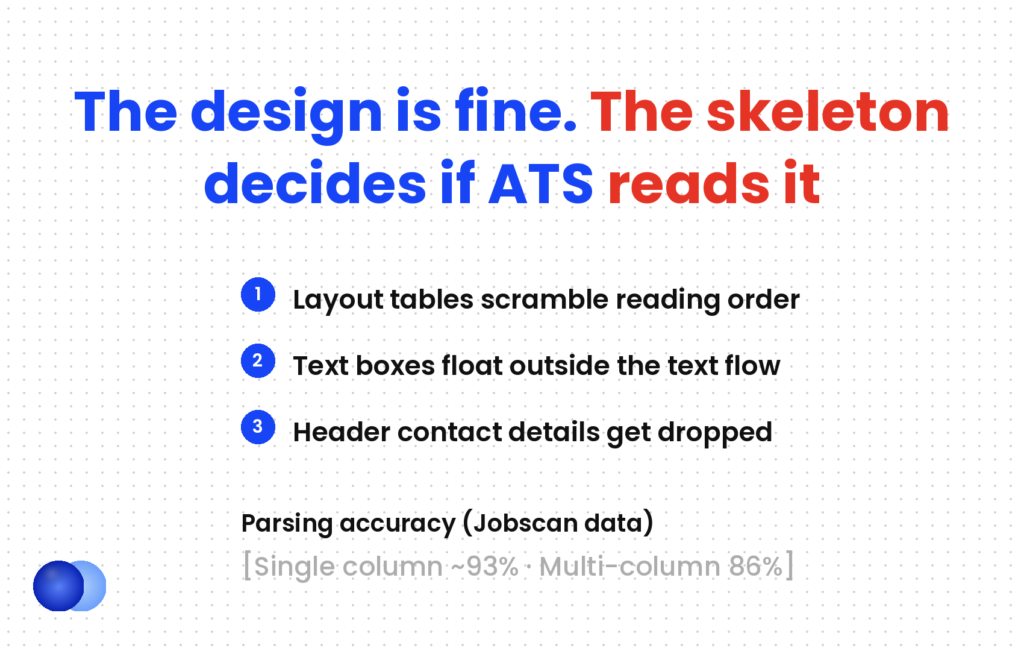
Layout tables. A two-column design in Word is usually a borderless table. A parser reads the cells in an order it chooses, so a job title from the left column can land beside a skill from the right. Mirrai Careers goes further and says most default templates use tables for layout.
Text boxes. Word treats a text box as a floating object sitting on top of the page, not as part of the text flow. Resume Optimizer Pro notes most ATS platforms treat them the same way, which is how a skills sidebar disappears.
Headers and footers. Word's page header is a separate layer. Jobscan's formatting guide warns that many parsers ignore that layer entirely, so a name and email placed there may never reach the candidate record.
Section columns. Layout > Columns splits text into newspaper columns, and the reading order problem returns.
For the underlying mechanics, see how does ATS work.
Move the name before you change anything else
Double-click the top margin of any Word resume template. If your name, phone or email turns editable, it lives in the page header. Cut it, close the header, and paste it as the first lines of the document body using a Title or Heading style. Do this first, because every later edit shifts the layout and you may forget. It takes 30 seconds and removes the single most common Word mistake on a resume.
How do you check a Word resume template in three minutes?
Use three built-in tools. Show/Hide ¶ and View Gridlines reveal layout tables, the Selection Pane lists every text box and shape, and double-clicking the top margin shows what sits in the header. If all three come back empty, the template's structure is safe.
Download the template, open it in Word, and work through five checks before you type a word of your own.
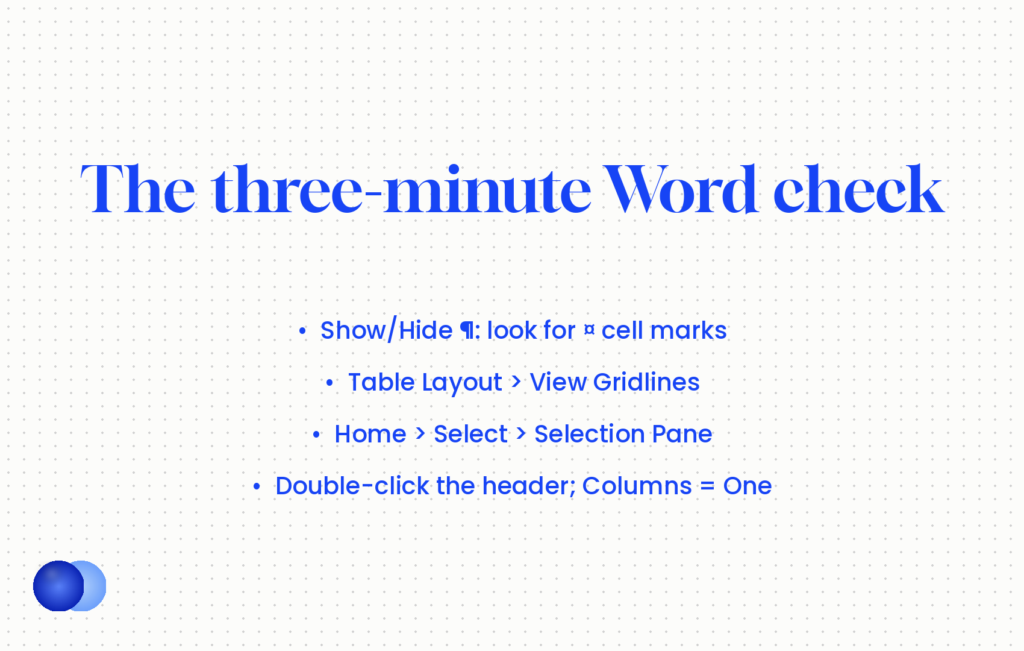
1. Turn on Show/Hide. Press Ctrl+Shift+8 (Cmd+8 on a Mac) or click ¶ on the Home tab. Small ¤ marks at the end of text blocks mean table cells.
2. View gridlines. Click inside any block, open the Table Layout tab if it appears, and select View Gridlines. Dotted lines around sections confirm a borderless table. If the Table Layout tab never appears, there is no table.
3. Open the Selection Pane. Home > Select > Selection Pane lists every text box, shape and picture on the page. An empty pane is what you want. Anything named "Text Box" holds content a parser may skip.
4. Check the header and footer. Double-click the top and bottom margins. Decorative lines there are harmless; your name, email or phone are not.
5. Check Layout > Columns. It should read "One".
Reading the results
One failure does not rule a template out. A table holding only a decorative line under your name can go without losing the design. A text-box sidebar has to become ordinary paragraphs, and if more than two sections need that fix, start again with a plainer template.
Built on a layout table (Polished Resume style): left cell holds "Skills: SQL, Tableau, Python, stakeholder reporting"; right cell holds "Data Analyst, Northwind Health · Mar 2021 – Jun 2024". A parser reading row by row can merge them into one line: "Skills SQL Data Analyst Tableau Northwind Health".
Built on paragraphs (Resume Simple Design style): "Data Analyst, Northwind Health · Mar 2021 – Jun 2024" on its own line, bullets underneath, and a Skills section further down as a plain comma-separated line. The parser reads it top to bottom exactly as a recruiter would.
Nothing about the words changed. The second version keeps every job title attached to its employer and dates.
How should styles and fonts be set up in a Word resume?
Use Word's built-in Heading styles for section names, one standard font at 11pt for body text, margins between 0.75 and 1 inch, and a right tab stop rather than a table to align dates. Styles keep the file consistent and give parsers a clean section structure to follow.
Styles are the part of Word most template users never touch, and they do more for a resume than any colour scheme.
Section headings. Apply Heading 1 or Heading 2 to "Experience", "Education" and "Skills" instead of bolding plain text. Open View > Navigation Pane and each heading appears as an outline entry — a quick check that the structure is real.
Body text. Set the Normal style once, at 11pt in Calibri, Arial, Georgia or Times New Roman. Resume Optimizer Pro recommends staying with standard fonts and avoiding decorative or script faces. A font the reader lacks gets swapped for a substitute, and the layout shifts.
Dates on the right. Designers often use a two-cell table to push dates to the right margin. A right-aligned tab stop does the same job without a table: Home > Paragraph > Tabs, set one at the right margin, and press Tab before the date. Write dates as month and year, such as Mar 2021 – Jun 2024, because year-only ranges parse unreliably.
Bullets. Use Word's bullet list button, not typed symbols or pictures. Custom picture bullets can come through as stray characters.
Margins. Keep them between 0.75 and 1 inch; the guide to resume margins explains why cutting content beats shrinking layout.
Should you save a Word resume template as .docx or PDF?
Keep a .docx master and send a text-based PDF unless the posting asks for Word. Both parse well when the layout is clean. Avoid the old .doc format, and never export the resume as an image or a scanned file.
PDF against Word is the small variable; the layout inside either file is the large one. A clean single-column resume parses in both formats, and a sidebar template causes trouble in both.
| Format | When to use it | Watch for |
|---|---|---|
| .docx (Word Document) | Your master copy; portals that ask for Word | Recipients on other software may see small layout shifts |
| .doc (Word 97–2003) | Almost never | Opens in Compatibility Mode and can drop newer formatting |
| PDF via Save As | The default for sending | Choose the standard option so text stays selectable |
| PDF via "Print to image" or scan | Never | Image-based PDFs contain no readable text at all |
To make a text-based PDF: File > Save As, pick PDF from the file type list, and save. On a Mac, File > Save As > File Format > PDF, and pick "Best for electronic distribution and accessibility". Open the PDF and try to highlight a line of text. If you can select it, a parser can read it.
Compatibility. A .docx opens in Word on every platform and in Google Docs, Pages and LibreOffice, but table-based templates shift the most when they cross apps. If you edit in Google's editor, the Google Docs resume template guide covers its export quirks.
For the full decision, see should I send resume as PDF or Word.
Keep one master .docx per target role, and save a fresh PDF from it each time you tailor the wording for a new posting.
Save as Word 97–2003 (.doc) or print the resume to an image, because older formats lose formatting and image files carry no text for a parser to read.
Where does a Word resume template stop helping?
At structure. A safe template stops the parser misreading you, and nothing more. It cannot tailor your wording to the posting, choose which results to lead with, or make an ordinary bullet persuasive. Those decisions carry far more weight than the file you started from.
A clean Word resume template removes one way to lose — the parser scrambling your history. That matters: one Jobscan survey of 384 recruiters found 99.7% use an applicant tracking system to filter candidates, so your file almost always meets software before a person.
But a parser reading your resume correctly is the floor, not the win. Vendor formatting data (Jobscan figures cited by Resume Optimizer Pro, and a similar Enhancv test) puts parsing accuracy at about 93% for single-column resumes and 86% for multi-column designs. Seven points is real, and it is still smaller than the gap between a generic resume and one tailored to the posting.
The most common Word mistake is putting your name and phone number in the header or footer. Many applicant tracking systems drop that area, so keep contact details in the body.
So spend five minutes choosing and checking the template, then the rest of your time on the words.
One honest limit: none of this tells you how a specific employer's system scores you. Two portals running different parsers can read the same file slightly differently. A clean skeleton narrows that variation; it cannot remove it.
Frequently asked questions
Are Microsoft Word resume templates ATS friendly?
Some are. An April 2026 audit by Resume Optimizer Pro cleared plainly named designs such as Resume (Simple Design) and Chronological Resume, and flagged Creative, Contemporary, Polished and Elegant CV for multi-column layouts, text boxes and header contact blocks.
Where do I find Microsoft's ATS resume templates?
In Word, go to File > New and search "ATS resume", or open Microsoft's ATS templates page online. It lists five resume designs, including ATS simple classic and ATS office manager.
Does the "ATS" label guarantee the template parses correctly?
No. Microsoft describes those templates as having clear sections and simple layouts but publishes no parser test. Run the Show/Hide, View Gridlines and Selection Pane checks on any template before you use it.
How do I tell if a Word template uses tables?
Turn on Show/Hide with Ctrl+Shift+8 and look for ¤ marks, or click inside a section and choose View Gridlines on the Table Layout tab. Dotted outlines mean a borderless layout table.
Can I put my name in the header of a Word resume?
Keep it out. Many parsers ignore Word's header and footer layer, so your contact details may never reach the candidate record. Put your name and details as the first lines of the body.
Should I send my Word resume as .docx or PDF?
Send a text-based PDF by default and a .docx when the posting asks for Word. Both parse well if the layout is single column; avoid the old .doc format and image-based PDFs.
What font should I use in a Word resume template?
A standard font such as Calibri, Arial, Georgia or Times New Roman at 11pt for body text. Decorative fonts can be substituted on the recruiter's machine and shift the layout.
Is a resume builder better than a Word template?
It depends on what you need. A template is free and fully editable but leaves the structure to you; a builder that exports to Word keeps the layout parse-safe and still gives you an editable .docx.

Comments