Email Subject Line for Job Application: 25 Examples by Situation
The best email subject line for job application emails: copy-ready formats with job title, job ID and name, plus referral, follow-up and cold email examples.

On this pageWhat is the best email subject line for job application emails?
- What is the best email subject line for job application emails?
- What subject line should you use when sending a resume or cover letter?
- How do you write a subject line for a referral, internship or cold email?
- What subject line should you use to follow up on a job application?
- What should you avoid in a job application subject line?
- How do you write the rest of the job application email?
- FAQ
- Sources
The best subject line for a job application email names the job title, the job ID if there is one, and your full name, in that order: "Administrative Assistant Application, Job ID 4471 - Jordan Lee." Put the job title first, because phones show only about 37 characters. If the posting gives a required subject line, copy it exactly.
The best email subject line for job application emails is "[Job Title] Application, Job ID [Number] - [Your Name]." Put the job title first and end with your name. If the posting gives a required subject line, copy it word for word.
Below are 25 subject lines you can copy, sorted by situation. Our example is Jordan Lee, who is applying for an administrative assistant job.
So start with the table, then jump to your situation.
Quick answers by situation
| Your situation | What to put in the subject | Example line |
|---|---|---|
| Applying to a posted job | Job title, job ID, your name | Administrative Assistant Application, Job ID 4471 - Jordan Lee |
| Someone referred you | Referrer's name first | Referred by Dana Cruz: Administrative Assistant - Jordan Lee |
| The posting gives a format | Copy it exactly | AA-4471 Lee |
| Internship | Term, role, your name | Summer 2027 Office Intern Application - Jordan Lee |
| No opening is posted | Role you want plus one strong fact | Admin Assistant, 5 Years in Scheduling - Jordan Lee |
| Following up | Reply in the same thread, or "Following up" + role | Following Up: Administrative Assistant Application |
What is the best email subject line for job application emails?
The best subject line states the job title, the job ID and your name, with the job title first. It should be short enough that the key words show on a phone, so keep the first 37 characters for the role. Skip greetings, filler and punctuation tricks. If the employer gives a format, use theirs instead.
A recruiter sees your subject line before anything else. Indeed's career guide calls it "your first opportunity to catch a recruiter's attention." So the line has one job: tell the reader what the email is and who sent it.
The three-part formula
Most strong subject lines use the same three parts. TopResume suggests the reason for the email, the position title, job ID if given, and your name6. Robert Walters adds a referral or a credential5 like CPA when it fits the role.
| Part | Why it matters | Example |
|---|---|---|
| Job title | Tells the recruiter which pile it goes in | Administrative Assistant |
| The word "Application" | Makes the email easy to search later | Application |
| Job ID | Matches your email to the right opening | Job ID 4471 |
| Your full name | Lets them find you in the inbox and the ATS | Jordan Lee |
| Optional extra | A referral, credential or key skill | Referred by Dana Cruz |
Why the job title goes first
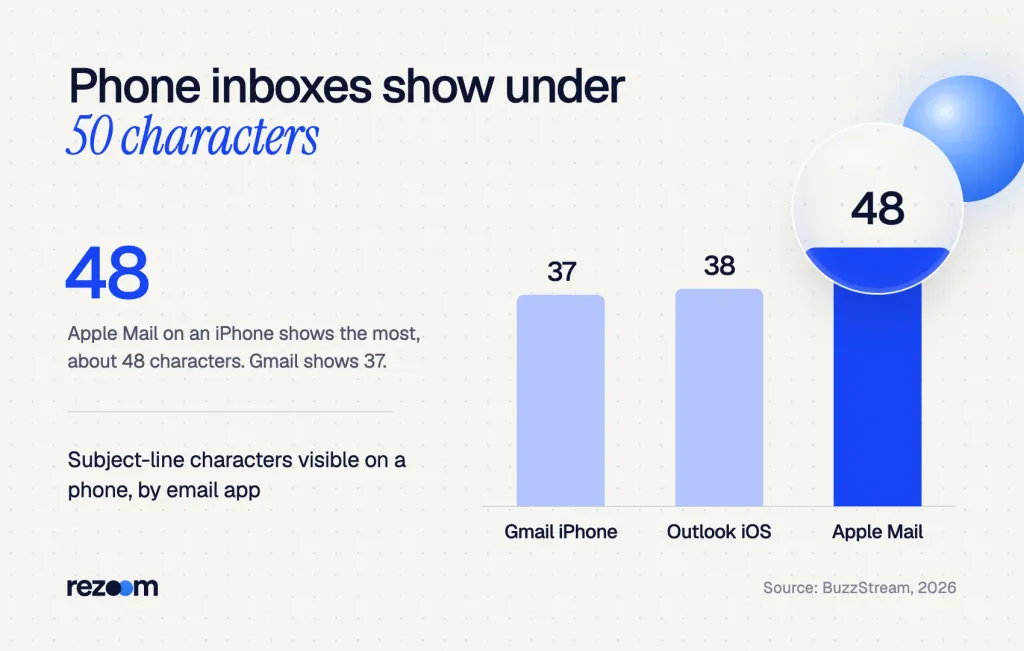
Phones cut subject lines short. BuzzStream's 2026 device tests found Gmail on an iPhone shows about 37 characters3, Outlook on an iPhone about 38 and Apple Mail about 48. BuzzStream also advises putting the key information within the first 40 characters.
So if you start with "Hello, my name is Jordan and I am applying," the recruiter never sees the role. But if you start with "Administrative Assistant Application," the first 37 characters already say everything that matters.
Before you hit send, email the draft to yourself and open it on your phone. If the job title and the word "Application" don't show in the inbox preview, move them to the front.
What subject line should you use when sending a resume or cover letter?
When you send a resume, name the role and say a resume is attached: "Resume: Administrative Assistant, Job ID 4471 - Jordan Lee." For a cover letter, the same line works, because the letter and resume travel together. Then make the email body a short version of your cover letter and attach both files as PDFs.
Virginia Tech's career center gives a clear model: "Application for graphic designer position listing 84G11." It also says you should follow the employer's instructions7 first, and never send an empty email that only holds an attachment.
Subject lines for sending a resume
Use "Resume" when the employer asked for one, and "Application" when you send the full package.
Resume: Administrative Assistant, Job ID 4471 - Jordan Lee Jordan Lee Resume - Office Manager Position Administrative Assistant Application and Resume - Jordan Lee Resume for Front Desk Coordinator Role (Ref. 22-118) - Jordan Lee
For the email itself, our guide on the email to send a resume has full templates. Also give your files clear names; our tips on resume file name formats show why "Jordan-Lee-Resume.pdf" beats "resume_final_v3.pdf."
What to write in an email to send a resume depends on one thing: whether a cover letter is attached. See 4 situations, subject lines and 4 templates.
Subject lines for a cover letter email
When the email body is your cover letter, the subject line stays simple. The recruiter needs the role and your name, not a pitch.
Subject: Administrative Assistant Application, Job ID 4471 - Jordan Lee Hi Ms. Patel, I'm applying for the Administrative Assistant role (Job ID 4471) I saw on your careers page. I've run calendars and travel for a 12-person sales team for five years, and I cut meeting conflicts by a third last year. My resume and cover letter are attached as PDFs. Thank you for your time. Jordan Lee | 555-0142
If you want more detail on the body, read our guide to the email cover letter, which covers greetings, length and sign-offs.
How do you write a subject line for a referral, internship or cold email?
Lead with the strongest hook. For a referral, put the referrer's name first. For an internship, add the term and year. For a cold email with no posting, name the role you want plus one fact that proves fit. When the posting gives a required subject line, copy it exactly and add nothing.
The formula stays the same, but the first words change. Whatever opens the line should be the thing most likely to get the email opened.
Referral subject lines
A referral is your best hook, so it goes first. Indeed advises adding the referrer's name only if they've agreed to be named1.
- Name first: Referred by Dana Cruz: Administrative Assistant - Jordan Lee
- Shorter version: Dana Cruz Referral - Admin Assistant Role
- Internal referral: Referred by Dana Cruz (Finance): Office Coordinator, Job 4471
Internship and entry-level subject lines
Recruiters often run several internship programs at once. So add the term, the year and the team.
- Internship: Summer 2027 Office Intern Application - Jordan Lee
- Student: Fall 2027 HR Internship - Jordan Lee, Ohio State '28
- Entry level: Entry-Level Receptionist Application, Job ID 3090 - Jordan Lee
Cold application subject lines
When no job is posted, you need a reason to open. Name the role, then one fact that shows fit, like a skill, a credential or a number.
- Skill hook: Admin Assistant, 5 Years in Executive Scheduling - Jordan Lee
- Credential hook: Jordan Lee, MOS Excel Expert - Office Support Roles
- Shared contact: Fellow Ohio State Grad Interested in Office Roles
Our guide to a cold email to a hiring manager shows how to write the rest of that email.
When the posting gives a required subject line
Some employers sort email with rules. If a posting says "Use AA-4471 Lee as your subject," type exactly that.
Indeed warns that ignoring the employer's instructions can lead to disqualification1. TopResume gives the same advice: include only what the posting asks for.
Posted job: [Job Title] Application, Job ID [Number] - [First Last]
Referral: Referred by [Name]: [Job Title] - [First Last]
Internship: [Season Year] [Role] Internship Application - [First Last]
Cold email: [Target Role], [One Proof Point] - [First Last]
Required format: [Copy the posting's exact text]
What subject line should you use to follow up on a job application?
The cleanest follow-up is a reply in the same thread as your application, so the recruiter sees your first email below it. If you must start a new email, use "Following Up: [Job Title] Application - [Your Name]." Wait about a week after you apply, and send one follow-up, not three.
FlexJobs says that in most cases, one follow-up email about a week9 after you apply is right. It also suggests Tuesday through Thursday, when your note is more likely to be seen.
Follow-up subject lines
- Same thread: Re: Administrative Assistant Application, Job ID 4471 - Jordan Lee
- New thread: Following Up: Administrative Assistant Application - Jordan Lee
- After an interview: Thank You: Administrative Assistant Interview - Jordan Lee
For timing and full scripts, read our guide on how to follow up on a job application.
How to follow up on a job application: advice ranges from 3 days to 2 weeks, so derive the timing instead. 42% of replies come from follow-ups.
What to say if they push back
Sometimes a recruiter can't find your email, or asks you to resend it in their format. Stay brief and fix it fast.
- "I don't see your application." Resend in the same thread: "Here it is again, with my resume attached as a PDF."
- "Please use the subject line in the posting." Apologize once and resend with their exact text.
- "Did you apply online too?" Be clear: "Yes, I applied on your site on March 3 and sent this email as a backup."
Recruiter: "Hi Jordan, I can't find your application. What subject did you use?"
"I sent it Tuesday as 'Administrative Assistant Application, Job ID 4471 - Jordan Lee.' I'll resend it in this thread now."
Recruiter: "Our filter only catches the format in the posting: AA-4471 Lee."
"Thanks for telling me. I'll resend with 'AA-4471 Lee' as the subject and both PDFs attached."
A cover letter tailored to every job post, in minutes.
What should you avoid in a job application subject line?
Never leave the subject blank, and never write just "Resume" or "Job." Avoid all caps, emoji, exclamation marks, slang and typos. Don't let the line run so long that the role gets cut off on a phone. And don't change the employer's required format, even to add your name.
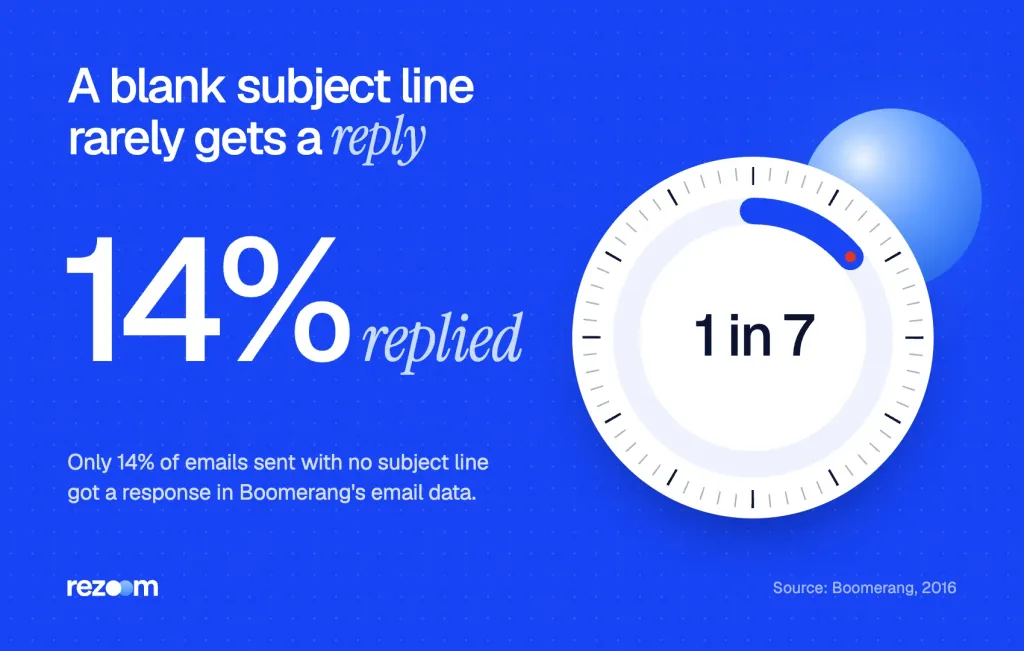
A blank line is the worst choice. Boomerang found that only 14% of messages4 with no subject line got a reply, in 2016 data. The same study found that subject lines of 3 to 4 words got the most replies.
Using all caps may get someone's attention, but in the wrong way.
Robert Walters
The UT Austin career office agrees with Virginia Tech that a blank subject is a no. It says the line should be short, clear and meaningful8 to the reader.
Weak subject lines and how to fix them
| Weak subject line | The problem | Better version |
|---|---|---|
| (blank) | Looks like spam, easy to skip | Administrative Assistant Application - Jordan Lee |
| Resume | No role, no name | Resume: Administrative Assistant, Job ID 4471 - Jordan Lee |
| HIRE ME NOW!!! | All caps and exclamation marks | Admin Assistant, 5 Years in Scheduling - Jordan Lee |
| Hi there :) my application | Greeting and emoticon | Office Coordinator Application - Jordan Lee |
| For your consideration | Vague | Front Desk Coordinator, Ref. 22-118 - Jordan Lee |
Do
- Put the job title in the first few words.
- Add the job ID when the posting lists one.
- End with your full name.
- Copy the employer's required format exactly.
Don’t
- Leave the subject blank or write only "Resume."
- Use all caps, emoji or exclamation marks.
- Open with a greeting like "Hello" or "Hi there."
- Add slang or abbreviations the posting doesn't use.
How do you write the rest of the job application email?
Keep the email short: one line on the role and where you found it, two lines on why you fit, one line on the attachments, and a sign-off with your phone number. Attach your resume and cover letter as clearly named PDFs. Then check every detail once more before you send.
A great email subject line for job application emails only gets the email opened. The body and the attachments decide what happens next. So use these steps every time.
- Write the subjectJob title, job ID, your name. Or copy the posting's format.
- Open with the roleName the job and where you saw it in the first line.
- Prove fit in two linesGive one skill and one result that match the posting.
- Point to the attachmentsSay your resume and cover letter are attached as PDFs.
- Sign off with contact detailsAdd your full name and phone number below your sign-off.
Make the attachments match
Before you send, check that your resume speaks to the job. Jordan studies administrative resume examples to see which skills hiring managers want. Then Jordan compares a draft with an administrative assistant resume sample and moves scheduling results to the top.
For the letter, an administrative assistant cover letter example shows how to open with a result instead of "I am writing to apply."
Administrative assistant cover letter example
See a short letter that leads with scheduling results, then reuse its first lines in your email body.
If you're applying for an office manager or receptionist job instead, browse these administrative cover letter examples. If you'd rather start from a draft, an AI cover letter builder can turn the job posting into a first version you then edit.
Finish the rest of the application
Many employers also ask you to fill out an online form. If it asks about past bosses, see our guide on the supervisor name on job application fields. If it asks about extra hours, here's how to answer willing to work overtime on job application questions.
Before you hit send
The sender name shows next to your subject line. If your address is a nickname, set up a free one with your first and last name before you apply.
Tailored to the job post, checked against ATS.
Frequently asked questions
What is a good subject line for a job application email?
Use "[Job Title] Application, Job ID [Number] - [Your Name]." It tells the recruiter the role, the opening and who you are in one glance.
Should I put my name in the subject line of a job application?
Yes. Your full name helps the recruiter find your email later and match it to your file. Put it at the end, after the job title and ID.
How long should a job application subject line be?
Aim for under 50 characters, and make sure the job title shows in the first 37. Phones often cut off the rest.
What subject line should I use when sending my resume?
Write "Resume: [Job Title], Job ID [Number] - [Your Name]." If the employer asked for a full application, use "Application" instead of "Resume."
What if the job posting tells me what subject line to use?
Copy it exactly, with nothing added. Some employers sort email with automatic rules, so a changed line can miss the right folder.
Can I use emoji or all caps in a job application subject line?
No. Both can look like spam or shouting. Keep the line plain, in title case or sentence case, with no exclamation marks.
Sources
We opened and read each page below. The small numbers in the text point here. Pages that carry no publication date show n.d.
- Indeed Career Guide2026
Indeed advises naming the role and your purpose, adding a referrer only with consent, and following required subject formats to avoid disqualification.
- Indeed Career Guide2026
Indeed says a job application subject line should be short and to the point, such as the applicant's name and the role.
- BuzzStream2026
BuzzStream's device tests found Gmail on iPhone shows about 37 subject-line characters, Outlook on iPhone 38 and Apple Mail 48.
- Boomerang2016
Boomerang found that only 14% of emails with no subject line got a response, and 3 to 4 word subject lines got the most replies.
- Robert Walters2023
Robert Walters advises front-loading key details, naming referrers and credentials, and avoiding all caps and exclamation points.
- TopResume2024
TopResume recommends the position title, location, job ID and your name, and including only what a posting's instructions ask for.
- Virginia Tech Career and Professional Developmentn.d.
Virginia Tech says a blank subject line is unacceptable and gives "Application for graphic designer position listing 84G11" as a model.
- University of Texas at Austin Career Servicesn.d.
UT Austin says subject lines should be short, clear and meaningful to the recipient, and never blank.
- FlexJobs2025
FlexJobs says one follow-up email about a week after applying is appropriate in most cases.
Mohammad has spent more than ten years designing consumer products and leads product at Rezoom, deciding what gets built and what gets left out. His guides cover the whole job search, from resume sections and cover letters to interview answers and career moves.
Goodi, M. (2026, November 19). Email Subject Line for Job Application: 25 Examples by Situation. Rezoom. https://rezoom.io/email-subject-line-for-job-application/