How to Withdraw a Job Application: Emails, Portals and Scripts
Learn how to withdraw a job application in Indeed, Workday or Greenhouse, plus copy-ready emails for a new offer, low pay, personal reasons and late stages.

On this pageHow do you withdraw a job application?
- How do you withdraw a job application?
- How do you withdraw on Indeed, Workday, Greenhouse or LinkedIn?
- What should a withdraw application email say?
- Which withdrawal email should you send in your situation?
- What if the recruiter pushes back or asks you to stay?
- Does withdrawing a job application hurt your chances later?
- What should you do after you withdraw?
- FAQ
- Sources
To withdraw a job application, use the portal's withdraw button if there is one, then send the recruiter a short email. Thank them, say you want to withdraw from consideration, give one neutral reason or none, and leave the door open. Do it as soon as you are sure, and call first if you have an interview within 24 hours.
To withdraw a job application, click the portal's withdraw button if it has one, then email the recruiter. Keep the note to three or four lines: thanks, a clear withdrawal, one neutral reason and a polite close.
Most guides stop at one email. This one covers each portal, a script for each situation and what to say when a recruiter asks you to stay.
Quick answers by situation
| Your situation | What to do | Example line |
|---|---|---|
| You accepted another offer | Withdraw now, by email or phone | "I have accepted another offer, so I would like to withdraw." |
| You lost interest before an interview | Short email, no long reason | "I have decided to withdraw my application for the role." |
| The pay range is too low | Name the gap once, kindly | "The range is below what I need, so I will step back." |
| Personal reasons | Keep it private | "Due to personal reasons, I need to withdraw." |
| You have an interview tomorrow | Call first, then email | "I am calling to cancel tomorrow's interview and withdraw." |
| You applied through a recruiter | Tell the agency recruiter | "Please withdraw my name from the Acme role." |
How do you withdraw a job application?
To withdraw a job application, first use the withdraw button in the job portal if one exists. Then email your recruiter or hiring contact with a short note that thanks them, states your withdrawal, gives one neutral reason or none, and closes politely. If an interview is close, call first and follow up in writing.
The portal and the email do two different jobs. The button updates the company's system. But the email reaches a real person, who may have a calendar invite with your name on it.
If you only applied online and never spoke to anyone, the button alone is often enough. After a phone screen or interview, though, always send an email too.
- Decide for sureWithdrawing closes the door on that posting, so confirm you do not want the job before you act.
- Use the portalLog in to the site where you applied and look for a withdraw option next to the job.
- Email your contactSend a short note to the recruiter or the person who scheduled your interviews.
- Cancel invitesDecline any calendar invites so the panel does not wait for you.
- Update your trackerMark the job as withdrawn so you do not reapply by mistake.
Why speed matters
The University of Houston's Rockwell Career Center tells students to contact the employer right away once they know.
When you know that you no longer want to be considered for employment you should contact the employer immediately.
Rockwell Career Center, University of Houston
So a late note beats no note. But an early note saves the team a slot they can give to another candidate.
How do you withdraw on Indeed, Workday, Greenhouse or LinkedIn?
Indeed lets you withdraw from My Jobs, but only for jobs you applied to directly on Indeed. Workday shows a Withdraw button in Candidate Home only if the employer turned it on. Greenhouse's MyGreenhouse FAQ sends you to the employer. If a portal has no button, email the recruiter, since that always works.
Each system works a little differently. Here is what each vendor's help page says.
| Platform | How to withdraw | What to know |
|---|---|---|
| Indeed | Applied tab in My Jobs, three-dot menu, "Withdraw application" | Only for jobs you applied to on Indeed; you may not be able to apply again |
| Workday | Withdraw button next to the job in Candidate Home | Shows only at stages where the employer allows it |
| Greenhouse | Contact the company | The MyGreenhouse FAQ routes withdrawals to the employer |
| Workable | Link at the bottom of your confirmation email | Usually works only before anyone reviews your application |
| Handshake | My Jobs, job page, "Withdraw Application" | Status must be Pending and the posting still active |
| Check the job's menu under My jobs, Applied | If no option shows, email the recruiter |
Indeed
Indeed's help center explains the steps: open the Applied tab in My Jobs, pick the three-dot menu, then choose Withdraw application1. It works only if you applied directly on Indeed. Also, "the employer may still contact you," and you cannot reopen a withdrawn application.
Workday and Greenhouse
Workday's admin guide says external candidates see a Withdraw button in Candidate Home2. But the button only shows at stages where the employer allows a candidate withdrawal. When you click it, the status changes and the application closes.
Greenhouse is simpler. Its MyGreenhouse FAQ for candidates3 says withdrawals go to the company directly. So for a Greenhouse job, your email is the withdrawal.
Workable, Handshake and LinkedIn
Workable puts a withdraw link at the bottom of your confirmation email4. It removes your details, but it usually stops working once someone reviews your file. Students on Handshake can withdraw only when the status is Pending and the posting is still active5.
For LinkedIn Easy Apply, look in My jobs under Applied and open the job's menu. If you see no withdraw option, email the recruiter or hiring manager instead.
Search your inbox for the confirmation email. The sender address often names the system, such as myworkday or greenhouse. That tells you where the withdraw button lives, or if you need to email.
What should a withdraw application email say?
A withdraw application email needs four parts: a thank-you, a clear sentence that you are withdrawing from consideration, one short neutral reason or none, and a close that leaves the door open. Put the job title and "withdrawal" in the subject line, and keep the whole note under 100 words.
You do not owe a detailed reason. One sentence is plenty, and "for personal reasons" is a complete answer.
Subject lines that work
- Plain: Withdrawal of application: Administrative Assistant
- After interviews: Withdrawing from consideration, Office Manager role
- With a req number: Application withdrawal, Req 4821, Jordan Lee
The four parts
- Thanks: Thank them for their time, and name the person or panel if you met them.
- Clear ask: Say "I would like to withdraw my application," not "I am not sure about this."
- Reason: One neutral line, or skip it.
- Close: Wish them well and say you would like to stay in touch.
Do
- Send it the day you decide.
- Use the same email thread the recruiter used.
- Name the exact job title and req number.
Don’t
- Criticize the company, pay or interviewers.
- Ghost after an interview is booked.
- Write a long story about your reasons.
Before you hit send
Which withdrawal email should you send in your situation?
Match the email to your reason. If you took another offer, say so in one line. If you lost interest, skip the reason. For a pay gap, name the gap once and invite them back if the budget changes. After late-stage interviews, thank each person and send it before your next scheduled step.
Copy the script that fits, then swap in your details. Each one stays under 100 words.
You accepted another offer
Subject: Withdrawal of application, Administrative Assistant Hi Dana, Thank you for considering me for the Administrative Assistant role. I have accepted another offer, so I would like to withdraw my application. I enjoyed learning about your team, and I hope our paths cross again. Best regards, Jordan Lee
You are no longer interested
Subject: Application withdrawal, Office Coordinator Hi Marcus, Thank you for your time so far. After more thought, I have decided to withdraw my application for the Office Coordinator role. I wish you and the team the best with your search. Best, Sam Carter
The salary does not work
Subject: Office Manager role, withdrawing Hi Priya, Thank you for sharing the pay range. It is below what I need for my next move, so I will withdraw from consideration. If the budget changes, I would be glad to talk again. Best, Alex Rivera
Personal reasons
Subject: Withdrawal of application, Receptionist Hi Tom, Thank you for considering me. Due to personal reasons, I need to withdraw my application at this time. I appreciate your understanding, and I hope to apply again in the future. Kind regards, Jordan Lee
After an interview or final round
Subject: Withdrawing from consideration, Executive Assistant Hi Lauren, Thank you, and please thank Mr. Ortiz and the panel for Tuesday's interview. I learned a lot about the team. After careful thought, I have decided to withdraw from the process. I hope we can stay in touch on LinkedIn. Best, Sam Carter
Fill-in-the-blank template
Subject: Withdrawal of application, [job title]
Hi [name],
Thank you for considering me for the [job title] role. [One neutral reason, or skip], so I would like to withdraw my application.
I enjoyed [one specific thing], and I wish you the best with your search.
Best regards, [your name]
If you applied through an agency, send the note to your agency recruiter, not the company. Then they can tell their client in their own words.
A cover letter tailored to every job post, in minutes.
What if the recruiter pushes back or asks you to stay?
Stay polite and firm. Thank them, repeat that you are withdrawing, and only share more if you want to. If you would stay for a better offer, say what would change your mind, such as pay or start date. If nothing would, say so kindly and end the call.
Sometimes a recruiter calls back with a counteroffer or a quick question. That is normal. First decide before the call what, if anything, would change your answer.
Recruiter: "Before you go, is there anything we could do to keep you in the process?"
"I appreciate that. I have accepted another offer and signed it, so my answer will not change."
Recruiter: "Understood. Could we reach out for future roles?"
"Yes, please do. I would be glad to hear from you."
When you would stay for the right offer
If the pay range is the only issue, name your number once. For example: "If the role could reach [your number], I would stay in." Then stop talking and let them answer.
If your interview is within 24 hours, call the recruiter, then send the email. A call means no one sits in an empty room waiting for you, and the email gives them a record.
Does withdrawing a job application hurt your chances later?
Usually not, if you withdraw early and politely. Silence does more harm. Indeed warns you may not be able to apply again to the same posting, so withdraw only when you are sure. Most recruiters remember a clean, prompt withdrawal and may contact you for future roles.
Going silent is more common than you might think. A 2025 LiveCareer survey of 1,008 employed US adults found that 25% of job seekers have ghosted an employer8 at some point. Of those who stopped replying, 51% had accepted another job.
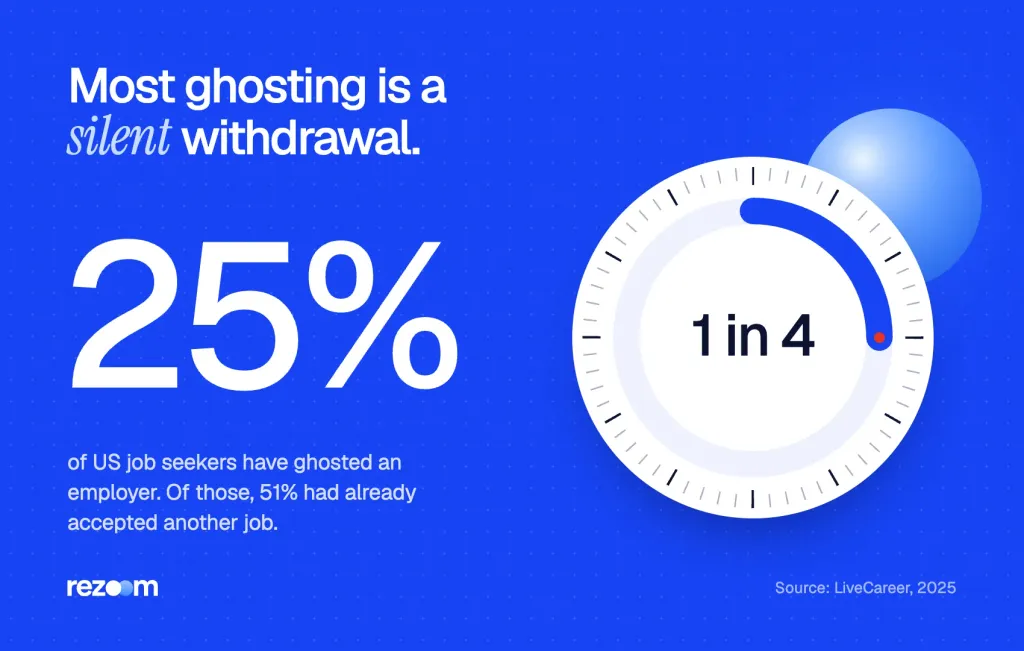
So most ghosting is just a withdrawal no one sent. Virginia Tech's career center puts it bluntly: failing to notify employers7 that you are withdrawing "is discourteous, and potentially dishonest."
Slow processes cause withdrawals too
In a NumberBarn survey reported by Allwork.Space, 37% of job seekers said they withdrew9 because the hiring process took too long. That is a fair reason. But you still owe the company a short note.
Can you apply to the same company later?
Yes, in most cases. Indeed notes you may not reapply to the same posting, but a new job at that company is a fresh start. Our guide on how to reapply to the same company covers timing and what to change.
Reapply to a company after rejection: how long to wait, including Google's 90-day rule, what the ATS remembers about you and what to change before you apply.
If you already said yes and now want out, that is a different case. Read our guide on how to decline a job offer after accepting before you send anything.
What should you do after you withdraw?
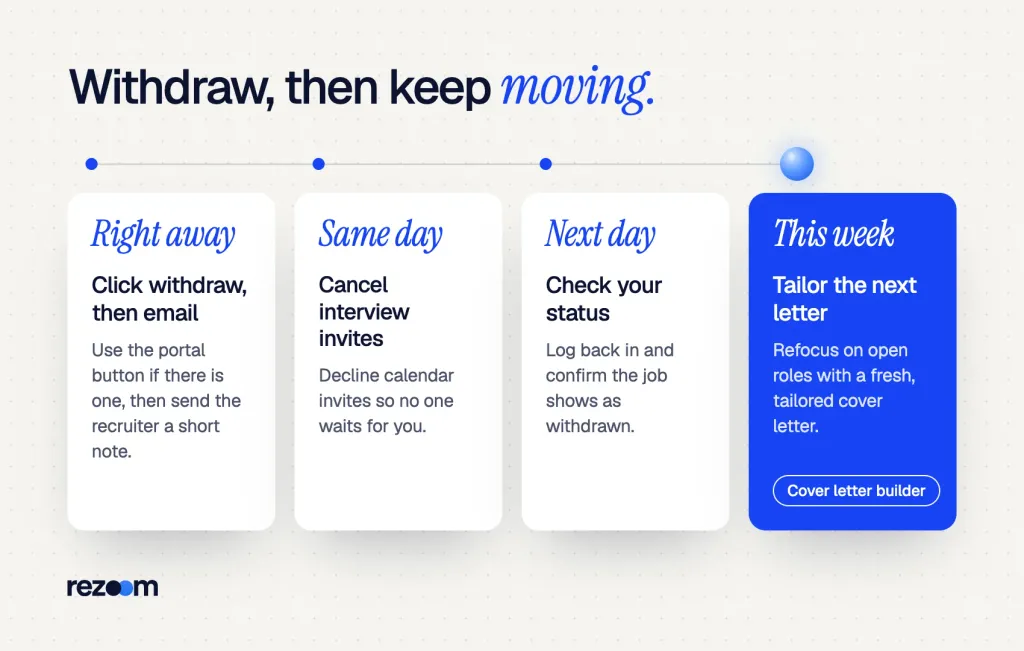
Check that the portal shows your status as withdrawn, decline any calendar invites, and update your job tracker. Then refocus on the roles you still want: refresh your resume, tailor each cover letter, and follow up on open applications so your search keeps moving.
A day later, log back in and check the status. Our list of job application status meanings explains labels such as "Declined by candidate" and "Withdrawn."
Job application status meanings explained: what In Process, Application Received and Closed mean in Workday, iCIMS, ADP and SuccessFactors, and what to do.
Next, turn to the jobs still open. Our guide on how to follow up on a job application shows when to nudge a recruiter. And if a company rejects you later, here is how to respond to a job rejection email.
Sharpen the applications you keep
If you work in office roles, browse our administrative resume examples for bullet ideas. Our administrative assistant resume example shows how to lead with calendars, budgets and tools you managed.
Administrative assistant resume example
A one-page admin resume that leads with scheduling, vendor and office tool results.
For each role you still want, write a fresh letter. Our administrative cover letter samples show short openings that name the job and one result.
Administrative assistant cover letter example
A short admin letter that opens with one result and matches the job post's top duties.
When you are ready, our AI cover letter builder drafts a tailored letter from your resume and the job post. Then edit each line so it sounds like you.
Free plan, no card.
Frequently asked questions
How do I withdraw a job application politely?
Send a short email that thanks the recruiter, says you are withdrawing, gives one neutral reason or none, and wishes them well. Use the portal's withdraw button too, if there is one.
Should I give a reason for withdrawing my application?
You do not have to. One neutral line, such as "I accepted another offer," is helpful but optional, and "for personal reasons" is enough.
Can I withdraw a job application on Indeed?
Yes, if you applied directly on Indeed. Open the Applied tab in My Jobs, pick the three-dot menu and choose "Withdraw application." You cannot undo it.
How do I withdraw an application on Workday?
Log in to the company's Candidate Home and click Withdraw next to the job. If you do not see the button, the employer has not turned it on for that stage, so email the recruiter.
Can I reapply after I withdraw?
Often you cannot reapply to the same posting, and Indeed warns about this. But you can usually apply to a new opening at the same company later.
Is it rude to withdraw after an interview?
No. It is rude to go silent. Withdraw as soon as you decide, thank the people you met, and call first if another interview is less than a day away.
Sources
We opened and read each page below. The small numbers in the text point here. Pages that carry no publication date show n.d.
- Indeedn.d.
Indeed lets you withdraw from the Applied tab in My Jobs only for jobs you applied to directly on Indeed
- Workdayn.d.
Workday shows external candidates a Withdraw button in Candidate Home at stages the employer allows
- Greenhousen.d.
MyGreenhouse sends withdrawal requests to the employer directly
- Workablen.d.
Workable offers a withdraw link in the confirmation email that usually works before review
- Handshaken.d.
Handshake allows withdrawal only when the status is Pending and the posting is active
- University of Houston Rockwell Career Centern.d.
Contact the employer immediately once you no longer want to be considered
- Virginia Tech Career and Professional Developmentn.d.
Failing to notify employers that you are withdrawing is discourteous
- LiveCareer2025
25% of job seekers have ghosted an employer, and 51% of them had accepted another job
- Allwork.Space (NumberBarn survey)2026
37% of job seekers withdrew from consideration because the process took too long
Mohammad has spent more than ten years designing consumer products and leads product at Rezoom, deciding what gets built and what gets left out. His guides cover the whole job search, from resume sections and cover letters to interview answers and career moves.
Goodi, M. (2026, November 4). How to Withdraw a Job Application: Emails, Portals and Scripts. Rezoom. https://rezoom.io/how-to-withdraw-a-job-application/