Workday Rejection Emails: Does Workday Send Them Automatically?
Workday rejection emails explained: when Workday sends automated rejections, how to spot a human one, what Not Selected means, and what to do next.

On this pageDoes Workday send automated rejection emails?
- Does Workday send automated rejection emails?
- How do recruiters reject candidates in Workday?
- How can you tell automated Workday rejection emails from human ones?
- What does your Workday application status mean?
- When do Workday rejection emails arrive, and why do some never come?
- Can you reapply after a Workday rejection?
- What should you do after a Workday rejection?
- FAQ
- Sources
Yes, Workday can send automated rejection emails, but only when the employer sets it up. A recruiter declines you with a reason, often in bulk or when the job closes, and a notification step emails you, sometimes after a timed delay. Some employers turn this off, so your status in Candidate Home may change with no email at all.
Yes, Workday rejection emails can be automated. When a recruiter declines you, or closes the job, a notification step the employer set up can email you. But each employer decides if that step exists, so some never send one.
So the real question is not "Workday or not." It is how your employer set up Workday. This guide shows how a decline turns into an email, how to tell a bot from a person, and what to do next.
Quick answers by situation
| Your situation | What it likely means | What to do |
|---|---|---|
| Generic email from a myworkday or noreply address | An automated decline after a recruiter picked a reason | Read it once, then move on to open roles |
| Email arrived at midnight or on a weekend | A scheduled or delayed send, not a person typing | Do not read the timing as a sign of your fit |
| Status says "Not Selected" but no email came | The employer changed your status without a notification | Treat it as a no, and send one short check-in if you interviewed |
| Personal note that names your interview | A recruiter wrote or edited it | Reply with thanks and ask to stay in touch |
| Job shows as canceled or closed | The role closed, so the employer declined all open applicants | Watch for a new posting and apply again |
| Status still "In Progress" after weeks | No decision yet, or no one updated the system | Follow up once by email |
Does Workday send automated rejection emails?
Yes, if the employer turns it on. Workday lets recruiters decline candidates with a reason, one at a time or in bulk, and a notification step can email each declined candidate. Employers choose the wording, the trigger and any delay. Some employers skip the step, so a status change can happen with no email.
Workday is a tool that employers configure. It does not reject anyone on its own. A person, or a rule the employer built, picks a decline reason first.
What Workday's own docs say
Workday's admin guide on notifications for candidates1 lists "candidate disposition" as a use case. It says recruiters can decline one person with a personal note, or decline the rest of the applicants on a closed or filled job in bulk. It also says custom notifications can run after a timed delay.
Workday's page on recruiting dispositions2 adds one more detail. Employers add a Notification step to send custom messages to declined candidates, and they can override the label that candidates see.
Real employers do it both ways
- Emails every decline: Emerson College's HR guide says all declined candidates get an automatic email9.
- Emails some declines: Washington State University set up automatic messages for certain decline reasons7 in 2024, such as missing qualifications or a canceled job.
- Emails none: UW–Madison tells its HR staff that a status change sends no message at all.
Changing a candidate's status in Workday, including removing them from consideration or closing the Job Requisition, does not send them any kind of notification/communication.
UW–Madison Office of Human Resources
So the same software can send a rejection the next morning, or never. That depends on the employer, not on you.
Which ATS sends automatic rejection emails? Greenhouse, Ashby, Workday, Oracle, iCIMS and Bullhorn can. See what triggers them and why some come late.
How do recruiters reject candidates in Workday?
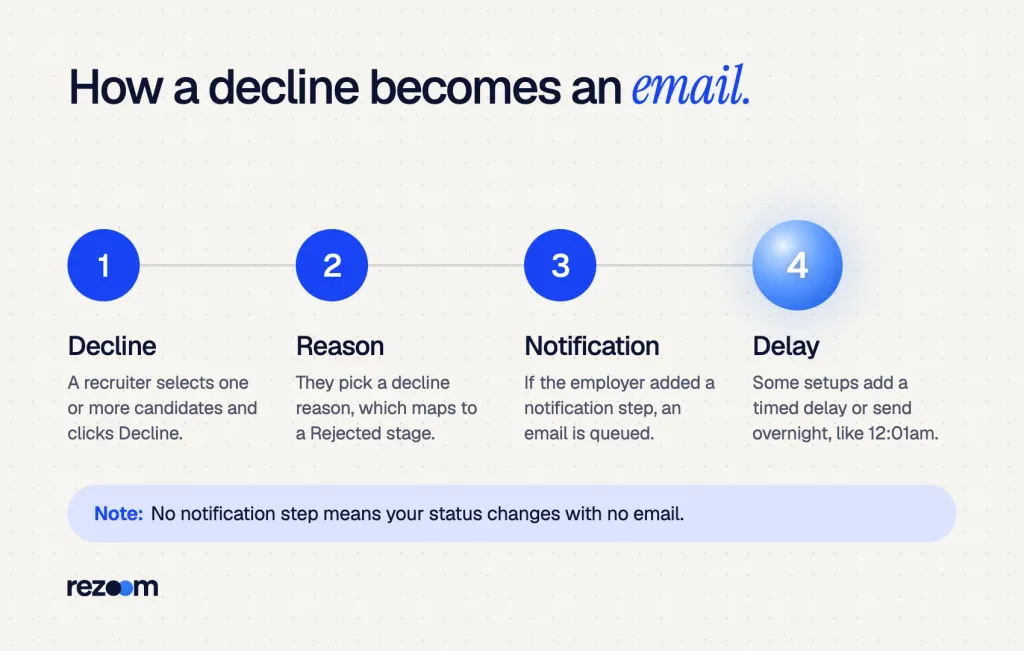
A recruiter selects one or more candidates on the job, clicks Decline and picks a reason. That reason maps to a Rejected stage. If the employer added a notification, Workday emails the candidate, sometimes the next day. When a job closes, the employer can decline every remaining applicant in one batch.
The flow is simple once you see it from the recruiter's side.
Declines start with a reason
A California College of the Arts job aid shows the steps. The recruiter opens the job, selects candidates and clicks Decline, and "you must first select a reason." The same guide says you can advance or decline a group of candidates8 at one time. In that setup, the email goes out at 12:01am the next day.
Bulk declines when the job closes
Workday also documents an automatic decline of remaining candidates3. When a recruiter closes the job and ticks the box, every candidate still in the Review or Screen stage gets the reason "Job Requisition Closed." That is why many people get a rejection weeks after applying, on the same day as dozens of others.
Why HR teams know this flow well
Recruiters and HR coordinators run these steps every day. If you work in HR, our human resources resume examples show how to list Workday and other HR systems as skills. For a closer match, our recruiter resume examples show how to turn applicant tracking work into results.
Recruiter resume example
A recruiter resume that shows ATS work, time-to-fill and hiring results in short, scannable bullets.
If your rejection lands at 12:01am or on a Sunday, a schedule sent it. It does not mean someone stayed up to reject you. So do not read meaning into the timing.
How can you tell automated Workday rejection emails from human ones?
Automated Workday rejection emails use a generic template, come from a no-reply or Workday address, and skip any detail about you. A human email names your interview or the people you met, comes from a real person's address, and often invites a reply. Most rejections at the application stage are automated.
You can usually tell in ten seconds. Check the sender, the details and the timing.
| Signal | Automated email | Human email |
|---|---|---|
| Sender | noreply or a myworkday address | A named recruiter at the company |
| Details | Job title and req number only | Your interview, the panel or a next step |
| Timing | Midnight, weekends or a big batch | Business hours, often after a call |
| Reply | Replies may go nowhere | The recruiter can answer you |
| Stage | Often after the application or screen | Often after interviews |
What an automated rejection looks like
Subject: Your application for Data Analyst, R-10482 Dear Jordan, Thank you for your interest in the Data Analyst position. After careful review, we have decided to move forward with other candidates. We encourage you to apply for future openings on our careers site. Talent Acquisition Team
What a human rejection looks like
Subject: Data Analyst role, update Hi Jordan, Thank you for meeting with Priya and me on Tuesday. We enjoyed your SQL walkthrough, but we chose a candidate with more health data experience. I would like to keep you in mind for the next analyst role. Can I reach out when it opens? Dana
Even a human note can start from a template. But if it mentions your interview, a person read your file. That is a real chance to build a relationship. Our guide to ATS rejection email meaning breaks down common phrases such as "moving forward with other candidates."
What does your Workday application status mean?
Workday status labels vary by employer, because each one can rename them. Common ones are "In Progress" while you are under review, "Not Selected" when you are out, "Withdrew" if you pulled out, and "Canceled" when the job closes. A declined application often moves to an Inactive tab in Candidate Home.
Each employer runs its own Candidate Home, and labels change from one to the next. Here are real examples from employer pages.
| Label you see | Where we saw it | What it means |
|---|---|---|
| In Progress | University of Washington | Your resume is still under review |
| Sent to Dept | University of Washington | HR passed your file to the hiring team |
| Not Selected | University of Washington | You are out, and it can happen at any time |
| Completed (Inactive tab) | UW–Madison | You were declined, or the job was canceled |
| Withdrew | Both | You pulled your own application |
| Recruitment Canceled | University of Washington | The job will not be filled |
The University of Washington's after-applying page6 says "Not selected" can occur at any time after you apply. Its HR team defines that status as "no longer under consideration"5, which is also the wording many employers use in the email.
Why "Completed" can mean rejected
At UW–Madison, every decline reason except Withdrawn shows the candidate "Application Status: Completed"4 on the Inactive tab. So "Completed" there does not mean you finished a step. It means the process ended for you.
For more labels across systems, see our list of job application status meanings.
Free ATS score, the text the software extracts and your missing keywords. No sign-up.
When do Workday rejection emails arrive, and why do some never come?
Timing depends on the employer. Some send Workday rejection emails within days of applying, some the night after a recruiter clicks Decline, and many only when the job closes. Some employers send nothing, because they never added a notification or they keep backup candidates open until the hire is final.
There is no single clock. Here is what the employer guides show.
- Within a week: Emerson's guide asks hiring teams to decline candidates who miss the criteria within three to seven days of applying.
- The next night: The CCA setup sends the email at 12:01am after a manual decline.
- At the close: A bulk decline happens when the recruiter closes the job, which can be weeks or months later.
- Never: Some employers, like the UW–Madison setup, send no automatic message.
Silence is common across ATS platforms
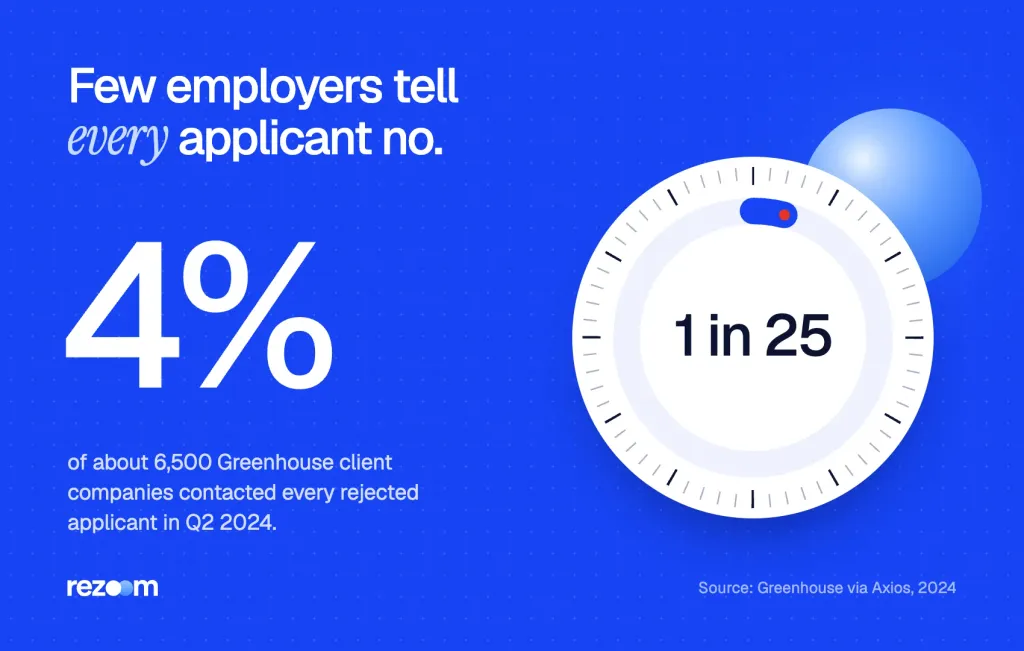
Ghosting is not just a Workday issue. Greenhouse found that only 4% of its roughly 6,500 client companies contacted every rejected applicant11 in Q2 2024. Its co-founder told Axios that some teams hold off on rejections to keep backup candidates.
And its 2024 State of Job Hunting report found that 61% of job seekers were ghosted after an interview12. So if no email comes, check Candidate Home before you assume you are still in the running.
ATS rejection email meaning: an instant reply points to a screening rule, weeks later to a human review. Decode common phrases and know what to do next.
Can you reapply after a Workday rejection?
Yes, you can apply to other jobs at the same employer, and a new posting is a fresh start. Recruiters can also reactivate a declined application in some setups. We found no Workday rule that blocks reapplying everywhere, so check the careers site, change your resume, and ask the recruiter if you were close.
A Workday decline is not a ban. It closes one application for one job.
A decline can be reversed
The University of Texas at Austin announced in 2022 that its recruiters can reactivate a declined application10 in Workday. So if a recruiter declined you by mistake, ask. The fix may take them a minute.
Change something before you apply again
If an automated email came right after you applied, a screening question or your resume may have tripped the filter. First read how Workday parses resumes, then fix headings, dates and job titles. Our guide on how to reapply to the same company covers timing.
What to say if you push back
- Ask once: Send one short note if you interviewed, not after a form rejection.
- Name the facts: Point to a missed detail, such as a license or a date, if the decline looks like an error.
- Stay open: Ask to be considered for the next role, not for a debate.
Recruiter: "Thanks for reaching out. The hiring team has made its decision."
"I understand. I saw the status change to Not Selected right after I applied. I hold the CPA license the post asks for. Could it be a parsing error?"
Recruiter: "Let me check your file."
"Thank you. If the decision stands, I would still like to hear about future roles."
What should you do after a Workday rejection?
Reply to a human note with brief thanks, skip replies to no-reply emails, and update your tracker. Then check your resume against the next job post, tailor your cover letter, and set alerts on the employer's careers site. If the rejection came fast, test your resume's format before you apply again.
A rejection email is data. Use it to sharpen the next application.
- Check the senderIf a person wrote it, reply within a day. If it came from no-reply, do not reply.
- Update Candidate HomeNote the status and the date in your job tracker.
- Fix your resumeRun it through an ATS check and match the job post's key terms.
- Tailor the next letterWrite a fresh cover letter for each open role.
- Set alertsTurn on job alerts on the employer's careers site.
Reply only when a person wrote
If a recruiter wrote to you, thank them in three lines. Our guide on how to respond to a job rejection email has more scripts.
Hi [name],
Thank you for letting me know, and for your time on [date]. I enjoyed learning about [one detail].
If a [type of role] opens, I would be glad to be considered.
Best, [your name]
Test your resume before the next application
When rejections arrive within hours, your resume may not parse well. Run it through our free ATS resume checker to see what a system reads. If you are applying for HR roles, our HR cover letter examples show short openings that name the job and one result.
Do
- Reply to a recruiter who wrote to you personally.
- Check Candidate Home if no email comes.
- Apply to new postings at the same employer.
Don’t
- Reply to a no-reply address.
- Read meaning into a midnight send time.
- Send the same resume again without changes.
After a Workday rejection
Each employer runs its own Workday sign-in. Use the same email address on all of them, then search your inbox for "myworkday" to see every update in one place.
If no update comes at all, our guide on how to follow up on a job application shows when and how to nudge.
Free ATS score and your missing keywords. No sign-up.
Frequently asked questions
Does Workday automatically reject applicants?
Not on its own. A recruiter, or a rule the employer built, picks a decline reason. Workday then records it and can email you if the employer added a notification.
Why did I get a Workday rejection email at midnight?
Some employers schedule decline emails. One college's setup sends them at 12:01am the day after a recruiter clicks Decline, so the time says nothing about you.
Does "Not Selected" in Workday mean I was rejected?
Yes. At the University of Washington, "Not selected" means you are no longer under consideration, and it can happen at any time after you apply.
Why didn't Workday send me a rejection email?
Your employer may not have set up a decline notification, or it may wait until the job closes. Check your status in Candidate Home.
Can a recruiter undo a Workday rejection?
In some setups, yes. The University of Texas at Austin lets recruiters reactivate declined applications, so ask if you think it was a mistake.
Should I reply to a Workday rejection email?
Reply only if a person wrote it. Skip replies to no-reply addresses, since no one reads them.
Sources
We opened and read each page below. The small numbers in the text point here. Pages that carry no publication date show n.d.
- Workdayn.d.
Workday lets recruiters send disposition notices one at a time or in bulk, with optional timed delays
- Workdayn.d.
Employers add a Notification step to email declined candidates and can override the label they see
- Workdayn.d.
Closing a job can decline all remaining Review and Screen candidates with the reason Job Requisition Closed
- UW–Madison Office of Human Resources2025
At UW–Madison a Workday status change sends candidates no notification, and declines show as Completed
- University of Washington Human Resources2026
UW sends a disposition email and defines Not Selected as no longer under consideration
- University of Washingtonn.d.
UW explains its Workday statuses and says Not selected can occur any time after applying
- Washington State University2024
WSU sends automatic Workday messages for certain decline reasons
- California College of the Arts2020
Recruiters can decline candidates in a group, and the email goes out at 12:01am the next day
- Emerson College Human Resourcesn.d.
All declined candidates get an automatic email, ideally three to seven days after applying
- University of Texas at Austin2022
Recruiters can reactivate a declined or withdrawn Workday application
- Axios2024
Only 4% of about 6,500 Greenhouse client companies contacted every rejected applicant in Q2 2024
- Greenhouse via PR Newswire2024
61% of job seekers in the 2024 State of Job Hunting report were ghosted after an interview
Mohammad has spent more than ten years designing consumer products and leads product at Rezoom, deciding what gets built and what gets left out. His guides cover the whole job search, from resume sections and cover letters to interview answers and career moves.
Goodi, M. (2026, November 5). Workday Rejection Emails: Does Workday Send Them Automatically?. Rezoom. https://rezoom.io/does-workday-send-rejection-emails/