Position Applied For on a Job Application: What to Write
Position applied for on a job application: type the exact title from the posting, add the job ID, and know what to write for walk-ins, two roles or any job.

On this pageWhat does "position applied for" mean on a job application?
- What does "position applied for" mean on a job application?
- What should you write for position applied for?
- What do you put for a general or walk-in application?
- Can you apply for two positions at once?
- How do you use position applied for in a cover letter or email?
- Should you put position applied for on your resume?
- What should you check before you submit?
- FAQ
- Sources
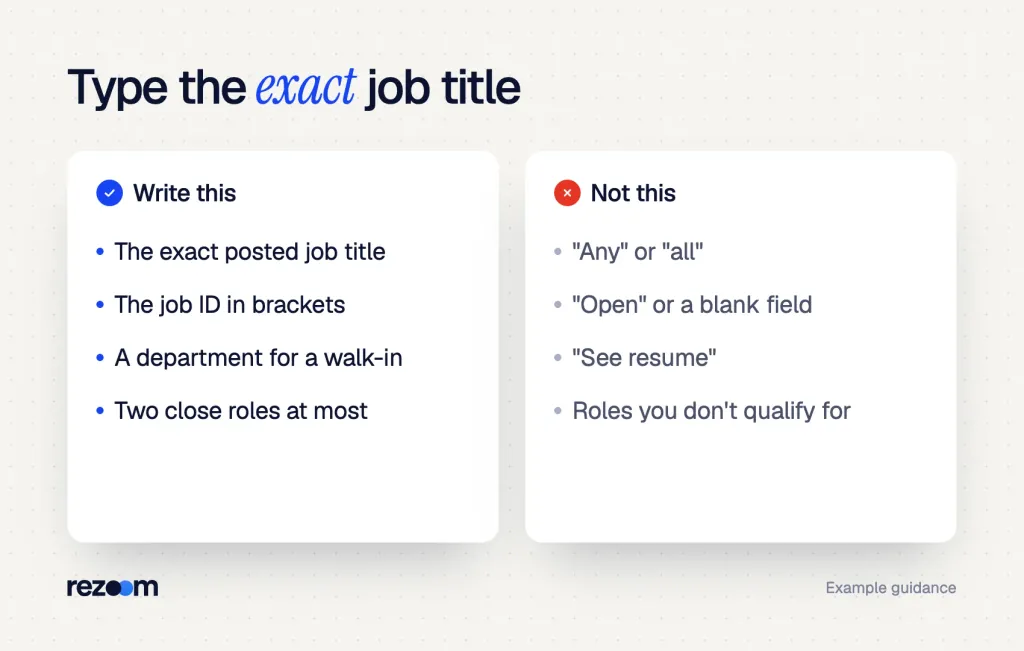
The "position applied for" field asks which job you want. Type the exact job title from the posting, and add the job or requisition ID if the form has room. If you apply without a posting, name a real role or the department you want. Never write "any" or "open," and use the same title in your cover letter and email subject line.
The "position applied for" field asks which job you want. Type the exact job title from the posting, plus the job ID or location if the form has room. Never write "any" or leave it blank.
The same field shows up as "position desired," "job title applied for" or "desired position." They all ask one thing. But the small details, like the job ID, the title spelling and the location, decide where your form lands.
Quick answers by situation
| Your situation | What to say/do | Example line |
|---|---|---|
| You saw a job posting | Copy the title exactly as posted | "Administrative Assistant II" |
| The posting shows a job ID | Add the ID after the title | "Administrative Assistant II (Req #48213)" |
| The company has many sites | Add the location | "Shift Supervisor, Dayton store" |
| You walk in with no posting | Name a real role or a department | "Front desk or guest services" |
| You want two roles | List both, most wanted first | "Cashier; Stock Associate" |
| The form says "position desired" | Same answer as above | "Medical Receptionist" |
What does "position applied for" mean on a job application?
"Position applied for" means the exact job you want at this company. HR uses it to route your form to the right hiring manager and the right job opening. So type the title from the posting, not your current title and not a general word like "any." Add a job ID when the posting lists one.
Big employers run dozens of openings at once. Your form often goes into an applicant tracking system, and the title field tells it which pile to put you in.
So a vague entry can send you to the wrong manager, or to nobody. A precise one puts you in front of the person who is hiring.
Position desired vs. job title vs. position applied for
These labels look different, but most forms use them the same way. One label is the odd one out.
| Form label | What it asks | What to type |
|---|---|---|
| Position applied for | The job you want now | Exact posted title |
| Position desired | The job you want now | Exact posted title or a department |
| Job title applied for | The job you want now | Exact posted title |
| Job title (in a work history section) | The title you held at a past job | Your real past title |
| Desired job title (on a resume) | Your target role | The title you are aiming for |
If the label sits inside the work history block, it asks about your past. Then you type the title you really held, not the one you want.
If that title was odd, see our guide on resume job title vs. actual title.
Applying for multiple positions at the same company? See how many roles is too many, what recruiters see, whether to reuse one cover letter and what to say.
What should you write for position applied for?
Write the job title exactly as the posting shows it, with the same words, level and spelling. Then add the job or requisition ID and the location if the field has room. If the form gives a drop-down, pick the matching title. A clean, exact entry helps both people and software match you to the job.
Minnesota's CareerForce site puts the rule plainly: reference the exact job title3 in the posting when you apply for a posted role. That means "Accounts Payable Specialist II," not "AP clerk."

- Find the postingOpen the ad again and copy the title. Don't type it from memory.
- Match the levelKeep "I," "II," "Senior" or "Lead" as written. They often mark different pay bands.
- Add the job IDPut the req or job number in brackets after the title if there is room.
- Add the siteFor chains and hospitals, add the store, branch or unit.
- Check the restUse the same title on your resume, cover letter and email.
Where to find the job ID or requisition number
A requisition is a hiring request inside the company. Breezy HR calls it "a formal internal request from a hiring manager to the HR department."6 The number tied to it is the req ID, and many postings show it as "Job ID" or "Req #."
You can usually find it near the top or bottom of the posting, in the page URL or in your confirmation email. If the form asks for it and you can't find one, Climb the Ladder suggests7 "N/A" when the field takes text.
Position applied for: [Exact job title from posting] ([Job ID or Req #]), [City or site]
Filled in: Administrative Assistant II (Req #48213), Columbus office
Why the exact title matters for ATS
Software and recruiters both scan for the posted title. Jobscan found that applicants whose resume title matched the job listing had an interview rate 10.6 times higher4 than those without a match. That study looked at resumes, but the same logic applies to every field on your form.
So check that your resume says the same thing. Run it through our free ATS resume checker to see if the posted title and key terms show up.
Copy the title straight from the posting and paste it into the field. It keeps the spelling, the level and the punctuation exact. Then do the same with the job ID, because one wrong digit can file you under the wrong opening.
What do you put for a general or walk-in application?
Don't write "any," "all" or "open." Name one or two real roles the place hires for, or name the department you want, such as "Front desk" or "Kitchen." Check the company website first to see what is open. A specific answer shows focus; a blank or "any" reads as if you just need a job.
Goodwill's career team says it well. Writing "any" or "all" shows an employer that you're just in need of a job.
If you're answering a job ad or looking for a specific position, enter that job title.
Minnesota State CAREERwise
The same Minnesota State guide adds a rule for walk-ins. If you aren't applying for a set role, enter the department2 where you want to work.
Position: Front Desk Agent or Guest Services Note: Open to day or evening shifts.
What to say if they push back
Sometimes a manager asks why you didn't just write "any." Keep your answer short and keep it on what you can do.
- "So you'd take anything?" Stay focused: "I'd like the front desk, because I'm good with guests. But I'm glad to start in another area."
- "We only have night shifts." Be clear: "Then I'd like to be on the list for the night front desk role."
- "That role isn't open." Ask next steps: "What roles are open now that use people skills?"
Interviewer: "You wrote front desk, but we don't have that opening right now."
"Thanks for telling me. I picked it because I like working with guests. What do you have open?"
Interviewer: "We need help in housekeeping."
"I can do that. Could you also keep my form on file for the next front desk opening?"
Can you apply for two positions at once?
Yes, if the roles are close and you qualify for both. List them in one field with a semicolon, most wanted first, or file two separate applications if the system asks for one title per form. Don't stack unrelated jobs. Two close roles show range; five random ones look unfocused.
Goodwill also warns against adding roles you know you aren't qualified for, in the hope of a call back. So pick roles that share the same skills, like cashier and stock associate, or receptionist and office assistant.
Position: Receptionist; Office Assistant
Cover letter line: "I'm applying for the Receptionist role (Job #2210), and I'd also welcome a look for the Office Assistant opening."
Online systems often allow one title per form. Then you submit two forms and tailor each resume. Our full guide on applying for multiple positions at the same company covers how many to send and how to explain it.
Do
- Copy the title from the posting word for word.
- Add the job ID and site when the form has room.
- Pick two close roles at most on one form.
Don’t
- Write "any," "all," "open" or "see resume."
- Type your current title in place of the job you want.
- List roles you don't qualify for.
Free ATS score, the text the software extracts and your missing keywords. No sign-up.
How do you use position applied for in a cover letter or email?
Name the exact position in the first lines of your cover letter and in the email subject line. Add the job ID if there is one, plus your name. If the posting tells you what subject line to use, use it word for word. This helps the reader find your file in seconds.
The Muse says your subject line should name the job title you're applying for. It also suggests any job code or position number from the listing. And if the posting gives a subject line, use the exact one they give you5.
Subject: Application: Administrative Assistant II (Req #48213) - Jordan Lee
Opening: "I'm applying for the Administrative Assistant II role (Req #48213) at your Columbus office."
Some old-style letters still use a "Re:" line, like "Re: Position applied for: Office Manager." That works too. But a plain first line that names the role reads more natural. For the full layout, see how to write a cover letter, and for the email itself, read our guide to the email to send a resume.
For a model, this administrative assistant cover letter example names the role in the first line and ties each skill to the job.
Administrative assistant cover letter example
See how the letter names the role in its first sentence.
Should you put position applied for on your resume?
Don't add a "Position applied for:" label to your resume header. It looks like a form, not a resume. Instead, put the target title under your name or in your summary, using the posted title when it fits your real skills. That way the title still matches the job.
A resume title line does the same job more cleanly. TheJobNetwork advises, "Don't leave the hiring manager guessing"8 about the job you're after. So "Administrative Assistant" under your name beats "Position applied for: Administrative Assistant."
Some countries' resumes use the label, and some recruiters ask for it. If one asks, add it, but otherwise let the title line and your summary carry it. Our post on why you need a strong resume headline shows how.
Examples by industry
The title line changes by field, but the rule holds: posted title, real fit. Browse our administrative resume examples to see the title line in action across office roles.
| Industry | What to type | Resume title line |
|---|---|---|
| Office and admin | Administrative Assistant II (Req #48213) | Administrative Assistant |
| Healthcare | Medical Receptionist, Westside Clinic | Medical Receptionist |
| Retail | Sales Associate, Store #112 | Sales Associate |
| Hospitality | Front Desk Agent | Front Desk Agent |
| Warehouse | Forklift Operator, 2nd Shift | Forklift Operator |
For the closest match to the admin row, these administrative assistant resume examples put the target title right under the name.
Administrative assistant resume example
Shows a clean title line that matches the posted role.
What to put for earliest start date on job application forms: the first day you could begin if hired. Examples if employed, unemployed or a student.
What should you check before you submit?
Before you submit, check that the title matches the posting, the job ID is right, and the site is named. Then make sure your resume, cover letter and email use the same title. If you listed two roles, confirm both are open and that you qualify for each.
A form with a clean title field reads as careful. Next, look at the fields around it, like desired salary on job application forms and how did you hear about us.
Before you submit the form
Save a PDF or screenshot of the posting when you apply. Postings come down fast, and you will want the exact title and job ID when the recruiter calls. It also helps if you follow up weeks later.
Free ATS score and your missing keywords. No sign-up.
Frequently asked questions
What does position applied for mean?
It means the job you want at this company. Type the exact title from the posting, and add the job ID if there is one.
What is the difference between position desired and position applied for?
On most forms there is no difference. Both ask which job you want now, so give the posted title.
Can I write "any position" on a job application?
It's better not to. Career guides say "any" makes you look like you just need a job, so name a role or a department.
Should I include the job ID in the position field?
Yes, if the field has room and the posting lists one. Put it in brackets after the title.
What if I don't know the exact job title?
Check the company's careers page or the posting. If you walked in, name the department you want, like "Kitchen" or "Front desk."
Should I put position applied for on my resume?
Not as a label. Put the target title under your name or in your summary instead.
Sources
We opened and read each page below. The small numbers in the text point here. Pages that carry no publication date show n.d.
- Goodwill Industries Internationaln.d.
Goodwill advises against writing "any" or "all" for the position applying for, and against listing roles you are not qualified for.
- Minnesota State CAREERwisen.d.
Minnesota State says to enter the posted job title, or the department you want if you are not applying for a set position.
- CareerForce Minnesotan.d.
CareerForce advises applicants to reference the exact job title in the posting when applying for a posted position.
- Jobscan2025
Jobscan found applicants whose resume title matched the job listing had an interview rate 10.6 times higher.
- The Musen.d.
The Muse advises naming the job title and any job code in the email subject line, and using the employer's exact subject line if given.
- Breezy HRn.d.
Breezy HR defines a job requisition as a formal internal request from a hiring manager to HR, tracked by a requisition ID.
- Climb the Laddern.d.
Climb the Ladder explains that the requisition number identifies the opening and often appears as Job ID or Req ID on the posting.
- TheJobNetworkn.d.
TheJobNetwork advises stating a clear target title so the hiring manager is not left guessing what job you want.
Mohammad has spent more than ten years designing consumer products and leads product at Rezoom, deciding what gets built and what gets left out. His guides cover the whole job search, from resume sections and cover letters to interview answers and career moves.
Goodi, M. (2026, November 16). Position Applied For on a Job Application: What to Write. Rezoom. https://rezoom.io/position-applied-for-on-job-application/