

Summary
To find keywords in a job description, read it in four passes: the job title and opening, the requirements list, the responsibilities, then repetition. Score each term by where it appears and how often, and keep the top 10 to 15. Copy the employer's exact wording, list acronyms in both forms, and use soft skills only when the posting repeats them. Jobscan's 2025 survey found 76.4% of recruiters filter candidates by skills from the job description.
To find keywords in a job description, read the posting in four passes: the title and opening lines, the requirements, the responsibilities, and finally the terms that repeat. Then rank what you collected, because not every word carries the same weight.
Most guides stop at "look for repeated words." That misses the real work. A posting has a structure, and the place a term appears tells you how much it matters to the recruiter who will later search for it.
This guide covers where keywords hide, a simple scoring rule to rank them, and how to handle hard skills, soft skills, acronyms and synonyms. If you want a ready list of common terms by field, see our resume keywords guide. This one teaches the extraction method.
Why do keywords in a job description matter so much?
Recruiters search their applicant tracking system with words taken from the posting. Jobscan's 2025 survey of 384 recruiters found 76.4% filter candidates by skills from the job description and 55.3% filter by job title. If those exact terms are missing from your resume, a search can skip you even when you qualify.
An applicant tracking system stores your resume as searchable text. Our explainer on how ATS works covers the parsing step. The step that matters here comes after: a recruiter types words into a search box.
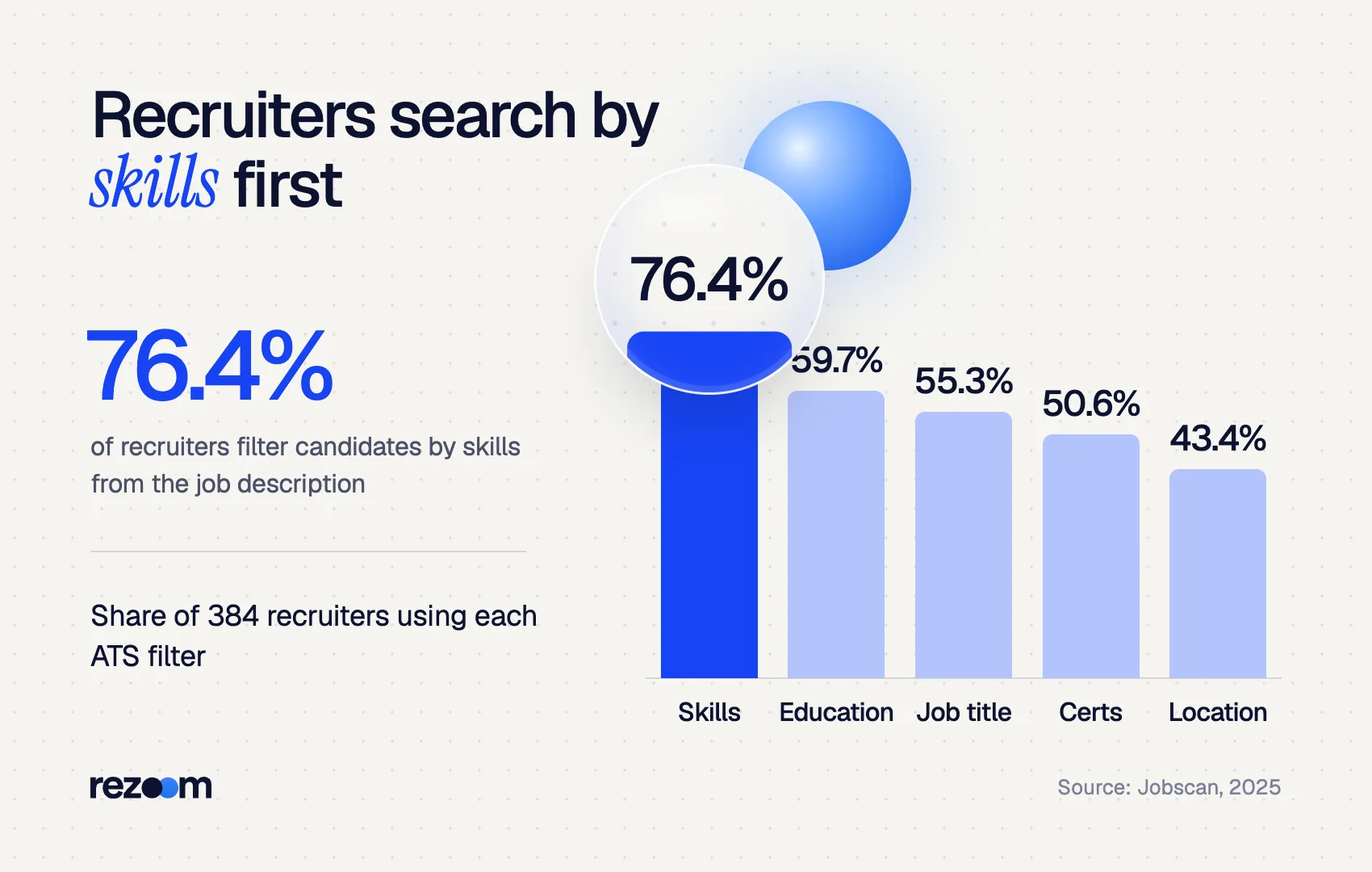
In Jobscan's 2025 State of the Job Search report, 99.7% of the 384 recruiters surveyed used filters in their ATS. The most common filter was skills, used by 76.4%. Education followed at 59.7%, job title at 55.3% and certifications or licenses at 50.6%.
Those filters pull their words from somewhere, and that is usually the posting itself. So the keywords in a job description are a preview of the search you need to match.
The same report found candidates whose resume matched the job title had an interview rate 10.6 times higher than those who did not. That makes the title the single most valuable keyword in most postings.
Where do keywords hide in a job posting?
Keywords cluster in five places: the job title, the first paragraph, the required qualifications, the preferred qualifications and the responsibilities. Required qualifications hold the hard skills, tools and credentials recruiters filter on. Responsibilities hold action phrases for your bullets. The title and repeated terms signal what matters most.
Each part of a posting holds a different type of keyword. Read them in this order.
- Job title and opening paragraph. The title is a search term in itself. The opening usually restates the role's purpose in the employer's own words, such as "own lifecycle email campaigns."
- Required qualifications. This is where hard skills, tools, degrees, licenses and years of experience live. Treat every item here as a likely filter.
- Preferred qualifications. These are tiebreakers. Include the ones you genuinely have.
- Responsibilities. These read as verb plus object, like "build monthly performance reports." They become the language of your bullet points.
- Company and benefits text. This rarely holds searchable keywords. Skim it for culture words, but don't spend keywords on it.
The table shows what to pull from each section.
| Posting section | Keyword type to pull | Where it goes on your resume |
|---|---|---|
| Job title | Exact title, seniority level | Headline or summary, matching past titles |
| Opening paragraph | Core function, team, industry terms | Summary |
| Required qualifications | Hard skills, tools, degrees, licenses | Skills section, education, certifications |
| Preferred qualifications | Bonus tools and credentials | Skills section, if you have them |
| Responsibilities | Action phrases and deliverables | Experience bullets |
How do you find keywords in a job description, step by step?
Make four passes. First, copy the job title and opening phrases. Second, list every skill, tool and credential in the requirements. Third, note the action phrases in the responsibilities. Fourth, count repeats and mark anything in the title or requirements twice. You should end with 10 to 15 ranked terms.
Paste the posting into a document so you can highlight it. Then work through these passes.
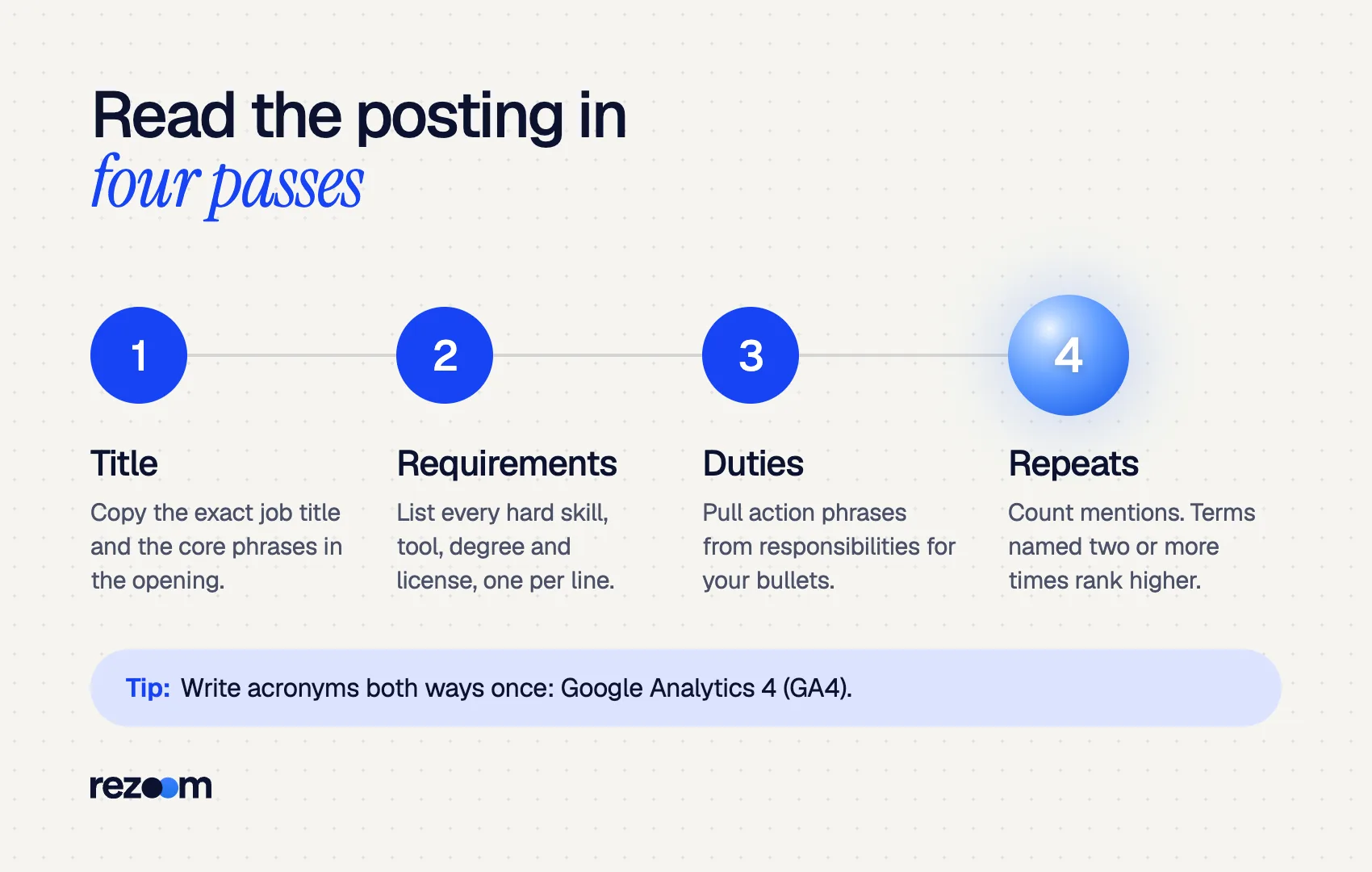
Pass 1: Title and opening. Write down the exact job title. Then underline the two or three phrases that describe the role's main job.
Pass 2: Requirements. List every hard skill, software tool, certification, degree and license. Split combined items. "Experience with HubSpot and Salesforce" gives you two keywords, not one.
Pass 3: Responsibilities. Pull the noun phrases, not the filler. From "Partner with sales to build lead scoring models," keep "lead scoring."
Pass 4: Repetition. Count how often each term appears. Search the document for each one. A term that shows up three times outweighs one that shows up once.
Here is how the raw list looks for a sample posting.
Title: Marketing Coordinator
Opening: email marketing, campaign performance, B2B SaaS
Requirements: HubSpot, Salesforce, Google Analytics 4 (GA4), Excel, bachelor's degree in marketing
Preferred: SEO, Canva, A/B testing
Responsibilities: lead scoring, monthly performance reports, content calendar, cross-functional collaboration
Repeated: email marketing (4x), HubSpot (3x), campaign performance (2x)
The posting in this example is invented, but the structure matches most corporate listings. Many university career centers give the same core advice. Grinnell College's career office tells students to note words appearing multiple times in the posting and use them in the resume.
How do you rank the keywords you find?
Score each term by location and frequency. Give 3 points if it appears in the job title, 2 if it is in the opening or required qualifications, 1 if it is preferred or only in responsibilities, and add 1 for each repeat. Your top five scores must appear on your resume, ideally more than once.
A long list is not the goal. A ranked list tells you which words need prime space in your summary and top bullets. Use this scoring rule.
| Where the term appears | Points |
|---|---|
| In the job title | 3 |
| In the opening paragraph or required qualifications | 2 |
| In preferred qualifications or responsibilities only | 1 |
| Each additional mention anywhere | +1 |
Applied to the example posting, "email marketing" scores 5: 2 for the opening plus 3 for its extra mentions. "HubSpot" scores 4 as a required tool named three times. "Canva" scores 1 as a single preferred mention.
Then sort into three tiers:
- Must-match (top 5). Put each in your summary or skills section and in at least one bullet.
- Should-match (next 5 to 8). Use each once where it is true.
- Nice-to-have. Add only if you have room and real experience.
This ranking also tells you when to skip a job. If you can't honestly claim three of the five must-match terms, your time is better spent on another posting. For more on using that judgment, see our sibling guide on how to tailor your resume to a job description.
How should you treat hard skills vs soft skills in a posting?
Prioritize hard skills, tools and credentials, because recruiters filter on them. Treat soft skills as keywords only when the posting repeats them or lists them as requirements. Then prove soft skills inside a bullet with a result, instead of listing words like "communication" on their own.
Hard skills are concrete and searchable: SQL, payroll processing, forklift certification, GA4. Recruiters type these into searches. Our list of hard skills examples shows how to phrase them.
Soft skills are harder to search for. Few recruiters filter on "team player." Still, when a posting says "cross-functional collaboration" twice, that phrase is a signal about the job. Use the exact phrase once, inside a result. Our guide to soft skills for a resume covers how to show them.
- Led cross-functional collaboration with sales and product to launch 3 email nurture tracks in Q2
- Presented monthly performance reports to 12 stakeholders, cutting review meetings from 60 to 30 minutes
How do you handle acronyms, synonyms and exact phrasing?
Mirror the posting's exact wording. If it says "project management," don't write "managed projects" only. Write an acronym in both forms, such as "Google Analytics 4 (GA4)." A recruiter's search finds the words typed, so the full term and the short form each need to appear once.
Recruiter search is literal. Greenhouse's help center explains that quotation marks in a Boolean candidate search match an exact phrase in order. A recruiter can add synonyms with OR, as in "trainer OR instructor OR teacher," but you can't count on that.
So follow three rules:
- Use the employer's term. Grinnell's career office notes that if a posting says "teamwork," you shouldn't swap in "collaboration."
- Write acronyms both ways. Syracuse University career services advises you to spell out acronyms at least once and include the short form.
- Match job titles with context. If your title was unusual, add the standard version in parentheses, such as "Campus Brand Ambassador (Marketing Intern)." Our guide on job title vs actual title explains how.
When a posting is thin, check the occupation on O*NET OnLine from the U.S. Department of Labor. Its profile for market research analysts and marketing specialists lists reported job titles and technology skills, such as Salesforce, Tableau and Microsoft Excel. Compare two or three similar postings, too. Terms that appear across all of them are core keywords for the field.
Copy the exact job title and top skills from the posting do: Write acronyms in full once, with the short form in parentheses do: Split combined requirements into separate keywords do: Prove soft-skill keywords inside a result-driven bullet
Swap the employer's term for a synonym you prefer dont: Paste the whole posting or hide keywords in white text dont: Claim a tool or license you don't actually have dont: Spend keyword space on company and benefits language
How do you check that your resume matches the keywords?
Search your final resume for each of your top 10 terms. Every must-match keyword should appear at least once in the skills section or summary and once in an experience bullet. Then run the resume and posting through an ATS checker to catch missed terms and formatting that hides text from the parser.
Do this check on the exact file you will upload.
- Open your resume and use Find for each must-match keyword.
- Confirm the job title appears in your headline or summary.
- Confirm each acronym appears in both forms.
- Read one bullet aloud. If it sounds like a keyword list, rewrite it.
The free Rezoom ATS resume checker does the matching for you. Paste the posting, upload your resume and it lists which keywords in a job description you matched and which are missing. Our sibling guide on what a good ATS score is explains how to read the result.
Rank once, reuse often
Keep a running keyword sheet for your target role. After five postings, the terms that appear in all of them are your core keywords. Build those into a master resume, then tailor only the top five for each application.

Frequently asked questions
How many keywords should a resume have?
There is no fixed number. Aim to match the top 10 to 15 terms from the posting, with the five highest-ranked ones appearing at least twice in natural sentences.
Can I just copy the job description into my resume?
No. Pasting the posting or hiding it in white text reads as keyword stuffing to recruiters. Use each keyword in a true statement about your own work.
Should keywords go in the skills section or the bullets?
Both. Put tools and hard skills in the skills section, then repeat the most important ones in experience bullets with a result attached.
Do soft skills count as keywords?
Only sometimes. Treat a soft skill as a keyword when the posting repeats it or lists it as a requirement, and show it through an achievement.
Should I use the same keywords in my cover letter?
Yes. Grinnell's career office notes that cover letters also pass through ATS software. Use your top three or four keywords in the letter, in full sentences.
What if a job description has very few keywords?
Compare two or three similar postings and the O*NET profile for the occupation. Terms that appear across all of them are safe core keywords.



Comments