

Summary
The best one way video interview tips are simple: set the camera at eye level on a stable surface, face your light source, use a headset or earbud mic, and structure every answer for the timer. Answer in one sentence first, spend most of the time on what you did, and end with a result. Research on recorded interviews found raters' scores tracked answer quality and first impressions, while background type and blur had no measurable effect.
A one way video interview is a recorded interview with nobody on the other end. You read a question, get a short prep window, then record your answer before a timer runs out. The tips that matter most are a stable eye-level camera, light in front of you, clear audio and an answer structure built for the clock.
The good news is that reviewers care most about what you say. In a 2024 study, 276 raters with hiring experience scored recorded interviews, and background type and blur had no link to final scores. Answer quality and first impressions did.
This guide is platform-neutral. For live calls, see our Zoom interview tips. For platform settings like think time and retakes on one vendor, see our HireVue interview tips.
What is a one way video interview?
A one way video interview, also called an asynchronous or on-demand interview, is a set of written or prerecorded questions you answer on camera alone. Each question has a prep timer and a recording timer. The employer sets the questions, time limits, retake count and deadline, and reviewers watch the videos later.
Employers use them to screen many applicants without scheduling calls. North Dakota State University's career center notes that employers may ask you to finish within a set number of hours or business days. It adds that some formats let you resubmit a response.
Timers vary by employer. A CUNY career guide describes a typical pattern of 30 seconds to prepare and 3 to 5 minutes to answer. Others give one or two minutes. Read the invite closely.
| Feature | Live video interview | One way video interview |
|---|---|---|
| Who is there | An interviewer, in real time | Nobody; reviewers watch later |
| Follow-up questions | Yes | No; each answer must stand alone |
| Retakes | Not possible | Sometimes, set by the employer |
| Timing | Flexible conversation | Fixed prep and answer timers |
| What to optimize | Rapport and listening | Clear, complete, timed answers |
The biggest shift is the missing follow-up. In a live call, an interviewer asks "what was the result?" Here, nobody will. Every answer must include its own ending.
How should you set up your camera, light and sound?
Put the camera at eye level on a stable surface, sit facing a window or lamp, and frame your head and upper body. Use earbuds or a headset mic in a quiet room. A plain wall is fine, but research suggests your background matters far less than what you say.
Do this setup once, 10 minutes before you start, and leave it alone.
Camera. Wake Forest University's career office advises elevating your computer so the camera sits at eye level, and warns against leaning in too close. CUNY suggests framing "your head and upper body," as if you sat across a table.
Stability. Use a laptop or put your phone in a holder. NDSU warns that "the shaking of a handheld device can be distracting and off-putting to an interviewer."
Light. Sit facing your main light source. A window or lamp behind the camera lights your face. A window behind you turns you into a silhouette.
Sound. Choose a quiet room with soft surfaces. Earbuds or a headset mic keep your voice close and cut echo. Record a 10-second test and listen back.
Eye line. Endicott College's career center says to keep eye contact with the camera rather than your own image. A sticky note beside the lens helps.
| Check | Good enough | Fix it if |
|---|---|---|
| Camera height | Lens level with your eyes | Viewers see up your nose |
| Framing | Head and shoulders, small gap above | Your forehead is cut off |
| Light | Face evenly lit from the front | Your face is darker than the wall |
| Audio | Clear voice, no echo, no fan hum | You hear room echo on playback |
| Connection | Wired or strong Wi-Fi | Playback stutters |
How do you structure a one way video interview answer under a timer?
Use a four-part plan: answer in one sentence, set up the situation briefly, spend most of the time on what you did, then end with a result and a link to the job. For a two-minute limit, that is roughly 10, 20, 60 and 30 seconds. Aim to finish with a few seconds to spare.
The timer changes how you speak. In a live interview, you can recover from a slow start. In a one way video interview, a long setup eats the time you need for the result.
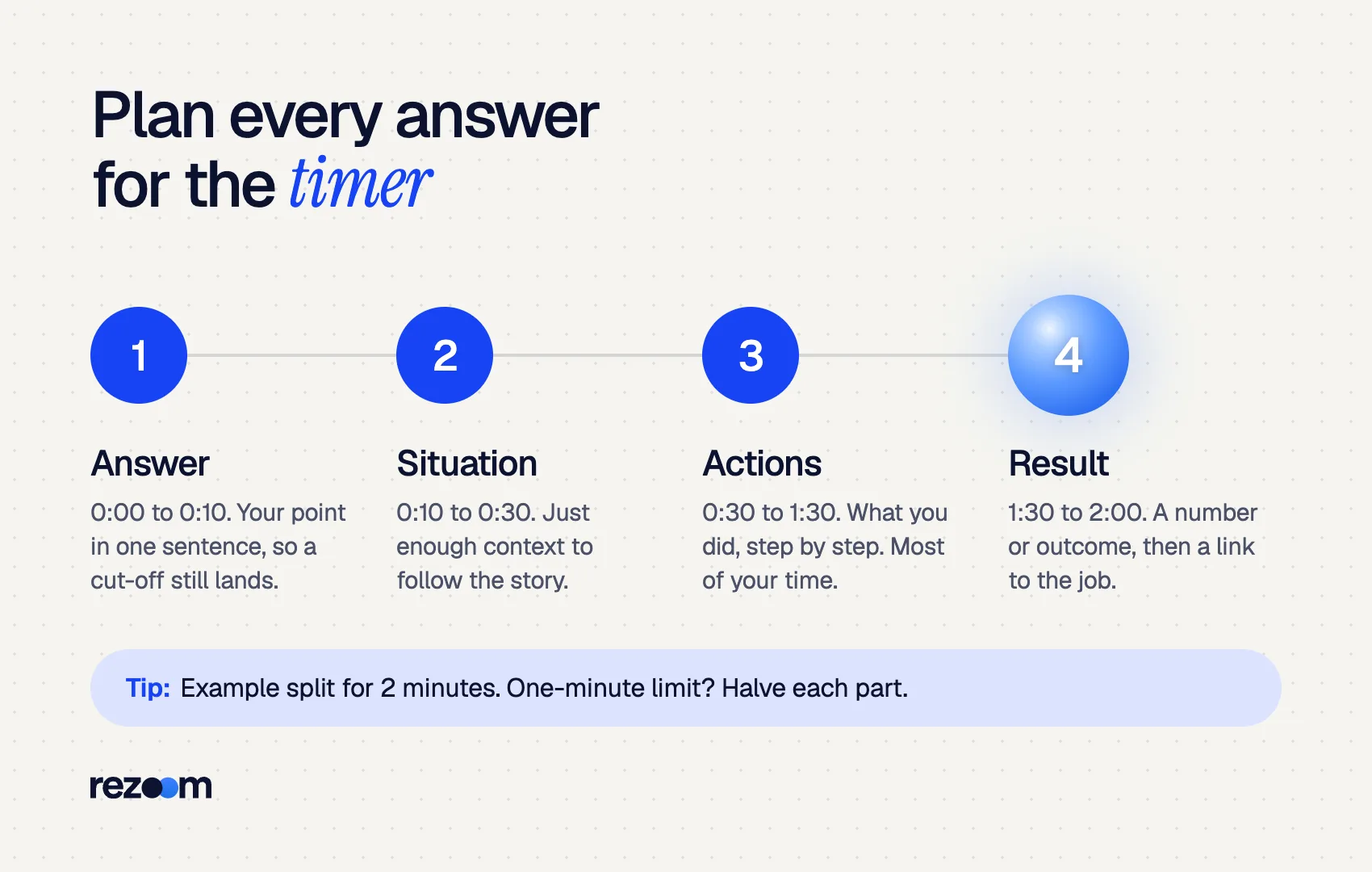
This plan is a version of the STAR method adjusted for a clock. The answer comes first, so even a cut-off recording still makes your point.
0:00–0:10  Answer: "Yes. I led a vendor switch that cut costs 18%."
0:10–0:30  Situation: contract renewal, rising fees, 6-week deadline
0:30–1:30  Actions: built a scorecard, ran 3 vendor demos, got finance and IT sign-off
1:30–2:00  Result + link: "Saved $42K a year. I'd bring the same process to your ops team."
During the prep window, write cue words, not sentences. A CUNY guide warns that "it will be obvious in the video if you're reading something."
ANSWER: vendor switch, -18%
SIT: renewal, 6 weeks
ACT: scorecard / 3 demos / sign-off
RESULT: $42K/yr -> your ops team
Scale the same split to your limit. For one minute, halve each part. For three minutes, add a second action or a lesson learned, not a longer setup.
What is the best practice routine before you record?
Practice in three rounds. First, record answers to five common questions with no timer. Second, repeat them with the exact prep and answer limits from your invite. Third, watch the playback twice: once muted to check presence, once eyes-closed to check content. Fix one thing per round.
Three rounds take about an hour and remove most surprises.
Round 1: content. Record five answers on your phone or laptop with no timer: tell me about yourself, why this role, a strength, a conflict and a mistake. Our guides to tell me about yourself and other common interview questions give structures for each.
Round 2: the clock. Set a phone timer to your real limits and record again. Wake Forest suggests having "a clock easily visible." Note which answers ran long.
Round 3: review. Watch muted first. Check eye line, framing and fidgeting. Then listen with your eyes closed. Check whether the first sentence answers the question and whether the result is clear.
If you want fresh questions for your exact role, our sibling guide on ChatGPT interview prep prompts shows how to generate them. Rezoom's AI mock interview can also time your answers and flag weak endings.
Practice the first ten seconds most
The 2024 study found final scores were tied to raters' initial impressions as well as answer quality. Rehearse your opening line for each likely question until it is automatic. A clean first sentence sets the frame for everything after it.
What do reviewers actually see in a one way video interview?
Reviewers see your final recorded answers, usually next to your resume, and often watch many candidates in one sitting. Studies of recorded interviews found scores tracked answer quality and first impressions, not your background. Where AI scoring is used, HireVue documents that its AI reads the words you say, not your face.
Christina Scott and Nicolas Roulin tested home-office, bedroom and blurred backgrounds with 276 experienced raters. Their 2024 paper reports background type "was not associated with initial impressions or final interview scores." An earlier thesis study with 400 participants found the same pattern.
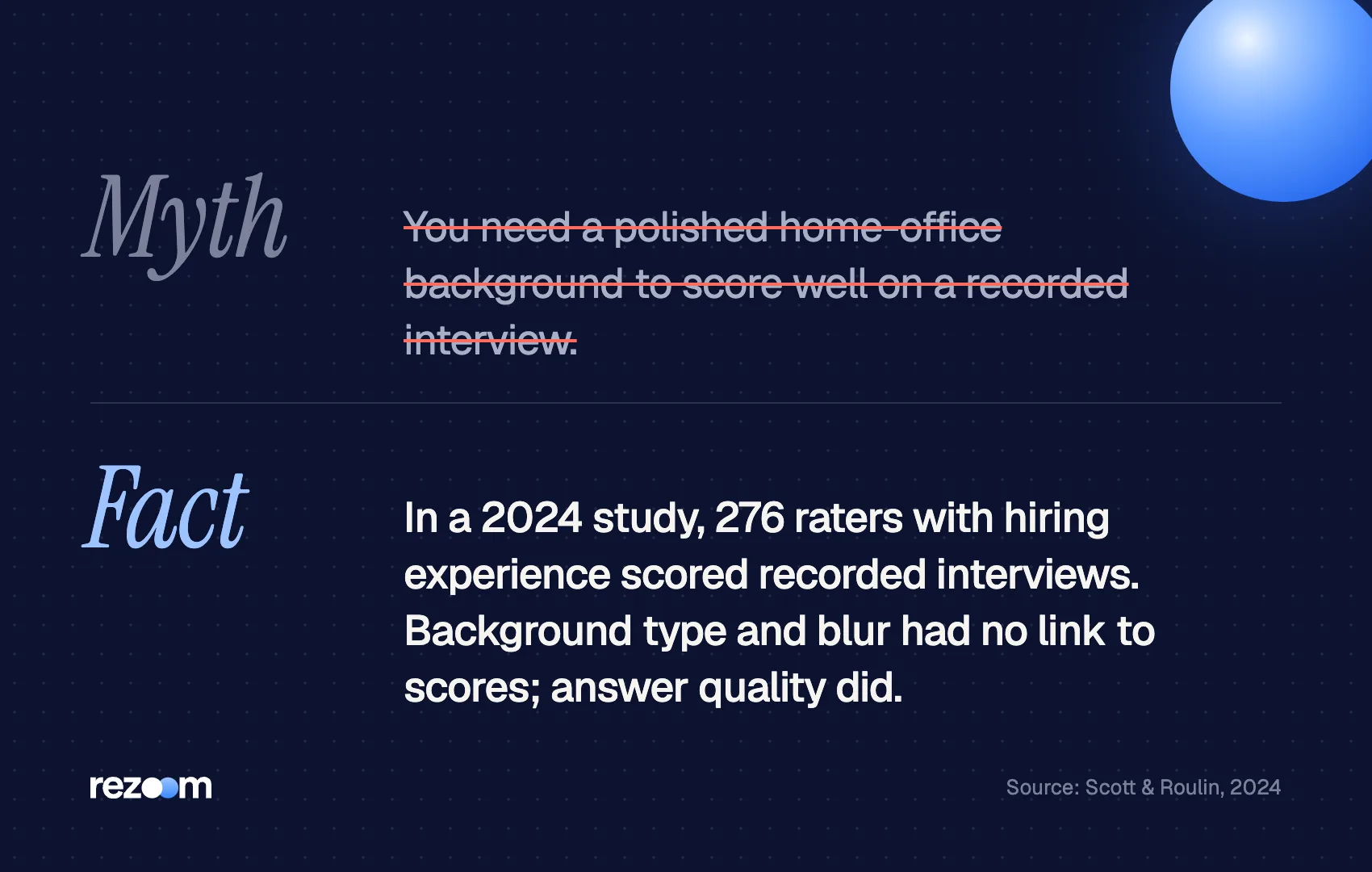
So a tidy, plain backdrop is enough. Spend your effort on answers.
Some employers add AI scoring. HireVue's explainability statement says its AI "relies only on what is said by the candidate," with no analysis of facial expressions, body language or background. It also says the employer, not the software, makes the final decision. Our AI video interview guide covers how those scores are built.
Short answers hurt on both fronts. Fortune reported that an outside audit of HireVue found very short answers were linked to more flagging for human review. A reviewer also has less evidence to score.
What mistakes should you avoid on a recorded interview?
The most common mistakes are reading a script, skipping the instructions, waiting until the deadline, recording on a handheld phone and giving very short answers. Each is easy to fix: cue words instead of scripts, a test recording first, finishing two days early and a stand or stack of books for the camera.
Endicott's career center warns that overlooking the instructions "may eliminate you from consideration." Read the invite for the number of questions, timers, retakes and deadline before you sit down. Wake Forest suggests asking, "How many attempts do you have to answer?"
Read every instruction and note the retake count do: Raise the camera to eye level on a stable surface do: Open each answer with a one-sentence point do: Finish recording at least two days before the deadline
Read a script off the screen dont: Hold your phone in your hand dont: Stop at 30 seconds when you have two minutes dont: Assume a reviewer will ask a follow-up
Last, check that your answers and your resume tell the same story. Reviewers often see both side by side. If a number you plan to mention is missing from your resume, add it with the Rezoom AI resume builder before you record.
Frequently asked questions
How long should one way video interview answers be?
Use most of the time given. For a two-minute limit, aim for 90 to 115 seconds, and always finish with a result rather than getting cut off mid-story.
Can you redo a one way video interview answer?
Only if the employer allows retakes. Some formats let you re-record or resubmit, others give one attempt, so check the instructions before your first question.
Is it okay to use notes?
Short cue words are fine. A full script is not, because reading pulls your eyes off the lens and sounds flat.
What should you wear?
Dress as you would for an in-person interview for the role. Endicott's career center recommends professional attire, and CUNY notes it helps you get into an interview mindset.
Does a one way video interview use AI?
Some do. Many employers simply watch the recordings. Where AI is used, the documented approach at HireVue scores the transcript of your words, not your appearance.
Does my background matter?
Less than you think. Two studies of recorded interviews found background type and blur had no link to scores, while answer quality did.


Comments