How Early to Log In for a Virtual Interview: The 5 to 10 Minute Rule
How early to log in for a virtual interview: test tech 30 minutes ahead, join 5 to 10 minutes early, and wait 10 to 15 minutes if the interviewer is late.

On this pageHow early to log in for a virtual interview: 5, 10 or 15 minutes?
- How early to log in for a virtual interview: 5, 10 or 15 minutes?
- What should you do 30 minutes before a virtual interview?
- What happens in a Zoom, Teams or Google Meet waiting room?
- How long should you wait if the interviewer hasn't joined?
- How do time zones and one-way video interviews change the timing?
- How is a virtual interview different from an in-person one?
- FAQ
- Sources
Join a virtual interview 5 to 10 minutes before the start time. Test your camera, mic and internet about 30 minutes earlier, so you have time to fix problems. Zoom, Teams and Google Meet often hold you in a waiting room or lobby until the interviewer lets you in. If nobody shows after 10 to 15 minutes, check the invite, then email the recruiter.
Here is how early to log in for a virtual interview: click the meeting link 5 to 10 minutes before the start time. Run your tech check about 30 minutes before that. Never join right at the scheduled minute.
So if the interview starts at 2:00, you test your setup at 1:30 and join at 1:50 to 1:55. That gap gives you time to fix a frozen app or a dead mic.
Quick answers by situation
| Interview type | When to log in | What to do first |
|---|---|---|
| Zoom with a waiting room | 5 to 10 minutes early | Wait for the notice that the host will let you in |
| Microsoft Teams lobby | 5 to 10 minutes early | Make a test call in Settings before you join |
| Google Meet | 5 to 10 minutes early | Use the green room self-check, then click Join now |
| Phone screen (they call you) | Be ready 10 minutes early | Sit in a quiet room with your notes and a charged phone |
| One-way video (HireVue, Spark Hire) | Days before the deadline | Do the practice question before you record |
| Interviewer in another time zone | Same rule, your local time | Confirm the time in your calendar the day before |
How early to log in for a virtual interview: 5, 10 or 15 minutes?
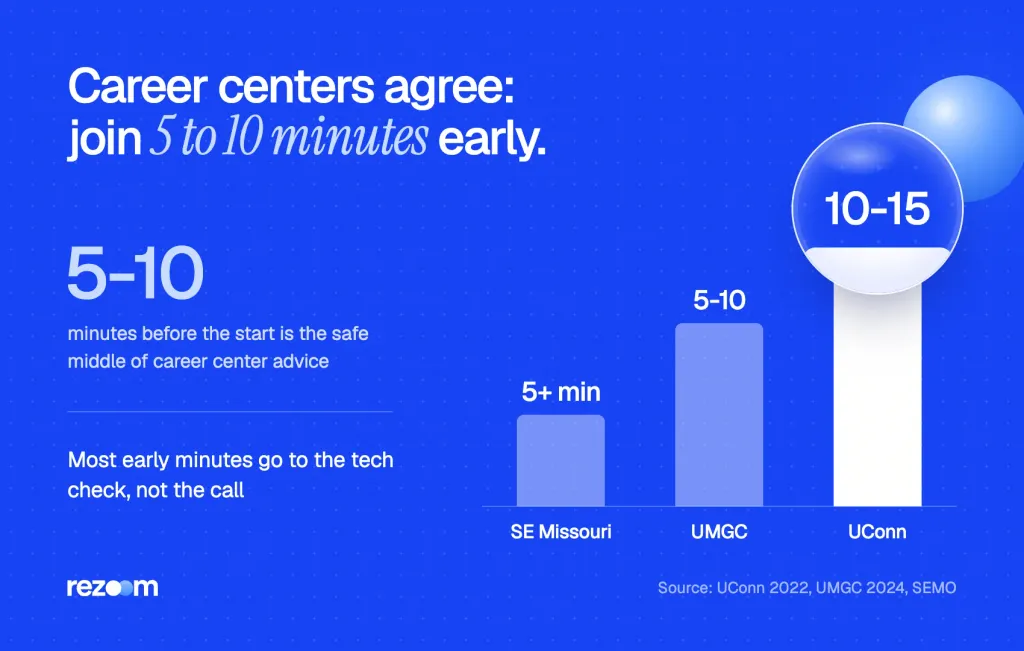
Log in 5 to 10 minutes before the start time. Career centers give a range from "at least 5 minutes" to "10 to 15 minutes," and all of them agree on one thing: never join late or right on the minute. Test your setup about 30 minutes earlier, so the last 10 minutes stay calm.
Southeast Missouri State University says to join around 5 minutes early, at minimum3. The University of Maryland Global Campus says 5 to 10 minutes before the start2, and UConn goes a bit earlier.
On the day of the interview, sign-in to the platform early if possible (10-15 minutes).
UConn Center for Career Development
So if you wonder how early to log in for a virtual interview, 5 to 10 minutes is the safe middle. Go closer to 15 when you use a new app, a borrowed laptop or shaky Wi-Fi.
The quiz answer: 5, 15, 30 minutes or on time?
Many people search this as a quiz question. Here is how each option holds up.
| Option | Good choice? | Why |
|---|---|---|
| At the scheduled time | No | Any glitch makes you late, and the interviewer sees you join last |
| 5 minutes early | Yes, the best pick | Time to load the app and settle, with no long wait |
| 15 minutes early | Fine with a waiting room | Good for a new app, but you may sit alone for a while |
| 30 minutes early | No, for joining | Use this time for your tech check, not for clicking the link |
If a test asks for one answer, pick 5 minutes early. In real life, 5 to 10 minutes covers you.
What should you do 30 minutes before a virtual interview?
Use the 30 minutes before the interview for a full tech check on the same device, room and network you will use. Run the app's own test: Zoom's test meeting, the Teams test call or the Google Meet green room. Then close other apps, silence your phone and put your notes in reach.
A test call takes about two minutes, but a fix can take twenty. UConn also tells candidates to take any trial run you can get and have a plan for a dropped call1.
- Open the right appCheck the invite for the platform and install or update the app now, not at 1:58.
- Run the built-in testJoin Zoom's test meeting, make a Teams test call or open the Meet green room.
- Check camera and lightLook at your preview. Sit facing a window or lamp, with the camera at eye level.
- Lock down the roomClose other tabs, mute your phone and tell anyone at home when the call starts.
- Save a backupWrite the interviewer's email and the dial-in number on paper, in case your laptop freezes.
How to test each platform
| Platform | Built-in test | What it checks |
|---|---|---|
| Zoom | Join a test meeting at zoom.us/test | Speakers and microphone, with a replay of your voice |
| Microsoft Teams | Settings, then Devices, then Make a test call | Speakers, mic and camera; you record a short message |
| Google Meet | Green room self-check before you click Join now | Mic bar, test sound and your video preview |
Columbia University's guide walks through Zoom's test meeting at zoom.us/test8. Microsoft explains the Teams test call6, which works in the desktop app. Google's help page covers the Meet green room self-check7.
A test on your phone tells you nothing about your laptop. Run the check on the same device, in the same chair, on the same Wi-Fi. If the call runs from a work laptop, check that its security software lets the app open.
What happens in a Zoom, Teams or Google Meet waiting room?
Many interviewers turn on a waiting room or lobby, so you can't enter until they let you in. You see a notice that says the host will admit you soon. That screen is normal and does not mean you joined the wrong call. Stay on, keep your camera ready and wait for the scheduled time.
Cornell's IT guide explains that people who join a meeting with a waiting room "will see a notice saying to wait for the meeting host to let them in"5. The University of Northern Iowa even tells its hiring teams to warn candidates about the waiting room4, so they know why they are not admitted right away.
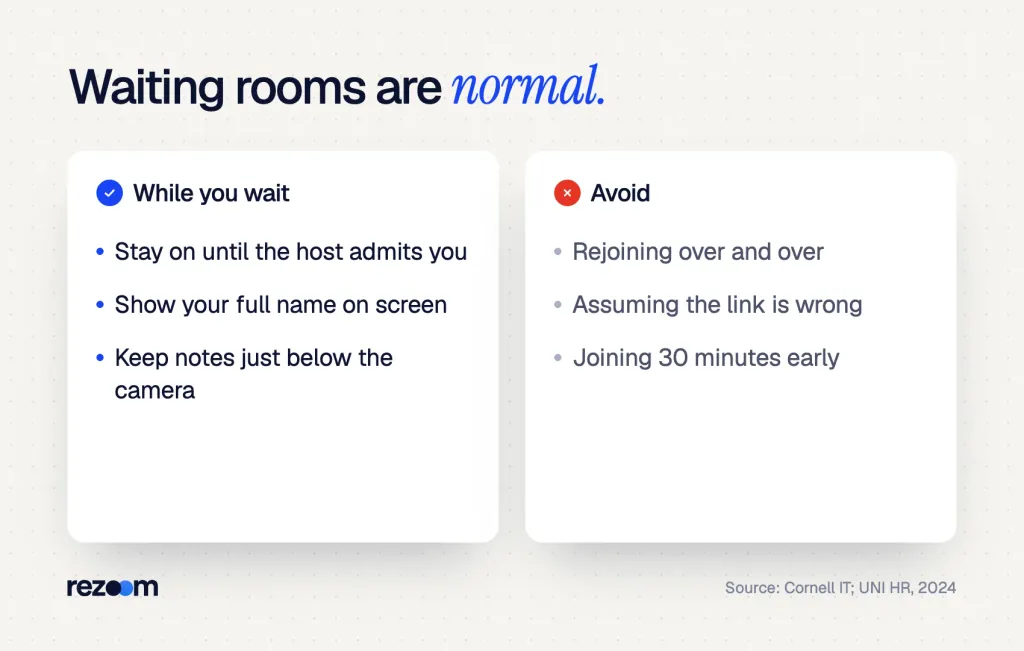
So joining 5 to 10 minutes early mostly means waiting on that screen. That proves your link works and you are on time.
What to do while you wait
- Stay on the call: don't leave and rejoin; you could lose your spot or miss the host.
- Check your name: your display name should be your real full name, not "iPhone 12."
- Review three stories: glance at your notes, then put them just below the camera.
- Sit up and smile: the host can admit you any second, often with the camera already on.
For more on the screen itself, our Zoom interview tips cover lighting, framing and eye contact.
Most Zoom interview tips are 15 equal rules. Only four change the outcome: audio, light, camera and framing. On a recorded AI screen, visuals barely count.
What to say when they let you in
"Hi Dana, thanks for having me. I can see and hear you well. Can you hear me okay?"
That one sound check saves you from an audio problem later.
How long should you wait if the interviewer hasn't joined?
Wait about 10 minutes, then check the invite for the right link, date and time zone. If nobody has joined by 10 to 15 minutes past the start, send a short email to the recruiter and stay on the call. Most late starts are a calendar mix-up or a meeting that ran over, not a sign of disinterest.
First rule out your own side. Check that you used the newest link in the latest email. Then compare the time zone in the invite with your calendar.
If all of that matches, write to the person who set up the call. UConn advises you to get the interviewer's contact details before the interview1, and this is the moment you need them.
Fill-in-the-blank email
Subject: [YOUR NAME] - [JOB TITLE] interview at [TIME + TIME ZONE]
Hi [RECRUITER NAME],
I'm in the [ZOOM / TEAMS / MEET] room for my [TIME] interview with [INTERVIEWER NAME] and want to check that I have the right link.
I'll stay on until [TIME + 15 MIN]. You can also reach me at [PHONE].
Thanks, [YOUR NAME]
Keep the tone neutral. If nobody answers after about 15 minutes more, leave the call and send a second note offering two new times.
What to say if they push back
Late interviewers often shrink the time or ask to move it. Have an answer ready.
- "We only have 20 minutes now." Say yes, then ask which topics matter most so you can focus.
- "Can we reschedule?" Agree right away and offer two specific times.
- "Sorry, I sent the wrong link." Thank them and move on; never make a point of it.
Interviewer: "So sorry, my last call ran over. We may only have half an hour now. Is that okay?"
"No problem at all. Which parts of the role do you most want to cover?"
Interviewer: "Mostly the campaign budget and how you lead your team."
"Great. I'll keep my answers short, and I'm happy to send more detail after the call."
Note when you joined and when you emailed. If the call never happens, you can tell the recruiter the facts calmly, without guessing why. A short, polite record makes it easy for them to book you again.
Mock interviews, out loud, with an AI voice coach.
How do time zones and one-way video interviews change the timing?
Time zones don't change the rule, but they cause most missed starts. Convert the time once, put it in your calendar, and check it the day before. One-way video interviews have no start time at all, only a deadline, so finish them a day or two early instead of on the last night.
Time zones
Remote jobs often put the recruiter in another state, so read the invite slowly: "2:00 PM ET" is 11:00 AM in California. If the email gives no time zone, reply and ask. Then let your calendar app show the converted time.
When you confirm, put both time zones in one line.
"Hi Priya, just confirming our interview on Thursday at 2:00 PM Eastern, which is 11:00 AM Pacific for me. I'll join the Zoom link from your invite a few minutes early."
One-way video and HireVue deadlines
A one-way interview gives you a link and a company deadline, with no interviewer to wait for. Spark Hire's help page notes that an expired link means the company's deadline has passed9, and only the employer can grant more time.
So treat the deadline like a start time with a big buffer. Record at least a day before it ends. Our one-way video interview tips and the guide to HireVue interview tips cover the recording itself.
How is a virtual interview different from an in-person one?
In person, you arrive 10 to 15 minutes early to park, sign in and find the room. Online, the commute is a click, so 5 to 10 minutes is enough. But the tech check adds a new step that in-person candidates skip, and that check is where most of your early time should go.
In person, the early buffer covers traffic and security desks. Online, it covers updates, logins and audio. Our guide on how early to arrive for an in-person interview covers the office version.
How early to arrive for an interview: walk in 10 to 15 minutes early in person, log in 5 to 10 minutes early online, and what to do if you run late.
Do
- Join 5 to 10 minutes before the start time.
- Run the app's test 30 minutes ahead.
- Keep the recruiter's email and phone number on paper.
- Email the recruiter if nobody joins by 10 to 15 minutes past.
Don’t
- Click the link right at the start time.
- Join 30 minutes early and sit in an open room.
- Leave and rejoin the waiting room again and again.
- Assume the interviewer forgot you before you check the invite.
Keep your materials open while you wait
Use the waiting room minutes to reread what you sent, the way a marketing manager candidate keeps her resume and the job post in one window. If you are in that field, our marketing resume examples show how strong candidates frame results. The marketing manager resume example is a good model for budget and team numbers you can mention out loud.
Marketing manager resume example
Use its campaign and budget bullets as talking points while you wait to be admitted.
Reread your letter too, since interviewers often quote it back to you. Our marketing cover letter examples show the kind of story you should be ready to expand on. Then skim our list of marketing interview questions one last time.
Your countdown checklist
Before you click the link
If you want practice that feels like the real thing, an AI mock interview lets you rehearse on camera before the day.
Practice out loud with an AI voice coach.
Frequently asked questions
How early to log in for a virtual interview: 5, 10 or 15 minutes?
Log in 5 to 10 minutes before the start time. Run your camera, mic and internet test about 30 minutes earlier, so you have time to fix any problem.
Is it rude to join a Zoom interview 15 minutes early?
No, if there is a waiting room, since you just wait on the notice screen. Without one, 15 minutes can drop you into an earlier call, so 5 to 10 minutes is safer.
Is 30 minutes too early for a virtual interview?
Yes, for joining the call. Use those 30 minutes for your tech check, then join 5 to 10 minutes before the start.
How long should I wait for an interviewer on Zoom?
Wait about 10 minutes, then check the invite. If nobody joins by 10 to 15 minutes past the start, email the recruiter and stay on the call a little longer.
What should I do if I get disconnected during a virtual interview?
Rejoin the same link right away. If that fails, email or call the interviewer with the contact details you saved, and offer to continue by phone.
When should I finish a one-way video interview?
At least a day before the deadline. An expired link means the company's deadline has passed, and only the employer can give you more time.
Sources
We opened and read each page below. The small numbers in the text point here. Pages that carry no publication date show n.d.
- UConn Center for Career Development2022
Sign in to the platform 10 to 15 minutes early, use trial runs, and get the interviewer's contact details in case of a disconnection
- University of Maryland Global Campus Career Services2024
Sign in 5 to 10 minutes before a virtual interview starts; most platforms have a virtual waiting room
- Southeast Missouri State University Career Servicesn.d.
Join a virtual interview around 5 minutes early at minimum
- University of Northern Iowa Human Resource Services2024
Interviewers should use a waiting room and tell candidates they may not be admitted right away
- Cornell University ITn.d.
People who join a Zoom meeting with a waiting room see a notice to wait for the host to let them in
- Microsoft Supportn.d.
A Teams test call checks your speakers, microphone and camera from Settings, then Devices
- Google Meet Helpn.d.
The Meet green room self-check tests your mic, speaker and camera before you join
- Columbia Universityn.d.
Zoom's test meeting at zoom.us/test checks your speakers and microphone before a real call
- Spark Hire Candidate Supportn.d.
An expired one-way interview link means the company's deadline has passed, and only the company can grant an extension
Mohammad has spent more than ten years designing consumer products and leads product at Rezoom, deciding what gets built and what gets left out. His guides cover the whole job search, from resume sections and cover letters to interview answers and career moves.
Goodi, M. (2026, October 30). How Early to Log In for a Virtual Interview: The 5 to 10 Minute Rule. Rezoom. https://rezoom.io/how-early-to-log-in-for-a-virtual-interview/