

Summary
The most useful HireVue interview tips follow the platform's own rules. Use the practice question as a full rehearsal, check how many retakes the employer allows, and spend think time on a three-word outline rather than a script. HireVue says its AI scores only the words you say, not your face, tone or background, so complete, specific answers matter more than polish. Most video assessments have five to eight questions and take under 20 to 30 minutes.
The best HireVue interview tips come from how the platform itself works. Use the practice question to test your setup, spend the think time on a short outline, and check how many retakes the employer allows before you record. Then give full, specific answers, because HireVue says its AI scores your words, not your face.
Most guides stop at "look at the camera." This one ties each tip to HireVue's own documentation: its AI explainability statement, its candidate FAQ and its assessment prep guide. Where a setting varies, we say so, because the employer configures most of them.
If your interview runs on a different platform, our guide to one way video interview tips covers the platform-neutral version.
How does a HireVue interview work?
A HireVue interview is a recorded, on-demand video interview. You open a link, try a practice question, then read or watch each real question, get time to think and record your answer. HireVue says most video assessments have five to eight questions and take under 20 to 30 minutes. Some employers add short games.
You complete it alone, at a time you choose before the employer's deadline. HireVue's assessment prep guide says most video assessments include "between 5 and 8 questions" and suggests setting aside 45 minutes.
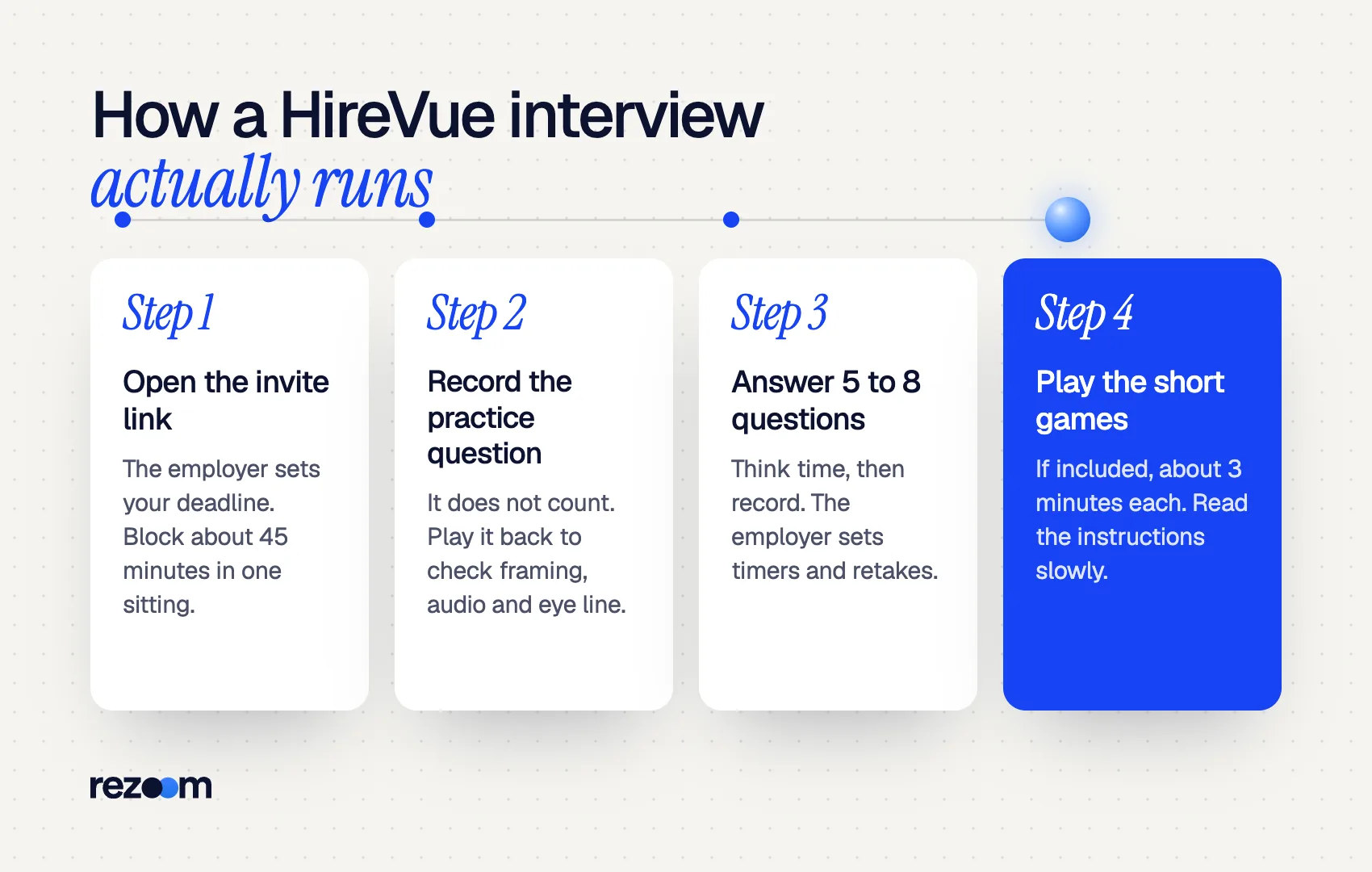
The flow runs in four stages:
- Invitation. You get a link with a deadline the employer sets.
- Practice question. HireVue's candidate tips page confirms you get "the opportunity to do a practice question." It does not count.
- Real questions. Each one is written or on video. You get think time, then record.
- Games (optional). Some employers add game-based assessments of about three minutes each.
If your connection drops, HireVue's candidate FAQ says you can "pick up where you left off with the same link."
| Setting | Who sets it | What HireVue documents | What to do |
|---|---|---|---|
| Number of questions | Employer | 5 to 8 in most video assessments | Block 45 minutes |
| Think time | Employer | 30 seconds in an older HireVue guide | Outline three words |
| Answer time | Employer | "Up to 3 minutes" in that guide | Finish before the clock |
| Retakes | Employer | 1 to 2 retries recommended | Check before question one |
| Games | Employer | About 3 minutes each, 6 to 15 minutes total | Play when alert |
The older HireVue guide on how to take a HireVue interview described "30 seconds to review the question" and "up to 3 minutes to answer." Treat those as typical, not fixed. Your screen shows the real limits.
Which HireVue interview tips matter most before you start?
Use the practice question as a full dress rehearsal, find out whether retakes are allowed, and record on the device you know best. HireVue suggests setting aside 45 minutes for a video assessment, choosing a time of day when you feel sharpest, and using the strongest Wi-Fi signal you can get.
These HireVue interview tips cover the ten minutes before your first real answer.
Rehearse with the practice question. Record it, play it back and check three things: framing, audio and where your eyes go. HireVue's older guide says you can repeat practices "until you feel comfortable."
Find the retake count. HireVue's explainability statement says "the number of re-takes allowed is set by the employer." Its recommended setting is 1 to 2 retries on top of the first attempt. Some employers allow none, so treat your first take as final.
Pick your device. The HireVue FAQ tells you to use whichever device you feel most comfortable with. The University of Colorado Boulder's video interview guidance adds that Google Chrome "tends to work best" for HireVue and advises against a phone in a car or coffee shop.
Ask for accommodations early. The explainability statement says candidates who need extra time due to a qualified disability can click "Request Accommodations."
How should you use HireVue think time?
Use think time to choose one story and write three cue words: the situation, your action and the result. Do not write a script, because reading shows on camera. When recording starts, give a one-sentence answer first, then tell the story and end on a number or outcome.
Of all the HireVue interview tips here, this one saves the most answers. Think time is short, so decide fast. Pick the first solid example that fits, rather than hunting for the perfect one. The STAR method gives you the order: situation, task, action, result.
Cue words beat full sentences. You glance once, then look back at the lens.
S: billing backlog, 400 tickets
A: triage tags + 15-min daily standup
R: 400 to 60 in 3 weeks
Your first sentence should answer the question outright. Reviewers, human or AI, should know your point before the story starts.
"My clearest example is a billing backlog I cleared at Northline Health. In three weeks we cut open tickets from about 400 to 60. Here is how I did it."
For openers like "walk me through your background," use the structure in our tell me about yourself guide: present, past, then why this role.
Does HireVue analyze your face or body language?
No. HireVue's explainability statement says its AI "relies only on what is said by the candidate" and does not assess facial expressions, body language, background or tone of voice. HireVue stopped using facial analysis in 2020 and announced it in January 2021, after finding visual data added very little predictive value.
Advice to "smile for the algorithm" is out of date. A 2020 CUNY career blog still says the platform evaluates "facial expressions, body language, tone of voice." That changed.
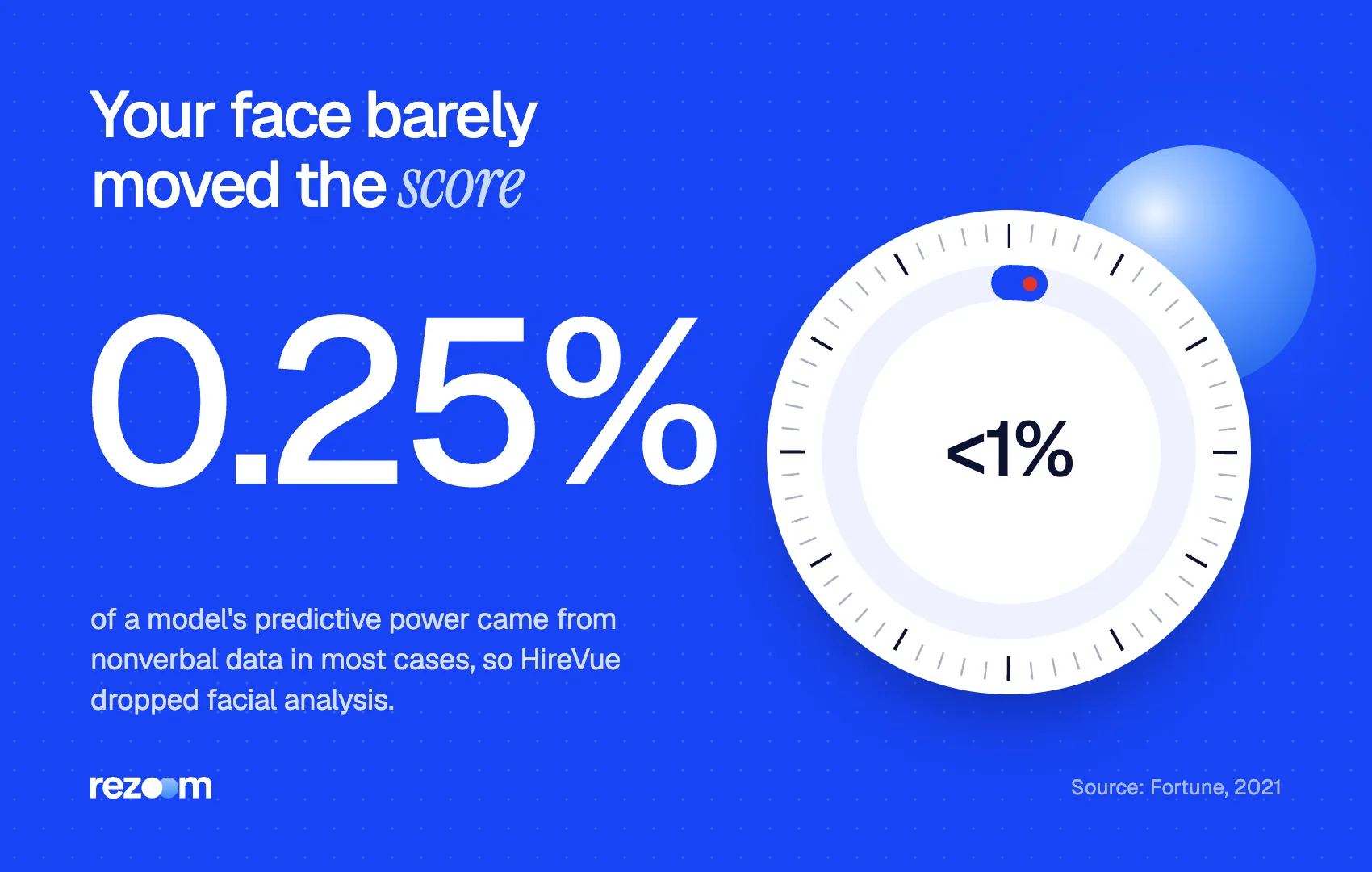
According to Fortune, HireVue's chief data scientist said nonverbal data "contributed about 0.25% to a model's predictive power" in most cases. For customer-facing roles it was about 4%. SHRM reported that the feature was discontinued in March 2020, and that HireVue still analyzes spoken answers through natural language processing.
Two practical points follow. First, content wins: specific actions, clear results and job-relevant skills. Second, humans can still watch your video. The explainability statement says recruiters keep the option to review the actual recording.
The same Fortune piece reports that the outside audit by ORCAA found minority candidates were more likely to give very short answers, which led to more flagging for human review. Short answers give any reviewer less to work with. Use most of your time.
For a deeper look at how AI scoring treats answer structure, see our guide to the AI video interview.
What are HireVue game-based assessments, and how do you prepare?
HireVue games are short puzzles that measure abilities like working memory, numeracy, problem-solving and emotional intelligence. HireVue says each game takes about three minutes, and its tests run 6 to 15 minutes in total. You cannot study the content, so prepare your conditions: quiet room, reliable device and a time you feel alert.
HireVue's article on game-based assessments lists traits such as fluid intelligence, working memory, creativity and work style. The prep guide says each game opens with instructions, and that "there is no way to study" beyond normal preparation.
That makes conditions your only lever:
- Play on the device the employer recommends. The prep guide says games run in a desktop browser or the HireVue app.
- Close other tabs and silence notifications.
- Read each game's instructions slowly. Speed matters inside the game, not on the instruction screen.
- Do the games right after a short break, not at the end of a long day.
The explainability statement also says HireVue gives each candidate a Candidate Insights Report with assessment scores. If you receive one, read it before your next interview.
How do you answer HireVue questions on camera?
Answer first, then prove it. Open with a one-sentence answer, tell one specific story with a number in the result, and close by tying it to the job. Look at the lens, not your own image. Use most of the time allowed, but stop once the point is made rather than padding.
HireVue's FAQ says its assessments focus on job-related competencies and "never look at age, race, gender, or even things on your resume such as GPA." So say the skills out loud. If the posting stresses stakeholder communication, name it in your answer.
Prepare five to seven stories before you start. Most HireVue questions are behavioral, so the same stories cover many prompts. Our list of common interview questions and the strengths interview answer guide help you choose.
Record the practice question and play it back do: Check the retake count before question one do: Write three cue words during think time do: Lead with a one-sentence answer and end on a result
Read a full script from the screen dont: Assume you can redo an answer dont: Give a 20-second answer when you have three minutes dont: Leave the interview until the deadline night
Match your stories to your resume
Recruiters often watch your video with your resume open. Make sure each story's numbers match the bullets they see. If your resume undersells a result you plan to discuss, fix it first in the Rezoom AI resume builder, then rehearse with Rezoom's AI mock interview.
These HireVue interview tips work best with timed practice. Our sibling guide on ChatGPT interview prep prompts shows how to generate realistic practice questions for your role.
Frequently asked questions
Can you retake a HireVue interview?
You can retake individual answers only if the employer allows it. HireVue recommends 1 to 2 retries per question, but the employer sets the number, and it can be zero.
Is a HireVue interview scored by AI?
Sometimes. Employers can use HireVue's AI assessments or simply review videos themselves. Where AI is used, HireVue says it scores only the transcribed words, and hiring decisions stay with the employer.
How long does a HireVue interview take?
HireVue says most video assessments take under 20 to 30 minutes and suggests blocking 45. Its explainability statement puts the video interview plus games at a typical 15 to 25 minutes.
Can you use notes during a HireVue interview?
Brief cue words are fine. A full script is not, because reading pulls your eyes off the lens and sounds flat.
What happens if my internet drops during HireVue?
HireVue's FAQ says you can pick up where you left off using the same link. Contact the employer if the deadline passes while you troubleshoot.
Do humans watch HireVue videos?
Yes, often. HireVue says top candidates typically move on to person-to-person interviews, and recruiters can review the recorded videos.



Comments