How Long to Wait for a Zoom Interview to Start (+ What to Send)
How long to wait for a Zoom interview to start: what to check at 5 minutes, what to send at 10, when to leave, and word-for-word emails to reschedule.

On this pageHow long should you wait for a Zoom interview to start?
- How long should you wait for a Zoom interview to start?
- What should you check while you wait?
- What should you send while you wait?
- What should you say when the interviewer joins late?
- What if the interviewer never shows up?
- Does the wait time change on Teams or Google Meet?
- How do you stay ready during a long wait?
- FAQ
- Sources
Wait about 10 to 15 minutes past the start time before you give up on a Zoom interview. At 5 minutes, check the link, time zone and your email. At 10 minutes, send the recruiter a short, polite note. If no one joins by 15 to 20 minutes, leave the call and send a reschedule email the same hour. A late interviewer rarely means you lost the job.
Wait for a Zoom interview to start for about 10 to 15 minutes past the scheduled time. Check your link and email at 5 minutes, send a short note at 10, and leave politely at 15 to 20 minutes with a reschedule request.
Late starts happen all the time. So the goal is simple: stay calm, look reliable and leave a clear paper trail.
Below you'll find a minute-by-minute plan, word-for-word messages and what to say when the interviewer finally shows up. Our example is Alex, a mid-level software engineer with a 2 p.m. Zoom interview.
Quick answers by situation
| Your situation | What to say/do | Example line |
|---|---|---|
| You're stuck in the waiting room | Stay put; the host has to admit you | "Hi, I'm in the waiting room for our 2 p.m. interview." |
| Zoom says "waiting for the host" | Wait 10 minutes, then email the recruiter | "I'm on the link and ready whenever you are." |
| You see "host has another meeting in progress" | The last call is running over; wait and recheck | "No rush, I'll stay on until 2:15." |
| You suspect a wrong link | Check the latest invite, then ask | "Could you confirm the link? I'm on the one from Monday's email." |
| The time zones don't match | Confirm the time in writing | "Just to confirm, is it 2 p.m. Eastern or Central?" |
| The interviewer never joins | Leave at 15 to 20 minutes and email | "I waited until 2:20 and would love to find a new time." |
How long should you wait for a Zoom interview to start?
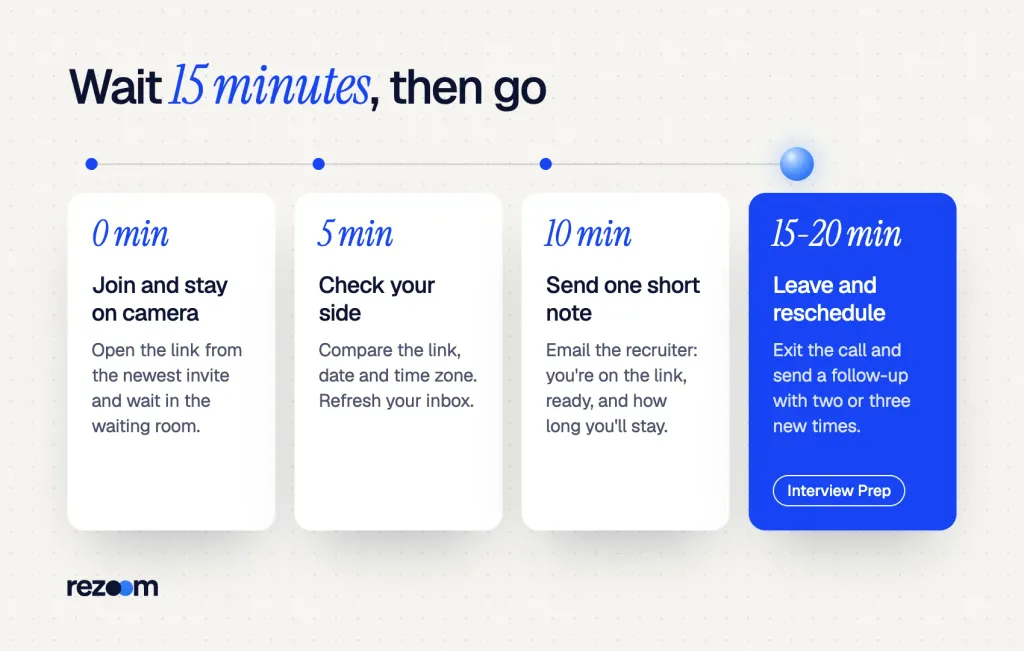
Wait 10 to 15 minutes past the start time, and up to 20 minutes for a final round or a panel. That is long enough to cover a meeting that ran over, but short enough to protect your time. Check your setup at 5 minutes, send a note at 10 and leave at 15 to 20.
Most late starts come from a call that ran long or a lost link. So the first few minutes are rarely a sign of trouble.
Some interview platforms set a clear rule for this. Talview tells candidates that if the interviewer doesn't join within 15 minutes, contact your recruiter1. That's a good default for Zoom, too.
At 5 minutes: check your side
First, make sure the problem isn't on your end. Open the newest calendar invite and compare the link, the date and the time zone. Then refresh your email, because a lot of last-minute changes arrive as a new invite.
At 10 minutes: send a short note
If no one has joined by 10 minutes, email the recruiter and the interviewer. Keep it to three lines. Say you're on the call, say how long you'll wait, and give a phone number.
At 15 to 20 minutes: leave politely
If the screen still says you're waiting by 15 minutes, you can leave. For a final round or a panel, give it up to 20 minutes. Then send a follow-up email within the hour, so the recruiter knows you showed up on time.
Before you join, set a phone timer for 10 minutes past the start time. When it buzzes, send your note instead of refreshing the screen again. Then you won't spend the wait guessing.
What should you check while you wait?
Check four things: the newest invite, the time zone, the meeting status on screen and your email. A waiting room means the host must let you in. "Waiting for the host" means the meeting hasn't started. A host in another meeting usually means the last call is running over.
The message on your screen tells you a lot. In a waiting room, you will see a screen saying you're in the waiting room, and the host gets an alert that someone is in the waiting room3. So the host can see you and just needs to click Admit.
A virtual staging area that prevents people from joining a meeting until the host is ready.
Zoom
That's how Zoom describes its waiting room. The same post notes that hosts often turn it on for first-round video interviews2, so you'll see it a lot in hiring.
What each Zoom message means
- "Please wait, the meeting host will let you in soon." You're in the waiting room. Stay on the call and keep your camera ready.
- "Waiting for the host to start this meeting." No one has started the call yet. If this lasts past 10 minutes, send your note.
- "The host has another meeting in progress." The host's account is still in another call, often the one right before yours. Stay on and recheck every few minutes.
- "Invalid meeting ID." You likely have an old or mistyped link. Check the newest invite and email the recruiter right away.
If you joined early, that habit pays off here. Our guide on how early to log in for a virtual interview explains why 5 to 10 minutes early gives you time to fix sound and video before anyone shows up.
How early to log in for a virtual interview on Zoom, Teams or Google Meet: join 5 to 10 minutes early, test 30 minutes before, and how long to wait.
While you wait for the host
What should you send while you wait?
Send one short note at about 10 minutes. Email the recruiter and the interviewer together, say you're on the link and ready, and give a phone number. If you have the recruiter's cell, a brief text works too. Don't send a string of messages, because one clear note is enough.
Your note shows you were on time and still ready. So keep the tone warm and skip any hint of blame.
A short text or chat to the recruiter
Use this if the recruiter gave you a cell number or a chat thread in the hiring portal.
"Hi Jamie, it's Alex Rivera. I'm on the Zoom link for our 2 p.m. interview and ready whenever the team is." "No rush. I'll stay on until 2:15."
The 10-minute email
Here's a fill-in-the-blank version you can save in your drafts before every interview.
Subject: [Your name] – [Role] interview at [time]
Hi [Recruiter name],
I'm on the Zoom link for my [time] interview with [interviewer name] and ready to start.
If something changed, I can also talk by phone at [your number].
I'll stay on the call until [time + 15 minutes]. Thanks, [Your name]
Send it to both the recruiter and the interviewer. Then go back to the call and stay on camera.
Draft the 10-minute email the night before, with the subject line and phone number filled in. If you need it, you only change the time and hit send. If you don't, delete it after the interview.
What should you say when the interviewer joins late?
Say hello, smile and start. Don't mention how long you waited unless they ask. If they apologize, say "No problem at all" and move on. If they offer to cut the interview short or reschedule, pick the option that gives you the full time to make your case.
A late interviewer often feels a bit embarrassed. So the best thing you can do is make the start feel easy.
Interviewer: "I'm so sorry, my last meeting ran over."
"No problem at all. I'm glad we could connect. Thanks for making the time."
Interviewer: "Let's dive in."
"Sounds great. I'm ready when you are."
What to say if they push back
Sometimes the late start changes the plan. Here's how to answer the common cases:
- "We only have 20 minutes now. Is that okay?" Be flexible but clear: "That works. If we run out of time, could we book a short second call?"
- "Can we do this by phone instead?" Say yes if you can: "Sure. What number should I expect the call from?"
- "Let's push this to another day." Agree and lock it in: "Of course. Could we pick the new time now, so it's on both calendars?"
Interviewer: "Sorry for the delay. We only have about 25 minutes left. Is that okay?"
"Yes, that works. I'll keep my answers tight."
Interviewer: "Great. If we need more time, we can set up a follow-up."
"Perfect. If we run short, I'd love 15 more minutes to talk about the system design work."
Do
- Greet them warmly and start right away.
- Offer to cover more ground in a short second call.
- Keep your answers short if the time got cut.
Don’t
- Say how long you waited, unless they ask.
- Sound annoyed or sigh on camera.
- Leave the call the minute they join late.
Mock interviews, out loud, with an AI voice coach.
What if the interviewer never shows up?
Leave at 15 to 20 minutes, then send a polite follow-up email within the hour. Say you waited, restate your interest and offer two or three new times. Most no-shows come from calendar mix-ups, not a lost job. If you hear nothing in two business days, send one short check-in.
A no-show stings, but it rarely means the job is gone. Calendar errors, sick days and double bookings cause most of them. So treat it as a scheduling problem, not a rejection.
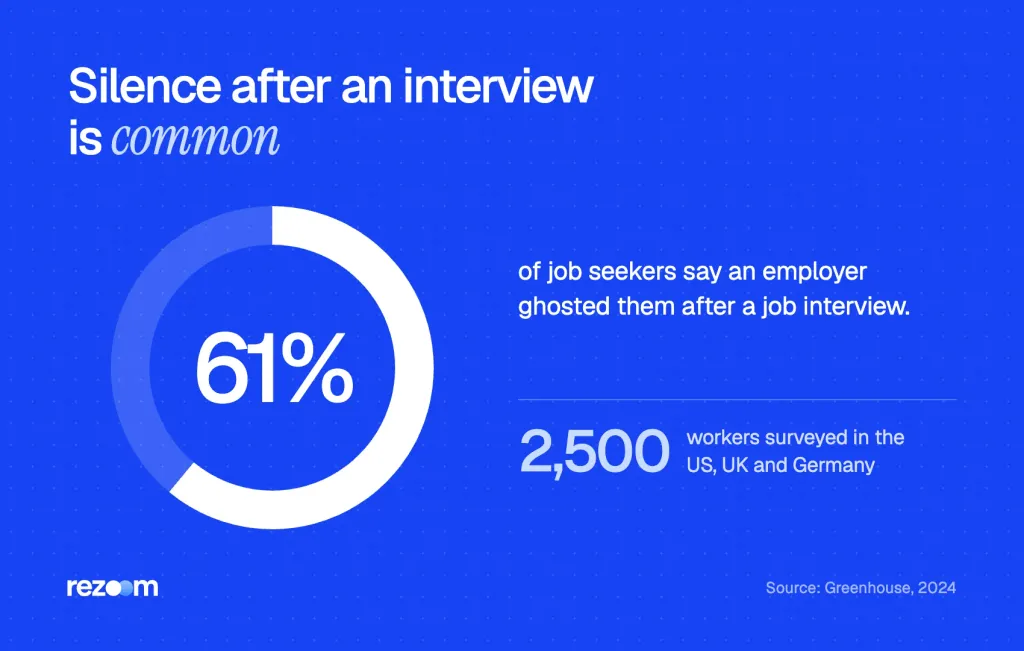
Silence after an interview is common too. In a Greenhouse survey of 2,500 workers4 in the US, UK and Germany, 61% of job seekers said an employer ghosted them after an interview. That's why a clear written record of your wait helps you.
The follow-up email after you leave
Subject: Alex Rivera – Software Engineer interview at 2 p.m. Hi Jamie, I joined the Zoom link at 1:55 p.m. and stayed until 2:20, but I think we may have missed each other. I'm still very keen on the Software Engineer role and would love to find a new time. I'm free Thursday 10 a.m.–1 p.m. or Friday after 2 p.m. Eastern. Thanks, Alex
- Leave the callWait 15 to 20 minutes, then exit so you're not stuck on a dead link.
- Email within the hourSend the follow-up to the recruiter and the interviewer, with the times you waited.
- Offer new timesGive two or three open windows with your time zone.
- Check in onceIf you hear nothing in two business days, send one short, friendly nudge.
The reply when they offer a new time
When the recruiter writes back, answer fast and confirm every detail. If you need a template for a different case, our guide on how to reschedule an interview by email has more versions.
"Thanks, Jamie. Thursday at 11 a.m. Eastern works great." "Could you send the new Zoom link in a calendar invite? Then I'll have it in one place." "Looking forward to it."
How to reschedule an interview by email: word-for-word templates for illness, emergencies and work conflicts, a voicemail script and a notice rule table.
Does the wait time change on Teams or Google Meet?
No. The same 10-to-15-minute rule works on Microsoft Teams and Google Meet. What changes is how you get in. On Teams, outside guests often wait in a lobby until someone admits them. On Google Meet, people outside the company must ask to join, and the host clicks Admit.
On Teams, the lobby keeps people from directly entering a meeting5 when they join. Someone from the company has to let you in. The organizer can also send lobby chat messages about delays, but you can't reply to them.
On Google Meet, anyone outside the company's domain must ask to join6. Then the host sees a request and clicks Admit or Deny.
| Platform | What you see while waiting | Who lets you in | What to do at 10 minutes |
|---|---|---|---|
| Zoom | Waiting room or "waiting for the host" | The host | Email the recruiter and stay on |
| Microsoft Teams | A lobby screen until someone admits you | Organizer, co-organizer or presenter | Watch for lobby chat, then email |
| Google Meet | "Asking to join" | The host or a co-host | Ask again once, then email |
If you're new to video calls in general, our Zoom interview tips cover lighting, sound and camera angle. Most of that advice carries over to Teams and Meet.
How do you stay ready during a long wait?
Use the wait to stay warm. Keep your camera on, sit up and review your top three stories. Glance at your resume and the job post one more time. Don't start other tasks or walk away, because the interviewer can join at any second and expect you ready.
A long wait can drain your energy. So treat it like a warm-up, not dead time.
Review your resume and stories
Pull up your resume and the job post side by side. If you want a model for how others present their work, browse these IT resume examples to see strong project lines.
For Alex, this software engineer resume example is a good check. It shows how to frame shipped features, scale and team impact in short bullets you can talk through out loud.
Software engineer resume example
Use it to pick two project stories you can tell in under a minute.
Keep your follow-up materials ready
If the interview gets pushed, you may need to resend your documents. These IT cover letter examples show how to restate your interest in a short, specific note.
And if you were the one running late, the rules flip. Our guide on running late for an interview explains what to send before the start time.
Practice so a late start doesn't throw you
The best cure for a rushed, shortened interview is practice. If you practice interview questions out loud, you can give tight two-minute answers when the clock gets cut. Then a late start won't shake your best stories.
Practice out loud with an AI voice coach.
Frequently asked questions
How long should I wait for a Zoom interview to start?
Wait about 10 to 15 minutes past the start time. Send a short note at 10 minutes, and leave at 15 to 20 minutes if no one joins. Then email the recruiter to reschedule.
How long should I wait if the interviewer doesn't show up on Zoom?
Give it 15 minutes for most interviews and up to 20 minutes for a final round or panel. After that, leave the call and send a polite follow-up email within the hour.
Is it rude to leave a Zoom interview if the interviewer is late?
No, as long as you waited a fair amount of time and sent a note first. Leaving at 15 to 20 minutes with a clear email looks professional, not rude.
What should I do if the interviewer doesn't join the Zoom call?
Check the newest invite and time zone, then email the recruiter at 10 minutes. If no one joins by 15 to 20 minutes, leave and send a follow-up with two or three new times.
Does an interviewer being late mean I didn't get the job?
Almost never. Late starts usually come from meetings that ran over or calendar mix-ups. Stay friendly and focus on your answers once they join.
Sources
We opened and read each page below. The small numbers in the text point here. Pages that carry no publication date show n.d.
- Talviewn.d.
Talview tells candidates to stay on the interview page and contact the recruiter if the interviewer doesn't join within 15 minutes.
- Zoom2024
Zoom describes the waiting room as a virtual staging area that keeps people out until the host is ready, often used for first-round video interviews.
- University of Colorado Boulder, Office of Information Technologyn.d.
People in a Zoom waiting room see a waiting screen, and the host gets an alert and clicks Admit to let them in.
- Greenhouse2024
In a survey of 2,500 workers in the US, UK and Germany, 61% of job seekers said they were ghosted after a job interview.
- Microsoft Supportn.d.
The Teams lobby keeps people from entering a meeting directly until an organizer, co-organizer or presenter admits them.
- Google Workspace Learning Centern.d.
In Google Meet, anyone outside the host's domain must ask to join, and the host clicks Admit or Deny entry.
Mohammad has spent more than ten years designing consumer products and leads product at Rezoom, deciding what gets built and what gets left out. His guides cover the whole job search, from resume sections and cover letters to interview answers and career moves.
Goodi, M. (2026, November 20). How Long to Wait for a Zoom Interview to Start (+ What to Send). Rezoom. https://rezoom.io/how-long-to-wait-for-zoom-interview-to-start/