Preferred Name on Job Application: What It Means and What to Type
Preferred name on job application forms means the name you go by. See what to type for a nickname, middle name or chosen name, and where your legal name goes.

On this pageWhat does preferred name on job application forms mean?
- What does preferred name on job application forms mean?
- What should you type in the preferred name field?
- Where does the employer use your preferred name vs your legal name?
- Will a preferred name cause problems with a background check or the I-9?
- How do you keep your name consistent across resume, LinkedIn and email?
- How do you fill in the name fields step by step?
- FAQ
- Sources
The preferred name on a job application is the first name you want recruiters to call you, such as a nickname, your middle name, an anglicized name or a chosen name. If you go by your legal first name, repeat it or leave the optional field blank. Your legal name still goes in the legal name fields, because the employer needs it for the background check, Form I-9 and payroll.
The preferred name on job application forms is the first name you actually go by. Type your nickname, middle name or chosen name there. If you use your legal first name every day, repeat it or skip the field when it is optional.
The field confuses people because it sits right next to "Legal first name." So applicants worry that a nickname will look like a lie, or that a blank box will hurt them. Neither is true, and the table below shows what to type in each case.
Quick answers by situation
| Your situation | What to type in "Preferred name" | Example entry |
|---|---|---|
| You go by your legal first name | Repeat it, or leave it blank if optional | Legal: Daniel · Preferred: Daniel |
| You use a common nickname | The nickname only | Legal: Daniel · Preferred: Dan |
| You go by your middle name | Your middle name | Legal: James Ryan · Preferred: Ryan |
| You use an anglicized or easier name | The name coworkers use | Legal: Xiaoming · Preferred: Sean |
| You use a chosen name | Your chosen first name | Legal: Michael · Preferred: Maya |
| The field is required and you have no other name | Your legal first name | Preferred: Priya |
What does preferred name on job application forms mean?
The preferred name on job application forms is the first name you want the employer to use with you day to day. It can be a nickname, a middle name, an anglicized name or a chosen name. It does not replace your legal name, which the employer still collects for legal steps like the background check and payroll.
Most hiring systems now store two names for every person. Workday, for example, says it lets employers track both legal and preferred names4. It also uses the legal name as the preferred name by default, unless you enter a different one.
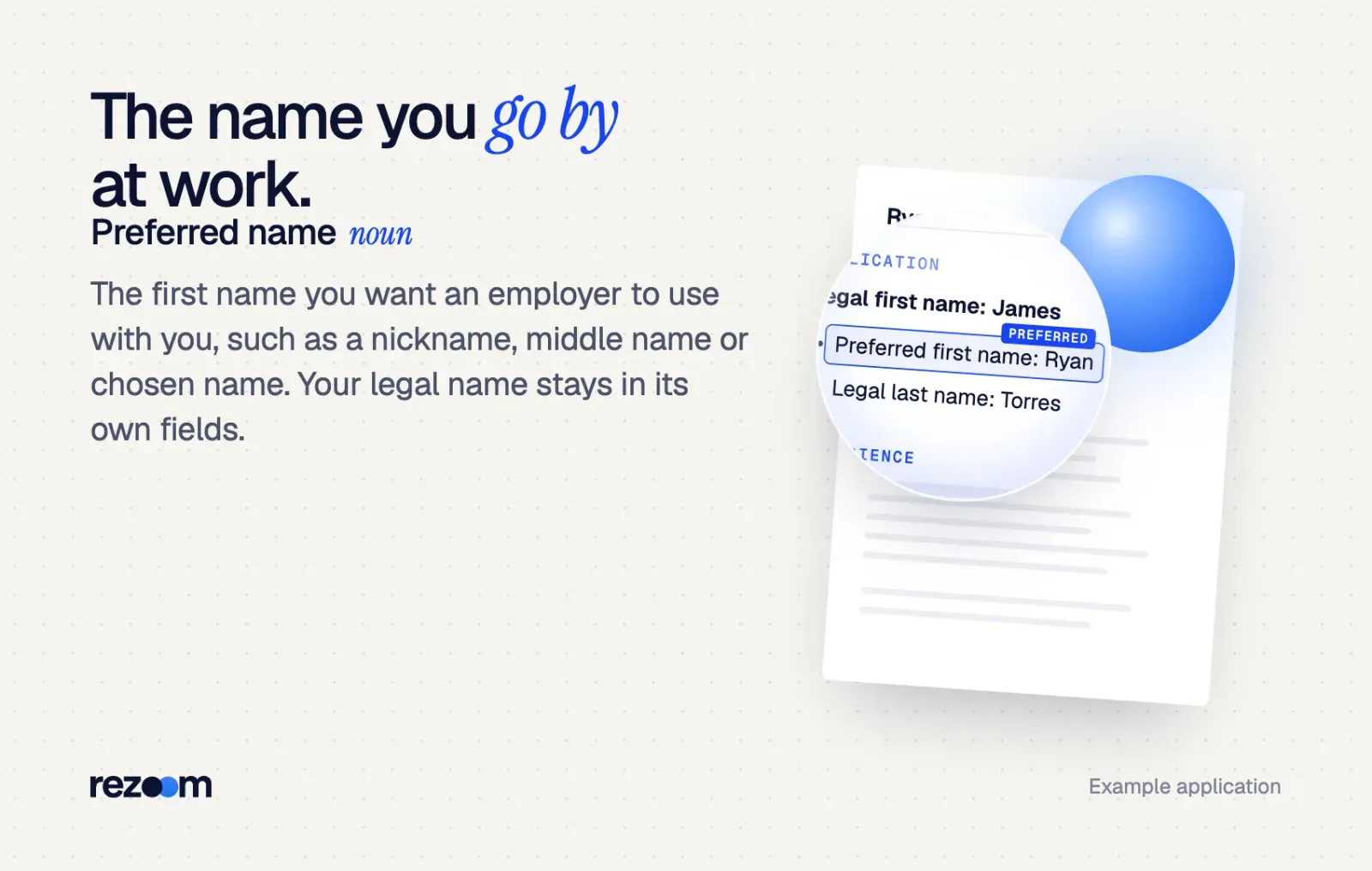
So the field is not a trick question. It simply asks, "What should we call you?" If your answer matches your legal first name, nothing changes. If it differs, recruiters see the name you use, while HR keeps the legal record.
Names that count as a preferred name
- A nickname. Dan for Daniel, Liz for Elizabeth, Alex for Alejandro.
- A middle name. Many people go by their middle name from childhood.
- An anglicized or shortened name. A name you use at school or work because others find it easier.
- A chosen name. A name that fits your identity, before or without a legal name change.
- A name in transition. A married or new surname you use before your documents catch up. Some forms only offer a preferred first name, so check the label.
The resume follows similar logic, but it is a different document. Our guide to the preferred name on resume covers how to format it at the top of the page.
What should you type in the preferred name field?
Type the first name you answer to at work. Use your nickname, middle name or chosen name if you go by one. If you use your legal first name, type it again or leave an optional field blank. Do not add quotes, initials, titles or pronouns, because the system pastes this field straight into emails and badges.
Hiring systems drop this field into emails, interview invites and scorecards. Greenhouse, for instance, offers a preferred first name email token3 that fills in your preferred name. If you left the field empty, the token falls back to your first name.
That means whatever you type will appear after "Hi" in a real email. Type it exactly as you want to read it there.
Same as your legal name
If you go by your legal first name, you have two safe choices. You can repeat it, or you can leave an optional field blank. Neither choice affects how a recruiter rates you.
Legal first name: Priya Preferred first name: Priya Legal last name: Raman
Nickname or middle name
Type only the name people call you. For example, write "Dan," not "Daniel (Dan)" and not "Daniel aka Dan." The legal field already holds the full name.
Legal first name: James Middle name: Ryan Preferred first name: Ryan Legal last name: Torres
Chosen name or name in transition
If you use a chosen name, type it in the preferred field and your current legal name in the legal fields. Many students and new grads face this choice on their first applications. Our student resume examples show clean name headers you can copy.
Legal first name: Michael Preferred first name: Maya Legal last name: Brooks Pronouns (optional field): she/her
If the form also has a pronouns field, it is optional. Our sister guide on whether to display pronouns to the hiring team explains that choice, and our post on pronouns on resume covers the resume side.
Yes, you can use a preferred name on a resume. See 4 clean formats, when your legal name is required, and how to match LinkedIn, email and job forms.
Where does the employer use your preferred name vs your legal name?
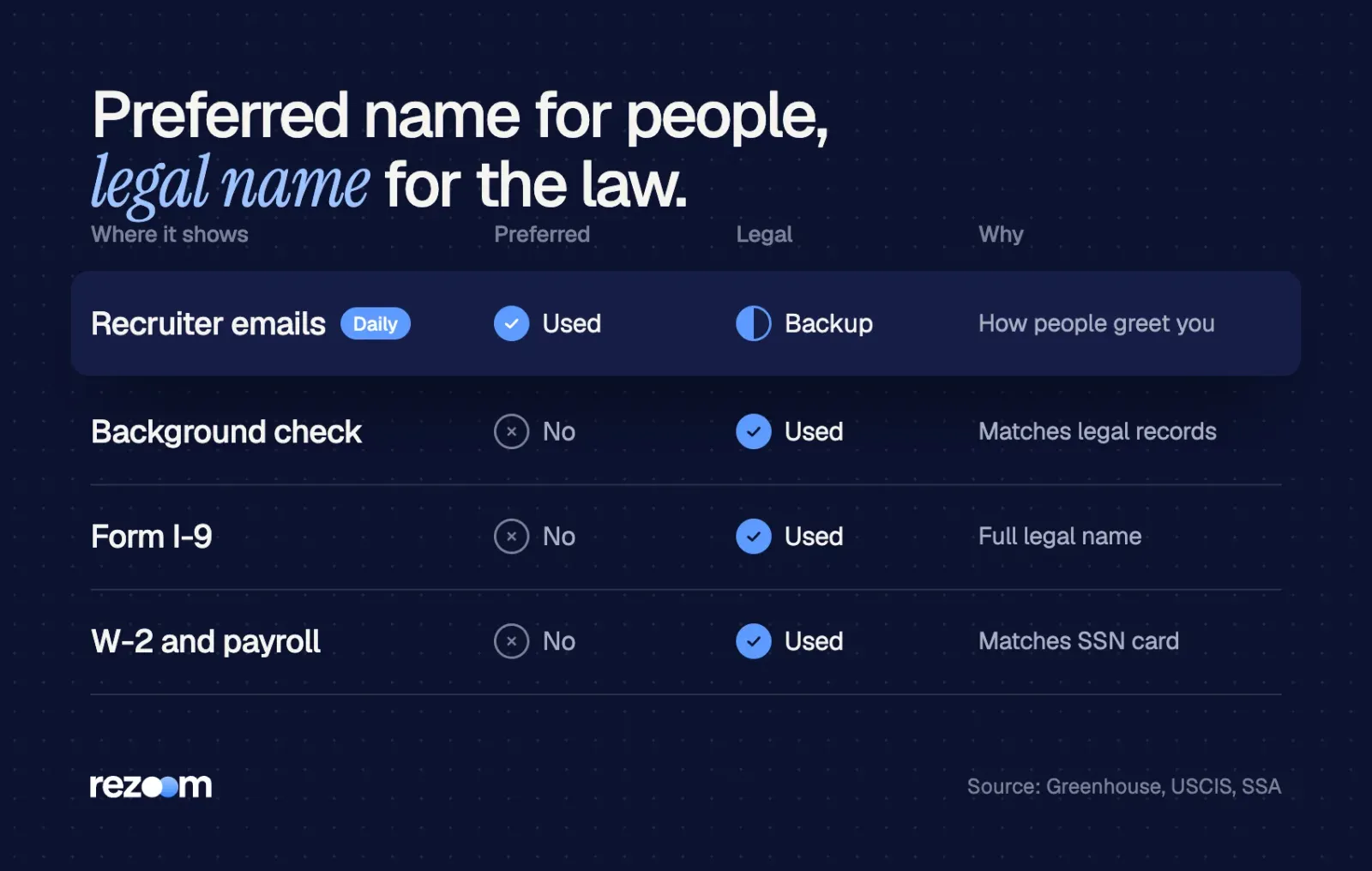
Employers show your preferred name where people talk to you: recruiter emails, interview invites, scorecards, the company directory and your badge. They use your legal name where the law or money is involved: the background check, Form I-9, tax forms and payroll. Both fields belong in the same record, so neither one hides the other.
Greenhouse spells out the split clearly. Your preferred first name gets priority in the candidate profile and scorecards. But legal steps still pull the legal name:
Any documents or processes of legal significance, like a background check, will use the candidate's legal name.
Greenhouse Support, Candidate preferred first name
Which name goes where
| Where your name appears | Which name the employer uses | Why |
|---|---|---|
| Recruiter emails and interview invites | Preferred | It is how people address you |
| Candidate profile and scorecards | Preferred (legal often in brackets) | Interviewers know who they met |
| Background check | Legal | Records match your legal identity |
| Form I-9 | Legal | USCIS asks for your full legal name |
| W-2 and payroll | Legal | The name must match your Social Security card |
| Badge, email address, directory | Usually preferred | Coworkers use it every day |
Why the legal name still matters
USCIS tells new hires to enter their full legal name in Section 1 of Form I-91. It also asks for other legal last names used, such as a maiden name. That is why the legal fields must stay accurate even when you go by something else.
Payroll works the same way. The Social Security Administration tells employers to enter the name on the Form W-2 as shown on the employee's Social Security card2. So your paycheck and tax forms will show your legal name until your card changes.
One gap to know about
Not every apply path carries the field. Greenhouse notes that LinkedIn Apply Connect and Indeed Apply do not support preferred names3 yet. If you apply that way, add your preferred name to your resume header and your email signature instead.
With a one-click button, the system reads your name from the resume file. So run it through our free ATS resume checker to see which first name the parser pulls.
Put your name alone on the first line of the resume, in plain text. If the parser grabs a wrong first name, remove quotes, icons or a text box around it. Then test the file again.
Will a preferred name cause problems with a background check or the I-9?
No, as long as your legal name fields are correct. Background check vendors and Form I-9 use the legal name, not the preferred name on job application forms. Problems start only when people type a nickname into a legal field or leave out a former legal last name the check will find.
Career centers give the same advice. The University of Vermont career center says that if a form asks for your legal name, you should list your legal name as it may be used for a background check5. UConn adds that documents asking for a legal name are usually for background check purposes6.
Former names and maiden names
Many forms also ask for "other names used." List former legal names there, such as a maiden name. If you skip one, a records search can turn up a name the employer did not expect, and that slows the check down.
Privacy for chosen names
If you worry about who sees your legal name, ask HR how they limit access. The UVM page notes that HR staff follow confidentiality rules, though some risk remains. The same caution applies to voluntary self-identification on job applications, which we cover in a separate guide.
Free ATS score, the text the software extracts and your missing keywords. No sign-up.
How do you keep your name consistent across resume, LinkedIn and email?
Use one first name everywhere a recruiter sees you: the preferred field, your resume header, LinkedIn and your email signature. Keep your legal name only in the legal fields. When a recruiter searches for you, the same name in every place tells them they found the right person.
A mismatch rarely costs you the job, but it causes small mix-ups. For example, a recruiter emails "Ryan," then the interviewer's calendar says "James." So pick one name and use it on every recruiter-facing surface.
Ryan Torres Marketing Coordinator candidate ryan.torres@email.com | (555) 014-2290 linkedin.com/in/ryantorres
If you just finished school, compare your header with our college graduate resume examples. Then match your letter too. Our student cover letter examples show a sign-off that uses the same first name as the resume.
Do
- Type only the first name you answer to.
- Use the same first name on your resume, LinkedIn and email.
- Keep the legal name fields exactly as your ID shows them.
- List former legal last names where the form asks for them.
Don’t
- Put a nickname in a legal name field.
- Add quotes, parentheses or "aka" to the preferred field.
- Type titles, pronouns or credentials like "Dr." or "RN" there.
- Use a joke name or a gamer tag.
Should you put pronouns on a resume? It is your choice. See where they go, how to format them, what display pronouns to hiring team means and the research.
How do you fill in the name fields step by step?
Fill the legal fields first, exactly as your ID shows them. Then type the first name you go by in the preferred field, or repeat your legal first name. Match that name on your resume and email signature. Finally, list former legal names where asked, and tell HR at the offer stage if your legal name will change soon.
- Copy your legal nameType your first, middle and last name exactly as your ID or Social Security card shows them.
- Add the name you go byType your nickname, middle name or chosen name in the preferred field, or repeat your legal first name.
- Answer "other names used"List any former legal last names, such as a maiden name.
- Match your documentsUse the same first name on your resume header, LinkedIn and email signature.
- Update HR when things changeIf your legal name changes, tell HR so payroll and the I-9 stay correct.
Fill-in-the-blank template
Legal first name: [FIRST NAME ON YOUR ID]
Middle name: [MIDDLE NAME OR INITIAL]
Legal last name: [LAST NAME ON YOUR ID]
Preferred first name: [NAME YOU ANSWER TO, or repeat legal first name]
Other last names used: [MAIDEN OR FORMER LEGAL LAST NAME, or leave blank]
What to say if they push back
Sometimes a recruiter or HR contact asks about the two names. Keep your reply short and calm.
- "Your background check came back under another name." Explain that it is your legal name and that you go by your preferred name at work.
- "Which name should we put on the offer letter?" Ask them to use your legal name on legal papers and your preferred name on your badge and email.
- "Why is your resume name different from your ID?" Say that you go by your preferred name, and both names refer to you.
Recruiter: "The background check lists a Michael Brooks. Is that you?"
"Yes, Michael is my legal first name. I go by Maya, which is the preferred name on my application."
Recruiter: "Got it. Which name goes on your badge?"
"Please use Maya on my badge and email, and my legal name on payroll and tax forms."
Final checks before you submit
Ask HR about your preferred name when you accept the offer, not on day one. That gives IT time to set up your email address and badge with the right name. It also avoids a week of fixing accounts.
Before you submit your application
Before you upload, run a final pass on the file the form will parse. If you want to know how one big system reads names and headers, see how Workday parses resumes.
Free ATS score and your missing keywords. No sign-up.
Frequently asked questions
What is preferred name in a job application?
It is the first name you want the employer to call you. It can be a nickname, middle name, anglicized name or chosen name. Your legal name goes in separate fields.
What is preferred first name in a job application?
It means the same thing as preferred name, limited to your first name. Type the first name you answer to, and keep your legal last name in the last name field.
Can I leave the preferred name field blank?
Yes, if the field is optional. Systems like Greenhouse fall back to your legal first name when the field is empty.
Should I put my nickname in the preferred name field?
Yes, if coworkers and friends use it. Type the nickname alone, without quotes or your full name.
Is it lying to use a preferred name on a job application?
No. Employers ask for it on purpose, and they still collect your legal name for the background check, I-9 and payroll.
Will my preferred name show on my paycheck?
Usually not. Payroll and W-2 forms use the name on your Social Security card, so your legal name appears there.
Sources
We opened and read each page below. The small numbers in the text point here. Pages that carry no publication date show n.d.
- U.S. Citizenship and Immigration Servicesn.d.
Employees enter their full legal name and any other legal last names used, such as a maiden name, in Section 1 of Form I-9
- Social Security Administrationn.d.
Employers enter the name on Form W-2 as shown on the employee's Social Security card
- Greenhouse Supportn.d.
Greenhouse shows the preferred first name in profiles, scorecards and emails, uses the legal name for background checks, and notes LinkedIn Apply Connect and Indeed Apply do not support preferred names
- Workday Administrator Guiden.d.
Workday tracks legal and preferred names and uses the legal name as the preferred name by default
- University of Vermont Career Centern.d.
Use your legal name where a form asks for it because it may be used for a background check, and use a preferred name on the resume
- UConn Center for Career Readiness2023
Documents that ask for a legal name are usually for background check purposes
Mohammad has spent more than ten years designing consumer products and leads product at Rezoom, deciding what gets built and what gets left out. His guides cover the whole job search, from resume sections and cover letters to interview answers and career moves.
Goodi, M. (2026, October 22). Preferred Name on Job Application: What It Means and What to Type. Rezoom. https://rezoom.io/preferred-name-on-job-application/