

Why Uploading Your Resume to LinkedIn Matters
LinkedIn has become the most important professional networking platform in the world, with over 1 billion members globally. Recruiters, hiring managers, and even AI-powered applicant tracking systems (ATS) rely on LinkedIn to filter candidates. Knowing how to upload your resume in LinkedIn and doing it the right way can give you a powerful advantage in your job search.
Table of contents
- Why Uploading Your Resume to LinkedIn Matters
- Upload Resume on LinkedIn Profile vs Easy Apply
- How to Add Resume to LinkedIn Easy Apply
- How to Upload Resume on LinkedIn Profile
- LinkedIn Resume Upload Format: Best Options
- Should I Upload Resume on LinkedIn?
- How to Delete or Update Resume on LinkedIn
- LinkedIn Resume vs CV: What’s the Difference?
- Optimizing Your Resume for LinkedIn and ATS
- Final Thoughts
- Next Step: Build a Resume That Gets Results
Upload Resume on LinkedIn Profile vs Easy Apply
There are two different ways to upload your resume on LinkedIn profile and each serves a different purpose:
- Upload when applying for jobs (Easy Apply)
- You can attach your resume directly to applications using LinkedIn Easy Apply.
- Upload to your profile
- You can add your resume to your Featured or About section, so recruiters can view it anytime.
How to Add Resume to LinkedIn Easy Apply
If you’re applying directly to a job on LinkedIn, follow these steps:
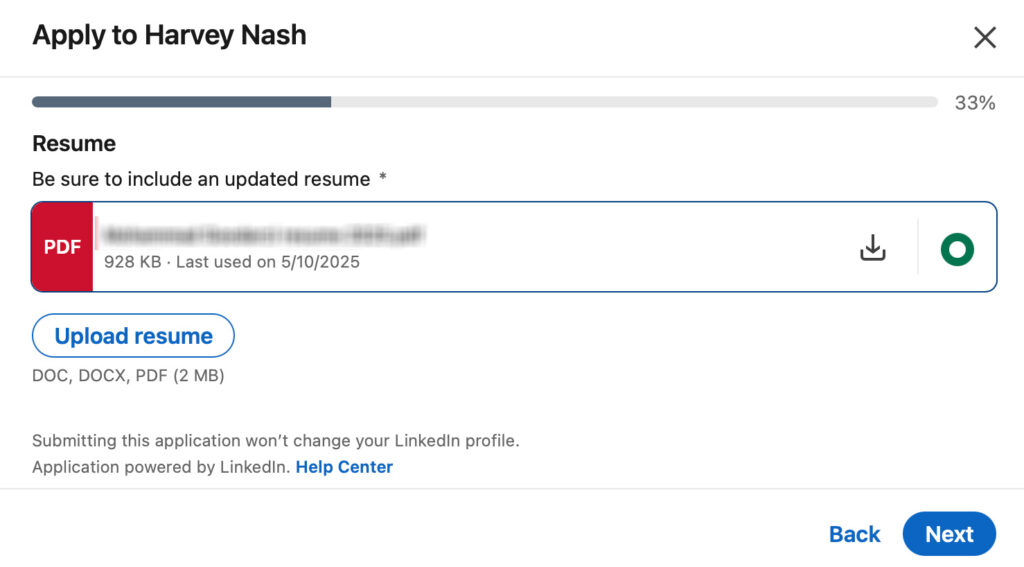
- Log in to your LinkedIn account.
- Search for jobs using keywords, titles, or company names.
- Click on the Easy Apply button.
- A pop-up window will appear with an upload resume option.
- Choose your resume file (PDF or DOCX recommended).
- Submit your application.
LinkedIn allows multiple resumes to be saved in your account, so you can upload tailored versions for different job applications.
How to Upload Resume on LinkedIn Profile
To make your resume visible on your profile:
- Go to your LinkedIn profile.
- Scroll to the Featured section.
- Select Add media → Upload resum.
- Title it clearly (e.g., Jane Doe – Data Analyst Resume 2025).
- Save.
Your LinkedIn profile with resume example will now be available for recruiters to download.
LinkedIn Resume Upload Format: Best Options
When uploading your resume, format matters. The most recruiter-friendly choices are:
- PDF → preserves layout and design.
- DOCX → preferred for ATS parsing.
- TXT → rarely recommended.
Always preview before uploading to avoid formatting issues.
Should I Upload Resume on LinkedIn?
Some candidates hesitate. Let’s break down the pros and cons:
- Recruiters can see your resume instantly.
- Easier for networking contacts to refer you.
- Boosts visibility in searches.
- Anyone can download your resume.
- Sensitive personal data may be exposed.
- A single version may not fit all job types.
upload a public-friendly version on your profile and keep tailored versions for specific job applications.
How to Delete or Update Resume on LinkedIn
If you’ve uploaded the wrong file or want to refresh:
- Go to your Featured section.
- Click the three dots (…) on your uploaded resume.
- Select Delete or Replace.
- Upload your new version.
This ensures your profile always has your most updated LinkedIn resume.
LinkedIn Resume vs CV: What’s the Difference?
- Resume → Short, targeted (1–2 pages), tailored to each job.
- CV → Longer, detailed (academic, research, medical).
On LinkedIn, a resume upload works best for most job seekers. Use a CV only if applying to roles where a full history is required.
Optimizing Your Resume for LinkedIn and ATS
Uploading your resume is just the first step. To maximize results:
1. Use Resume Headline for LinkedIn
- Your headline should mirror your resume title (e.g., Marketing Manager | Digital Strategy | SEO).
2. Add Keywords
- Use job title variations (UI/UX Designer, Product Designer).
- Include skills recruiters search (JavaScript, Agile, Figma).
3. Keep Formatting Simple
- Avoid tables, graphics, or special fonts.
Final Thoughts
Mastering how to upload resume in LinkedIn helps you stand out in the modern job market. From profile uploads to Easy Apply strategies, every step matters. But remember your resume is only effective if it’s well-crafted, ATS-friendly, and tailored.

Next Step: Build a Resume That Gets Results
Before you upload your resume, make sure it’s the strongest version possible. That’s where Rezoom.io comes in.
Rezoom helps job seekers:
- Design ATS-optimized resumes with professional templates.
- Test resumes against recruiter searches.
- Get insights for interview preparation.
👉 Don’t just upload your resume upload the version that gets you hired with Rezoom.


Your blog is a beacon of light in the often murky waters of online content. Your thoughtful analysis and insightful commentary never fail to leave a lasting impression. Keep up the amazing work!
Your writing is a true testament to your expertise and dedication to your craft. I’m continually impressed by the depth of your knowledge and the clarity of your explanations. Keep up the phenomenal work!
Every time I visit your website, I’m greeted with thought-provoking content and impeccable writing. You truly have a gift for articulating complex ideas in a clear and engaging manner.
Wow wonderful blog layout How long have you been blogging for you make blogging look easy The overall look of your site is great as well as the content
Hello my loved one I want to say that this post is amazing great written and include almost all significant infos I would like to look extra posts like this