Does Workday Use AI? What It Does to Your Application
Does Workday use AI? Yes: HiredScore grades your resume A to D for recruiters. See what the AI does, what it skips, and how to apply with a matching resume.
On this pageDoes Workday use AI to screen resumes?
- Does Workday use AI to screen resumes?
- What does HiredScore Spotlight do with your application?
- Does Workday's AI reject candidates automatically?
- What other AI tools sit inside Workday Recruiting?
- What is the Mobley v. Workday lawsuit about?
- How do you make your resume work with Workday's AI?
- Can you opt out of Workday's AI screening?
- What should you check before you apply on Workday?
- FAQ
- Sources
Yes. Workday uses AI in its recruiting tools, mainly HiredScore, which grades each resume from A to D against the job's requirements so recruiters know whom to review first. Workday says its AI does not hire or reject anyone, and people make the final call. Automatic declines in Workday come from employer rules, such as closing a job. Your best move is a resume that matches the posting.
Does Workday use AI? Yes: many employers on Workday turn on HiredScore, which grades your resume from A to D against the job's requirements. Recruiters sort by that grade, and people still make the hiring call.
So the AI decides who gets looked at first, not who gets hired. This guide shows what each tool does, what the lawsuit about it claims, and how to give the grader a clean resume to read.
Quick answers by situation
| Your situation | What to do | Example line |
|---|---|---|
| You worry the AI will reject you | Match the posting, then follow up with a person | "I applied on Workday and wanted to share one result." |
| The job lists 8 required skills | Use the same words in your skills and bullets | "SQL, Tableau, Python (pandas)" |
| You have a fancy two-column resume | Switch to one column with plain headings | "Experience" instead of "Where I've Been" |
| The form asks about AI or automated tools | Read the notice and ask for another review if you want one | "I'd like a person to review my application." |
| You got declined within minutes | Check if the job closed or a question ruled you out | "Was the role filled or closed?" |
| You applied years ago | Update your profile, since recruiters can rediscover past applicants | New title and skills in your Workday profile |
Does Workday use AI to screen resumes?
Yes, in most large setups. Workday's HiredScore AI compares each resume with the job requirements and gives a grade from A to D. Workday Recruiting can also score skills match and run chat and scheduling bots. The employer decides which tools to turn on, so two Workday sites can behave very differently.
Workday is the software. Your employer is the customer, and it chooses the features. So when people ask "does Workday use AI," the honest answer is: Workday sells AI tools, and many employers use them.
The main AI pieces
Workday sells HiredScore as part of its recruiting suite. Its product page says the AI instantly compares applicants to requirements2 and gives a reason for each grade. The same page says final hiring decisions stay with the recruiter and hiring manager.
| Tool | What it does to your application | Who sees the result |
|---|---|---|
| HiredScore Spotlight | Grades your resume A to D against the job | Recruiters |
| Candidate Skills Match | Rates skills overlap as Strong, Good, Fair or Low | Recruiters on the candidate grid |
| HiredScore Fetch | Finds past applicants and leads for new jobs | Recruiters |
| Paradox agent | Answers questions and books interviews by chat | You and the recruiter |
How it compares with other systems
Other systems handle AI in their own way. Our guide on whether Lever uses AI shows how one rival compares. If you want the parsing side first, read how Workday parses resumes before you rework your file.
What does HiredScore Spotlight do with your application?
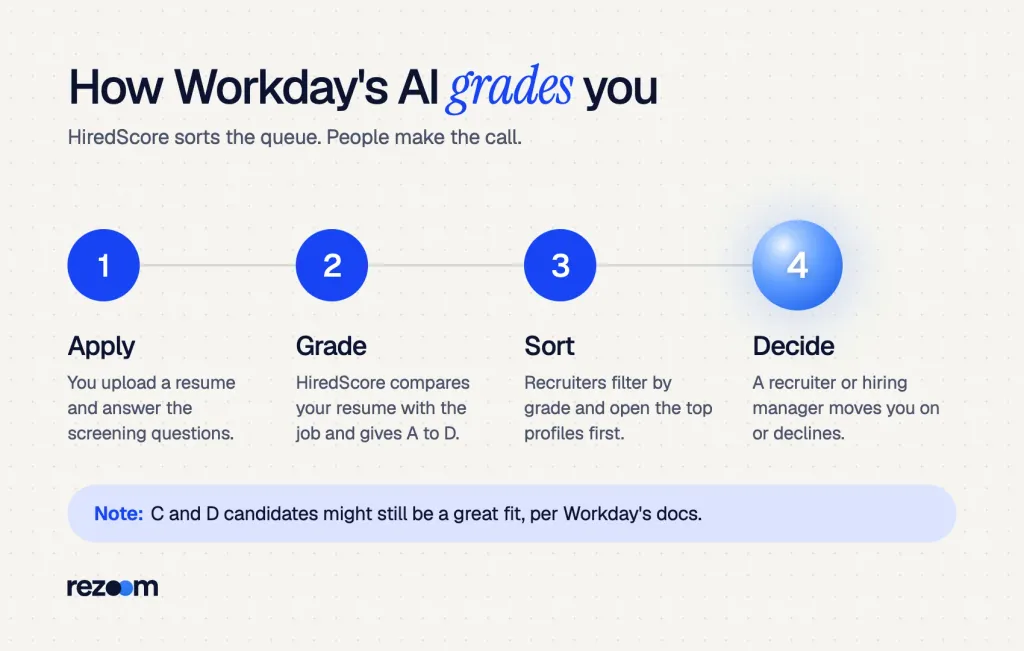
Spotlight reads your resume, compares it with the skills and qualifications in the job description, and gives you a grade. A means you meet or exceed the basic requirements, B means you meet them, C means you meet some, and D means you meet none. Recruiters then sort and filter by that grade.
Workday's help docs spell out the four grades. They say grades come from how well your resume matches the job description1.
| Grade | What it means | What it means for you |
|---|---|---|
| A | Meets or exceeds the basic requirements | Likely near the top of the list |
| B | Meets the basic requirements | Still in the first group to review |
| C | Meets some, not all, requirements | A recruiter may still screen you |
| D | Does not meet the basic requirements | Lower in the queue, not deleted |
When you get no grade at all
The same docs list cases with no grade. You get none if you skip the resume, if the file type is not supported, or if the job has no description. Campus and graduate roles also skip grading.
Grades are a sort order, not a verdict
The docs add that candidates with a C or D "might still be a great fit for the role." Recruiters can open any profile. But a recruiter with 400 applicants starts at the top, so a weak match costs you time and attention.
Workday's own recruiting team shows the scale. Its May 2026 article says its recruiters once spent about 24,000 hours a year9 screening people who did not meet basic requirements. That is the work the grader now speeds up.
The grade checks the basic requirements first. So list each must-have skill, license or degree in words a reader can spot. If the posting says "Bachelor's degree in statistics," write exactly that, not "BS, Stats."
Does Workday's AI reject candidates automatically?
Workday says no. Its 2026 guidance says its AI gives information and does not hire or reject. Fast rejections still happen, but they come from employer rules: closing a job can decline everyone left in review, and employers can bulk-reject or set knockout questions. The AI grade shapes the order, and a person or rule makes the decline.
Workday tackled this myth head-on in an April 2026 article.
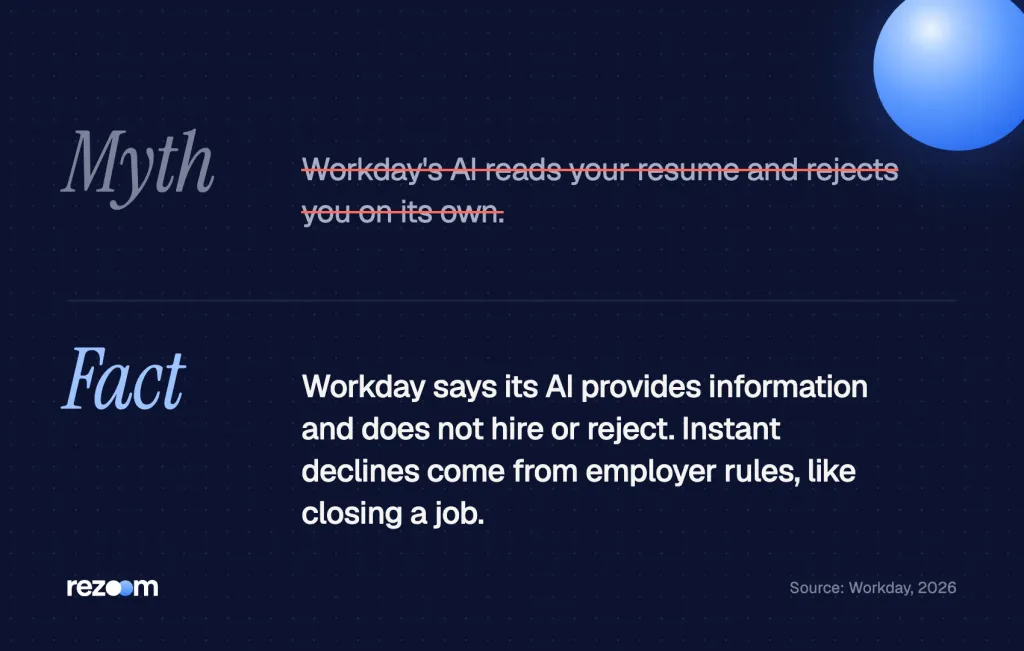
AI provides information; it doesn't hire or reject.
Workday, 2026
Its 2025 explainer also says Workday AI does not make hiring decisions7 and that customers keep human oversight.
So why did you get a rejection in 10 minutes?
Fast declines usually come from rules, not the AI. Workday's admin guide shows that when a recruiter closes a job, Workday can decline all remaining candidates5 with the reason "Job Requisition Closed." Recruiters can also advance or reject candidates in bulk.
Some employers also use knockout questions, such as work permits or a required license. Our guide to ATS knockout questions covers how to answer them honestly. And if you want to know what a silent or instant decline means, see whether Workday sends rejection emails.
What the AI can do on its own
HiredScore has one automation worth knowing. Its "Candidate Fast Lane" can automatically advance top-rated applicants3 to hiring manager review. So a strong grade can move you forward without a recruiter click.
Do
- Treat the grade as your place in line.
- Answer knockout questions honestly and fully.
- Follow up with a recruiter after you apply.
Don’t
- Assume a fast decline means the AI judged you.
- Stuff white-text keywords into your file.
- Apply to 30 roles at one company with one resume.
What other AI tools sit inside Workday Recruiting?
Beyond HiredScore, Workday Recruiting can score skills match with machine learning, rediscover past applicants, and run chat through Paradox, which Workday bought in October 2025. Paradox answers candidate questions and books interviews by text or chat. Workday also uses AI to summarize interview feedback11 for hiring teams.
These tools touch you at different steps.
Candidate Skills Match
Workday says it uses machine learning to calculate skills match4. It compares the skills in your resume with the skills on the job. Required skills count more, but the tool ignores how many years you used each skill.
The docs list the file types it reads: DOC, DOCX, HTM, HTML, PDF, RTF and TXT. They also say Workday plans to retire this feature in a future release, so HiredScore will likely carry more of the load.
Paradox chat and scheduling
Workday closed its Paradox purchase on October 1, 20256. The release calls it a candidate experience agent that uses conversational AI, mostly for frontline jobs. If a chatbot asks you questions by text, treat each answer as part of your application.
Bot: "Are you available to work weekends?"
"Yes, Saturdays and Sundays, 8 a.m. to 6 p.m."
Bot: "Do you have a valid forklift certification?"
"Yes, OSHA forklift certified, valid through 2027."
How Workday parses resumes, from Workday's own docs: which fields autofill, why Skills stay blank, and how to fix the form before you submit.
Free ATS score, the text the software extracts and your missing keywords. No sign-up.
What is the Mobley v. Workday lawsuit about?
Derek Mobley sued Workday in February 2023, claiming its AI screening tools hurt older, Black and disabled applicants. Workday denies the claims, and nothing has been proven. The court let key claims proceed, and plaintiffs asked in September 2026 to certify a class tied to HiredScore Spotlight, Fetch and Skills Match. A hearing is set for March 2027.
The case is Mobley v. Workday, in federal court in Northern California. Here are the steps so far.
- February 2023: Mobley files suit over Workday's screening tools.
- May 2025: The court preliminarily certifies a nationwide group of applicants age 40 and over under the age discrimination law.
- June 22, 2026: The judge lets the California state law claims proceed and dismisses a new race claim, per Bloomberg Law12.
- September 14, 2026: Plaintiffs ask to certify a class covering HiredScore Spotlight, Fetch and Candidate Skills Match, per a case tracker updated October 24, 202613.
- March 9, 2027: The certification hearing is scheduled.
What Workday says in its defense
Its product page says demographic data such as race and gender is never part of scoring. It also published a bias audit of its own Spotlight use10, tested by an outside firm on March 20, 2026. The audit found "no evidence of disparate impact," but only for Workday's own hiring in that period.
So the case is still open. For you, it changes nothing today, but it explains why more employers now add AI notices to their forms.
How do you make your resume work with Workday's AI?
Mirror the job's required skills in plain words, use one column with standard headings, and upload a DOCX or text-based PDF. Put each must-have in both your skills list and a result bullet. Then run your file through an ATS checker and fix anything the parser drops before you submit.
The grader can only score what the parser pulls out. So clean structure comes first, and keywords come second.
- Copy the must-havesPaste the job's basic requirements into a note. Mark each skill, tool, license and degree.
- Match the wordsUse the posting's exact terms in your skills section and in at least one bullet each.
- Keep it parse-friendlyOne column, standard headings, no text boxes, and a DOCX or text-based PDF.
- Check before you sendRun the file through a checker and fix any field that comes out blank.
A data analyst example
Say a posting asks for SQL, Tableau and A/B testing. Look at data analyst resume examples and note how each skill shows up twice: once in the skills list and once in a bullet with a number.
Data analyst resume example
See how a data analyst resume repeats each required tool in both the skills list and a result bullet.
JORDAN LEE
Austin, TX | (555) 014-7781 | jordan.lee@email.com
SKILLS: SQL, Tableau, Python (pandas), A/B testing, Excel
Built Tableau dashboards that cut weekly report time from 6 hours to 1
Wrote SQL queries across 12 tables to track churn for 40,000 users
Ran A/B tests on checkout pages that lifted conversion by 4%
Other tech roles
For help desk, cloud or developer jobs, browse our IT resume examples for layouts that parse cleanly. And to find the right terms fast, use our guide to finding keywords in a job description.
SKILLS: [Required tool 1], [Required tool 2], [Required certification]
[Action verb] [required tool 1] to [result with a number] for [team or users]
HiredScore can surface past applicants for new jobs. So if you applied to a company years ago, log in and replace the old resume. Otherwise the AI grades a version of you that is out of date.
Can you opt out of Workday's AI screening?
Sometimes. Workday has no single opt-out switch for candidates, because each employer sets its own forms. Some employers add an AI notice or ask if you want another review, often to meet local AI hiring rules. If you see that choice, you can take it, but a human review may be slower.
Look for a question near the end of the application. It might mention "automated employment decision tools" or "AI-assisted review." If there is no question, you can still ask a recruiter. Our full guide explains how to opt out of AI resume screening and when it helps.
Hi [Recruiter name],
I applied for the [Job title] role (req [number]) on [date]. If an AI tool scores applications, I'd like a person to review mine as well. My strongest match is [one required skill with a result].
Thanks, [Your name]
What to say if they push back
Recruiter: "Everything goes through our system first."
"I understand. I only want to make sure a person sees my SQL and Tableau work."
Recruiter: "The hiring manager only sees the top candidates."
"That makes sense. Could I send a short summary that you can add to my profile?"
- Stay specific: "My resume shows three of your four required tools."
- Stay short: "Here is one result that matches the role."
- Ask, don't demand: "Is there a way for a person to take a look?"
- Close the loop: "I updated my profile with my latest resume today."
Should you opt out of AI resume screening? Learn when it helps, when it hurts, and how to make your resume work for both ATS software and recruiters.
What should you check before you apply on Workday?
Before you submit, confirm your resume matches the job's basic requirements, reads in one column, and uploads as DOCX or a text-based PDF. Check the parsed profile fields, answer every screening question, and send a matching cover letter. Then follow up with a recruiter so a person knows your name.
A last pass takes five minutes and protects your grade.
Before you hit submit on Workday
For a matching letter, our IT cover letter examples show how to name the role and one result in the first lines. For more tactics on any AI grader, read how to beat AI resume screening.
Then test your file with our free ATS resume checker. It shows what a parser pulls out, so you can fix gaps before HiredScore grades you.
Free ATS score and your missing keywords. No sign-up.
Frequently asked questions
Does Workday use AI to reject applicants?
Workday says its AI does not hire or reject anyone. It grades fit, and people or employer rules, such as closing a job, cause declines.
What is a HiredScore grade?
It is a letter from A to D that shows how well your resume matches the job's basic requirements. Recruiters use it to decide whom to review first.
Can I see my HiredScore grade?
Workday's docs describe grades only inside recruiter tools, such as Spotlight and the Pending Actions dashboard. So plan to improve the match before you apply, not after.
Is Workday AI biased?
That question is at the center of Mobley v. Workday, which is still open. Workday denies the claims and says an outside audit of its own use found no evidence of disparate impact.
Does Workday read PDF resumes?
Yes. Workday's skills match reads DOC, DOCX, HTM, HTML, PDF, RTF and TXT files. Use a text-based PDF, not a scan.
Does Workday grade campus or graduate applications?
No. Workday's docs say HiredScore gives no grade on campus or graduate hiring requisitions. It also skips applications with no resume or an unsupported file.
Sources
We opened and read each page below. The small numbers in the text point here. Pages that carry no publication date show n.d.
- Workdayn.d.
HiredScore grades candidates A to D on how well their resumes match the job description, and C or D candidates might still be a great fit
- Workdayn.d.
HiredScore AI compares applicants to requirements with a rationale for each grade, and final hiring decisions remain with the recruiter and hiring manager
- Workdayn.d.
HiredScore Candidate Fast Lane can automatically advance top-rated applicants to hiring manager review, and recruiters can advance or reject in bulk
- Workdayn.d.
Candidate Skills Match uses machine learning to compare resume skills with job skills and reads DOC, DOCX, HTM, HTML, PDF, RTF and TXT files
- Workdayn.d.
Closing a job requisition can decline all remaining candidates with the reason Job Requisition Closed
- Workday2025
Workday completed its acquisition of Paradox, a conversational AI candidate experience agent, on October 1, 2025
- Workday2025
Workday says its AI does not make hiring decisions and customers keep human oversight
- Workday2026
Workday says its AI provides information and does not hire or reject candidates
- Workday2026
Workday recruiters spent about 24,000 hours a year screening candidates who did not meet basic qualifications before using AI
- Workday2026
An independent audit of Workday's own HiredScore Spotlight use, tested March 20, 2026, found no evidence of disparate impact
- Workdayn.d.
Workday Recruiting uses AI to summarize interview feedback and screening for hiring teams
- Bloomberg Law2026
On June 22, 2026, the court let California law claims in Mobley v. Workday proceed and dismissed a new race claim
- OpenClassActions2026
Mobley v. Workday timeline: filed February 2023, ADEA collective preliminarily certified May 2025, class certification motion filed September 14, 2026, hearing set March 9, 2027
Mohammad has spent more than ten years designing consumer products and leads product at Rezoom, deciding what gets built and what gets left out. His guides cover the whole job search, from resume sections and cover letters to interview answers and career moves.
Goodi, M. (2026, November 7). Does Workday Use AI? What It Does to Your Application. Rezoom. https://rezoom.io/does-workday-use-ai/