
Summary
Cover letter format is one of the few settled questions in job searching: one page, 1-inch margins, 11 or 12 point, single-spaced, left-aligned, 250 to 400 words. The rule people break is shrinking type or margins to fit an extra paragraph — a content problem wearing a layout costume. Cut first, then check length, then export.
Cover letter format has a comforting property that the writing does not: the answers have settled.
One page. One-inch margins. Eleven point. Single-spaced, left-aligned, 250 to 400 words. Every credible source says the same thing, which means following the conventions costs you nothing and breaking them costs a small tax of reader friction on every line.
There is exactly one rule people break, and it is worth the whole article: shrinking the type or the margins to fit an extra paragraph. That is a content problem wearing a layout costume, and it never works.
What is the standard cover letter format?
One page, 250 to 400 words, 11 or 12 point in a standard business font, one-inch margins on all sides, single-spaced with a blank line between paragraphs, left-aligned throughout. Save as PDF unless the posting says otherwise.
| Element | Standard | Acceptable range |
|---|---|---|
| Length | One page | Never two |
| Word count | 250–400 | 200 minimum, 450 ceiling |
| Margins | 1 inch all sides | 0.75 inch minimum |
| Body font size | 11pt | 10–12pt |
| Name in header | 14pt | 12–16pt |
| Line spacing | Single (1.0) | Up to 1.15 |
| Alignment | Left | Left only |
| Paragraph separation | One blank line | No indentation |
| File format | .docx if requested |
In practice, two of those deserve a note. No indentation — modern block format separates paragraphs with a blank line rather than a tab, and indented paragraphs read as a letter written in 2003. Left-aligned throughout, including the header if you like, because justified text creates uneven word spacing and centred body text is harder to scan.
Which fonts should you use?
Calibri, Arial, Helvetica, Georgia or Times New Roman — and critically, the same font as your resume. The two documents should look like one set. At most three size levels: your name, the body, and nothing else.
In cover letter format, font choice matters less than font discipline.
Match your resume. Same family, same body size, same header treatment. A cover letter in Georgia attached to a resume in Calibri reads as two documents from two people.
Three size levels maximum. Your name at 12–14pt, body at 11pt, and that is the whole system. Applicants get into trouble designing a letterhead with five sizes and a coloured rule, and both parsers and human readers prefer plain structure.
Avoid the obvious ones. Comic Sans, script fonts, and anything with personality that is not yours to lend.
The failure mode is shrinking type to cheat length
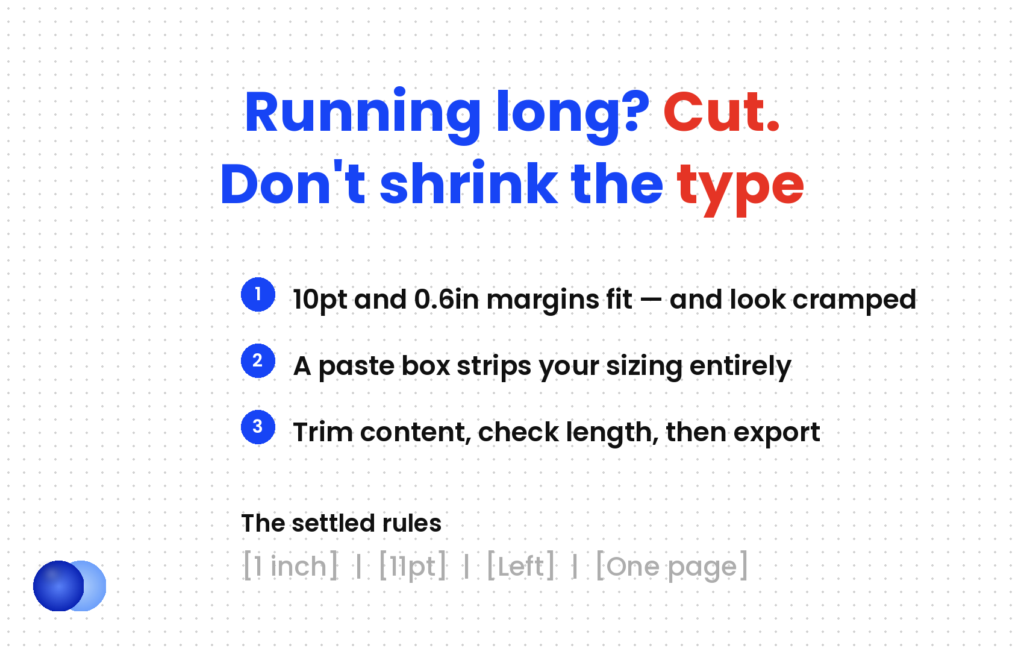
When a letter runs long, the instinct is to drop to 10pt and pull the margins to 0.6 inches. It fits, and it looks cramped before anyone reads a word. Worse, it can pass as a PDF upload and fail entirely in a paste box, where your careful sizing does not exist. The order of operations that works: cut the content, then check the length, then export. Never the reverse.
What are the seven parts, in order?
Header with your contact details, date, employer details, greeting, two to four body paragraphs, closing, and sign-off with your name. The employer address block is optional for digital applications and near-universal for print or formal sectors.
Here is the structure, top to bottom:
1. Your header. Name, phone, email, city, LinkedIn. Match your resume header exactly.
2. The date. Written out — 3 March 2026.
3. Employer details. Hiring manager's name, title, company, address. Optional for online applications; keep it for law, government, academia and anything print.
4. Greeting. On its own line, followed by a blank line. Who to address a cover letter to covers the choice, and a named greeting earned 15% more interviews across 7,287 applications.
5. Body. Two to four paragraphs. How to write a cover letter covers what goes in them.
6. Closing paragraph. Two to four sentences with a specific next step.
7. Sign-off. "Sincerely," or "Kind regards," a blank line, your full name typed. No handwritten signature needed for a digital letter.
Does formatting affect ATS parsing?
Yes, in specific ways. Text boxes, tables for body content, and contact details placed in headers or footers parse unreliably. Plain left-aligned paragraphs with standard fonts parse correctly everywhere. The formatting that causes trouble is the decorative kind.
Broadly, three things to avoid, all of which look fine to a human and break for a parser:
Text boxes. Content inside them frequently does not extract.
Tables for body text. A table used for layout scrambles reading order.
Contact details in the header or footer region. Many systems do not read those areas at all — the same problem that affects resumes, covered in how an ATS works.
Everything else is safe. Plain paragraphs, a bold name, standard fonts, left alignment — none of that causes a parsing problem in any system.
How does the submission channel change things?
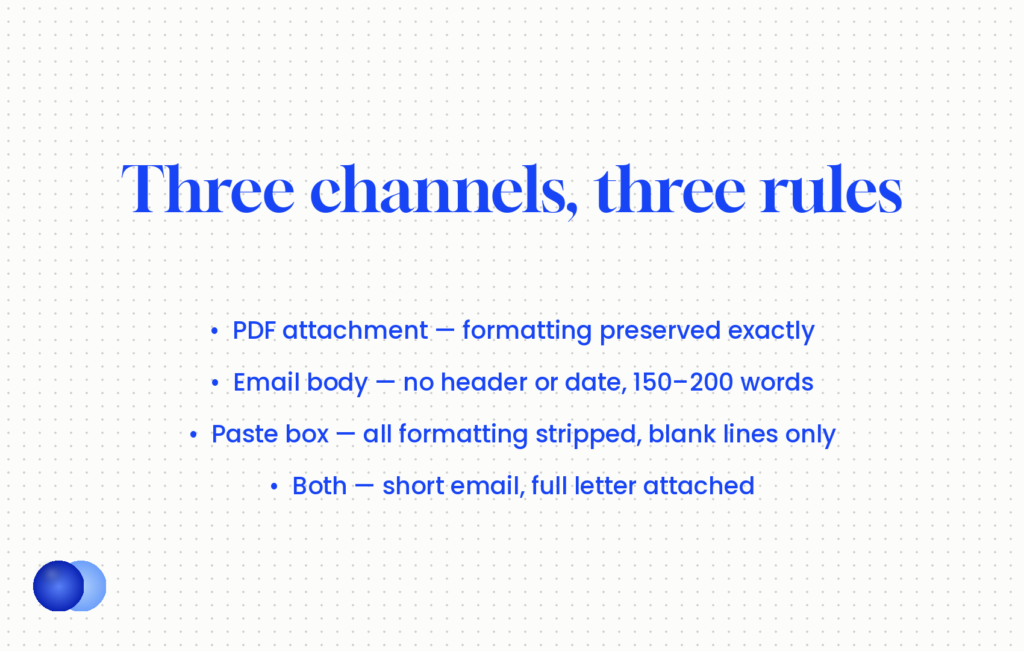
Three channels with different rules. A PDF attachment keeps your formatting exactly. An email body drops the header and date and runs shorter at 150 to 200 words. A portal paste box strips formatting entirely, so paragraph breaks are the only structure that survives.
Channel is the part of cover letter format that catches people, because a letter that works in one can fail in another.
| Channel | What changes |
|---|---|
| PDF attachment | Nothing — formatting preserved exactly |
| Email body | Drop the header block and date; 150–200 words; subject line carries context |
| Portal paste box | All formatting stripped; blank lines between paragraphs are your only structure |
| Both email and attachment | Short email introduction, full letter attached, each readable alone |
For the paste box specifically: write it so it reads correctly as plain text. No bold, no bullets, no indentation — just paragraphs separated by blank lines. If your letter depends on formatting to be legible, it will not survive there.
As a PDF attachment: Full header with name and contact details, date, employer block, greeting, four paragraphs, sign-off. 340 words.
In the email body: No header, no date, no employer block. Greeting, three paragraphs, sign-off. 185 words. The subject line reads "Senior Data Analyst — Sam Rivera".
Same argument, same evidence. The email version drops everything the email client already supplies and cuts the rest to what someone will read on a phone.
Name the file properly before uploading. Firstname-Lastname-Cover-Letter.pdf sits in a folder alongside a hundred applications, and cover letter final v2.docx tells a recruiter something you did not mean to say.
Use a template with a coloured sidebar or a two-column layout. It looks designed and it parses badly, and a cover letter has no content that benefits from columns.
Should the format change by industry?
Only at the margins. Conservative sectors — law, finance, government, academia — expect the full block format including the employer address. Tech and creative roles tolerate a lighter header. The underlying rules do not change, and no sector rewards unconventional layout.
Two adjustments to the standard cover letter format cover almost every case:
Conservative sectors. Keep the date and employer address block, use Times New Roman or Georgia, and stay at the formal end of the sign-off range. Academic cover letters can also run longer than one page, which is the one genuine exception to the length rule.
Tech, startups and creative. A lighter header is fine — name, email, LinkedIn, no postal address. Keep everything else standard.
What does not vary: one page, left alignment, plain structure, readable type. A designer who wants to show visual skill has a portfolio for that, and using the cover letter for it costs parsing reliability in exchange for nothing.
Format is the floor, not the ceiling. A perfectly formatted letter with generic content still loses to a slightly scruffy letter with real evidence.
Finally, that is the right note to end on. Getting the format right takes ten minutes and removes a source of friction. It does not make the letter persuasive — how long a cover letter should be covers why the word count follows from reading time, and everything above it is the content doing the actual work.
Frequently asked questions
What is the standard cover letter format?
One page, 250 to 400 words, 11 or 12 point in a standard business font, one-inch margins, single-spaced with a blank line between paragraphs, left-aligned throughout, saved as PDF.
What margins should a cover letter have?
One inch on all four sides. Three-quarters of an inch is the acceptable minimum, and anything below that looks crowded before anyone reads a word.
What font size should a cover letter be?
Eleven point for body text, 12 to 14 for your name in the header. Never drop below 10 point, and never shrink type to fit an extra paragraph — cut the content instead.
Should cover letter paragraphs be indented?
No. Modern block format separates paragraphs with a blank line. Indented paragraphs read as a convention from twenty years ago.
Should my cover letter match my resume?
Yes — same font family, same body size, same header treatment. The two documents should look like one set, which is a small signal of attention that costs nothing.
Does cover letter formatting affect ATS parsing?
Text boxes, tables used for layout, and contact details in headers or footers parse unreliably. Plain left-aligned paragraphs in standard fonts parse correctly everywhere.
How do I format a cover letter in an email body?
Drop the header block and date, keep the greeting, and cut to 150 to 200 words. The subject line carries the context that a header would have supplied.
Should a cover letter ever be two pages?
No, outside academic applications where the convention genuinely differs. For everything else, a second page signals an inability to prioritise.

Comments