Phone Device Type on a Job Application: What to Pick and Why
Phone device type on a job application, explained: when to pick Mobile or Landline, how to fill in country code and extension, and which number to give.

On this pageWhat does phone device type mean on a job application?
- What does phone device type mean on a job application?
- Should you choose Mobile or Landline for phone device type?
- What are the country phone code and phone extension fields?
- Which phone number should you put on a job application?
- How do recruiters use your phone number after you apply?
- What should you check before you submit the contact section?
- FAQ
- Sources
Phone device type asks what kind of phone your number rings: Mobile, Landline or another option. Pick Mobile if you give your cell number, because recruiters often text and some systems only send texts to mobile numbers. Choose your country code (+1 for the US), leave the extension blank unless you use a desk line, and give one number you answer every day.
Phone device type asks what kind of phone your number belongs to, such as Mobile or Landline. Pick Mobile if you give your cell number. That choice lets the employer text you, and it doesn't affect whether you get the job.
Below you'll find what each option means, how to fill in country code and extension, and which number to give. Our example is Maya, who is applying for a cashier job through Workday.
Quick answers by situation
| Your situation | What to say/do | Example line |
|---|---|---|
| You give your cell phone | Pick Mobile | Device type: Mobile |
| You only have a home phone | Pick Landline | Device type: Landline |
| You use Google Voice or a similar app | Pick Mobile if it gets texts, or VoIP if listed | Device type: Mobile |
| You must give a desk phone at work | Pick Landline and add the extension | Extension: 214 |
| You live in the US | Pick United States (+1) as the country code | Country code: United States (+1) |
| The form also asks Home or Work | Pick Home for a personal cell | Type: Home, Device: Mobile |
What does phone device type mean on a job application?
Phone device type tells the employer what kind of phone your number rings, usually Mobile or Landline. Some forms add Fax, Pager or VoIP. The field sits in the contact section of Workday and similar systems. It helps the recruiter know if they can text you, and it has no effect on your candidacy.
The field is part of the contact block, next to your name, email and address. In Workday, employers set up a list of device types that the form shows when it collects phone numbers2. So the exact options change from one company to the next.
If you've just filled in your legal name on a job application, you're in the same section. Most of these fields come straight from your account profile, so a mistake here can follow you to every job you apply for.
Legal name on a job application: which fields need it, what "do you have previously used legal names" means, and how to answer the former legal name question.
Device type vs phone type
Many forms ask two different things, and people mix them up. Device type asks what the phone is: Mobile or Landline. Phone type (or usage type) asks how you use it: Home, Work or Personal.
Oracle's recruiting system, for example, uses labels like "Home Mobile Phone" and "Work Phone" for candidates.
You need to enable the Home Mobile Phone (HM) for external candidates, and the Work Phone (W1) for internal employees.
Oracle, Implementing Recruiting
That note, from Oracle's setup guide4, shows the default thinking. Outside applicants give a personal mobile, and current staff give a work line.
Why employers ask
The answer mostly controls how the system reaches you. If you pick Mobile, the recruiter can call and, on many systems, text you. If you pick Landline, the system knows a text won't arrive.
Should you choose Mobile or Landline for phone device type?
Choose Mobile if the number belongs to a cell phone, which is true for most job seekers. In late 2024, 78.7% of US adults lived in homes with only wireless phones. Pick Landline only for a wired home or desk phone. When a VoIP option appears, use it for app numbers that can't take texts.
Most people should pick Mobile. The CDC found that in the second half of 2024, 78.7% of US adults1 lived in wireless-only homes. For adults aged 25 to 29, the share reached 88.9%.
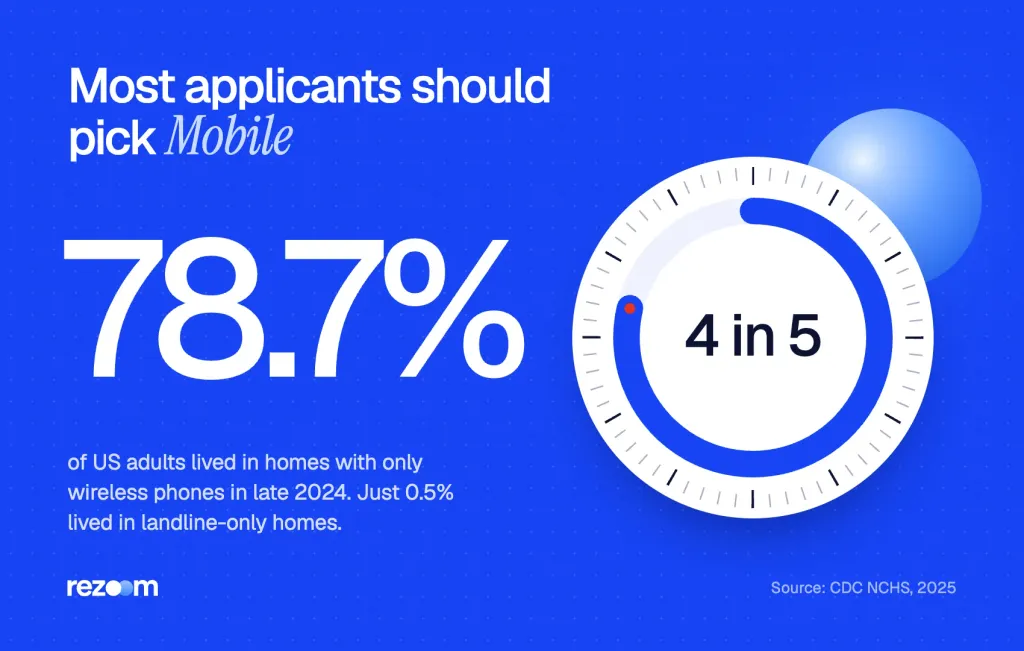
Landline-only homes are now rare. The same CDC report put adults in landline-only households at just 0.5%. So a recruiter will expect Mobile for most applicants.
| Option | Pick it when | What the recruiter can do |
|---|---|---|
| Mobile | The number rings your cell phone | Call, text and leave voicemail |
| Landline | The number rings a wired home or office phone | Call and leave voicemail only |
| VoIP | You use an internet number that may not get texts | Call; texting depends on the service |
| Fax or Pager | Almost never for a job seeker | Not useful for a hiring call |
What about Google Voice and other app numbers?
If your app number can send and receive texts, pick Mobile so recruiters can reach you the same way they'd reach a cell. Pick VoIP only when the form lists it and your number can't take texts. Then test the number from another phone before you submit, so you know calls ring through.
Workday's own connector data lists VoIP as one example of a phone device type value2, next to mobile and landline. But many forms only show Mobile and Landline. In that case, pick the option that matches how you'll answer.
If you can get a text at that number, choose Mobile. If you can't, choose Landline or VoIP. That one rule settles almost every phone device type question.
What are the country phone code and phone extension fields?
The country phone code is the dialing prefix for your number's country. US and Canadian numbers both use +1, so pick United States (+1) if you live in the US. The phone extension is for desk lines that route through a main office number. If you give a cell phone, leave the extension blank.
Workday stores the country code and extension as separate optional parts3 of a phone record. So you type only your 10-digit number in the main phone box, without the +1 or a leading 1.
How to fill in the country code
- US number: Pick United States of America (+1) from the dropdown.
- Canadian number: Pick Canada (+1). It shares the code with the US, so choose the right country name.
- Number from another country: Pick the country that issued the number, not the country of the job.
- Moving soon: Give the number you'll keep, then note your move in the cover letter.
When to use the extension box
An extension only matters if a caller has to dial a main number and then your line. That happens with office desk phones. But you shouldn't give a work desk line for a job search in most cases, so this box usually stays empty.
Country Phone Code: United States of America (+1)
Phone Number: (555) 555-0142
Phone Extension: [leave blank]
Phone Device Type: Mobile
Which phone number should you put on a job application?
Give one personal number that you answer every day and that has a set-up voicemail. For most people, that's their own cell phone. Avoid your current work line, a shared family phone or a number you plan to drop. Then use the same number on your resume, so the employer has one way to reach you.
Recruiters call fast, and a missed call can cost you a slot. So give the number you'll actually pick up. Keep it the same on your application, resume and job board profile.
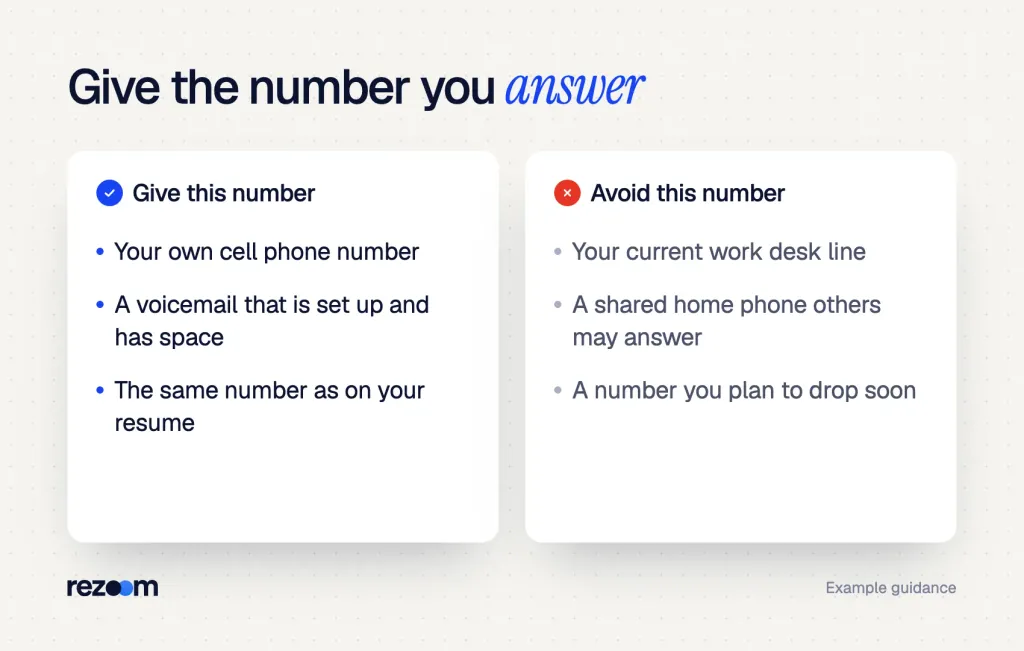
Do
- Use your own cell phone number.
- Set up a short, clear voicemail greeting.
- Use the same number on your resume and application.
Don’t
- Give your current employer's desk line.
- Use a shared phone that others may answer.
- List a number you plan to change before the job starts.
Scripts for your voicemail
If you can't answer, your voicemail is the first impression. Keep it short and use your full name, so the recruiter knows they reached the right person.
"Hi, you've reached Maya Ortiz." "I can't take your call right now, but I'll call you back today." "Please leave your name and number after the tone."
"Hi, you've reached [your full name]."
"I'm away from the phone right now. Please leave your name, number and a short message."
"I'll return your call by [today / the end of the day]."
If your name on the form differs
If you go by a different first name, recruiters may ask for that name on the phone. Our guide on the preferred name field on a job application explains how to set that up. And if the form also asks for a middle name on a job application, you can see what to enter there too.
Free ATS score, the text the software extracts and your missing keywords. No sign-up.
How do recruiters use your phone number after you apply?
Recruiters use your number to call for phone screens, send interview reminders and, on many systems, text you. In Workday, SMS works only for candidates who opt in with a mobile number from a supported country. So choosing Mobile, and opting in when asked, can speed up replies about your interview.
Texting is now a common way to reach candidates. Workday's candidate texting needs the candidate to opt in to SMS5 and to have at least one active application. Its opt-in tool also sorts out candidates with no eligible mobile phone6, which covers US, Canadian, UK and Australian mobile numbers.
That means a cell number marked as Landline can miss reminder texts. Maya picked Mobile and opted in, so she got her interview time by text the same afternoon.
Calls from unknown numbers
Recruiters often call from numbers you don't know. Most carriers now label or block suspected spam calls, and an FCC report found that fewer than 1% of AT&T customers7 opted out of its blocking tool in 2019. The same 2020 report noted that some wanted calls can get blocked or mislabeled.
So during a job search, check your blocked calls and spam folder every day. When a call goes to voicemail, call back within a few hours.
Watch for fake recruiter texts
Scammers know job seekers share their numbers. In April 2026, the FTC warned about fake recruiter texts8 that offer remote work and then ask for money. Never pay to get a job, and don't reply to a surprise job text with a keyword.
A real recruiter text names the company and the job you applied for. If a text offers a job you never applied for, don't reply. Look up the company's careers page and contact it there instead.
What to say if they push back
Sometimes a recruiter asks about your number, or a call fails. Here's how to handle the common cases.
- "We couldn't text you." Check the device type: "I may have marked it as a landline. I'll update my profile to Mobile now."
- "Is this your work phone?" Be clear: "No, it's my personal cell, so you can reach me any time during the day."
- "Your voicemail is full." Fix it fast: "Sorry about that. I've cleared it, and you can leave a message now."
Recruiter: "I tried calling twice, but I couldn't leave a message."
"I'm sorry I missed you. My voicemail was full, and I've cleared it now."
Recruiter: "No problem. Is this the best number to reach you?"
"Yes, it's my cell. You can call or text, and I'll answer between 9 and 5."
What should you check before you submit the contact section?
Before you submit, check that the device type matches your phone, the country code is right and the extension is blank for a cell. Make sure your voicemail works and your number matches your resume. Then finish the rest of the form, including the source question, and run your resume through a checker.
A clean contact section takes two minutes. But a typo in your number can make the best resume useless, because nobody can call you.
- Pick the device typeChoose Mobile for a cell, or Landline for a wired phone.
- Set the country codePick United States (+1) for a US number.
- Type the numberEnter 10 digits, with no +1 and no extension for a cell.
- Test your voicemailCall your number from another phone and listen to the greeting.
Before you submit the phone fields
Finish the rest of the form
The next box is often the how did you hear about us question on a job application. Answer it with the exact source, such as the job board or a referral name.
How did you hear about us on job application forms? Pick the source that led you to the job, name any referrer and keep the Other box short. 6 examples.
Your contact fields also need to match what Workday pulls from your file. See how Workday parses resumes so the phone number at the top of your resume lands in the right box.
Make your retail application stand out
Many hourly and store jobs use these forms, and hiring can move in a day. If you're after store work, browse our retail resume examples to see how others list shifts, sales and customer service.
For a register role, these retail cashier resume examples show how to list cash handling, speed and reliability on one page.
Retail cashier resume example
See how to show cash handling accuracy, customer service and shift flexibility.
If the job asks for a cover letter, our retail cover letter examples show how to mention your open availability in one line. Then run your file through the free ATS resume checker to make sure your phone number and other contact details read cleanly.
Free ATS score and your missing keywords. No sign-up.
Frequently asked questions
What is phone device type on a job application?
It's the kind of phone your number rings, such as Mobile or Landline. Pick Mobile for a cell phone so the employer can call and text you.
Does phone device type affect my chances of getting hired?
No. It only tells the system how to contact you. But a wrong choice can stop interview texts from reaching you.
What country phone code should I pick in the US?
Pick United States of America (+1). Then type your 10-digit number in the phone box without the +1.
What do I put in the phone extension box?
Leave it blank if you give a cell phone. Use it only for an office desk line that needs an extension after the main number.
Should I pick Home or Work for my cell phone?
Pick Home or Personal for your own cell, and Mobile as the device type. Choose Work only for a phone your employer provides.
Can I use a Google Voice number on a job application?
Yes. Pick Mobile if it gets texts, and test it from another phone before you submit.
Sources
We opened and read each page below. The small numbers in the text point here. Pages that carry no publication date show n.d.
- CDC National Center for Health Statistics2025
In July to December 2024, 78.7% of US adults lived in wireless-only households, 88.9% of adults aged 25 to 29, and 0.5% lived in landline-only households.
- CData (Workday connector documentation)n.d.
Workday phone device types (for example mobile, landline and VoIP) are prompts used when collecting phone numbers.
- Okta Workflows (Workday connector)n.d.
Workday phone records hold device type, country phone code and extension as separate optional fields.
- Oracle2026
Oracle Recruiting uses Home Mobile Phone for external candidates and Work Phone for internal employees.
- Workdayn.d.
Candidate SMS requires opt-in, a phone number in a supported country and at least 1 active job application.
- Workdayn.d.
SMS opt-in applies to Australian, Canadian, UK and US mobile numbers; candidates without one show as having no eligible mobile phone.
- Federal Communications Commission2020
Fewer than 1% of AT&T customers opted out of Call Protect in 2019, and some wanted calls get blocked or mislabeled.
- Federal Trade Commission2026
On April 30, 2026, the FTC warned about fake recruiter texts that offer remote work and then ask for money.
Mohammad has spent more than ten years designing consumer products and leads product at Rezoom, deciding what gets built and what gets left out. His guides cover the whole job search, from resume sections and cover letters to interview answers and career moves.
Goodi, M. (2026, November 21). Phone Device Type on a Job Application: What to Pick and Why. Rezoom. https://rezoom.io/phone-device-type-on-job-application/