How Early to Join a Teams Interview: Lobby, App and Test Call
How early to join a Teams interview: open the link 15 minutes ahead, click Join now 5 to 10 minutes early, and know what to do if the lobby keeps you waiting.

On this pageHow early to join a Teams interview: 15 or 5 minutes?
- How early to join a Teams interview: 15 or 5 minutes?
- What happens when you join a Teams interview early?
- Should you join a Teams interview from the app or the browser?
- How do you test Teams before the interview?
- How long should you wait in the Teams lobby?
- What if Teams won't let you join the interview?
- What should you say when the interviewer lets you in?
- FAQ
- Sources
Open the Microsoft Teams link 10 to 15 minutes before a Teams interview to check your camera and mic on the pre-join screen. Then click Join now 5 to 10 minutes early. You will usually wait in the lobby until the interviewer lets you in. If no one admits you within 30 minutes, Teams removes you, so email the recruiter by 5 to 10 minutes past the start.
Here is how early to join a Teams interview: open the link 10 to 15 minutes before, test your camera and mic, then click Join now 5 to 10 minutes early. Then expect to wait in the lobby until the interviewer admits you.
Teams adds a few steps that Zoom doesn't. You may get a browser prompt, a sign-in screen or a lobby with no countdown. So the extra minutes go to setup, not to sitting in the meeting.
Our example is Maya, who has a Teams interview at 10:00 a.m. for a customer service representative job.
Quick answers by situation
| Your situation | What to do | Example line |
|---|---|---|
| Standard Teams interview | Open the link at 9:45, click Join now at 9:52 | "Hi, this is Maya, here for the 10:00 interview." |
| You have no Teams account | Pick "Continue on this browser" in Edge or Chrome | Name field: Maya Patel |
| You're in the lobby | Stay put, camera on, and wait to be admitted | (No action needed) |
| It's 10:07 and no one has let you in | Send the recruiter a short email | "I'm in the Teams lobby and ready when you are." |
| Teams says "Sign in to join" | Try the browser option, then email the recruiter | "Your link asks me to sign in. Is there a guest link?" |
| You're on a phone | Use the Teams mobile app, not the phone's browser | (Install the app the night before) |
How early to join a Teams interview: 15 or 5 minutes?
Open the Teams link 10 to 15 minutes before the start so you can pick the browser or app, allow your camera and mic, and check your picture. Click Join now 5 to 10 minutes early. You will usually land in the lobby, and that early arrival tells the interviewer you're ready without forcing them to start early.
But the two numbers do different jobs.
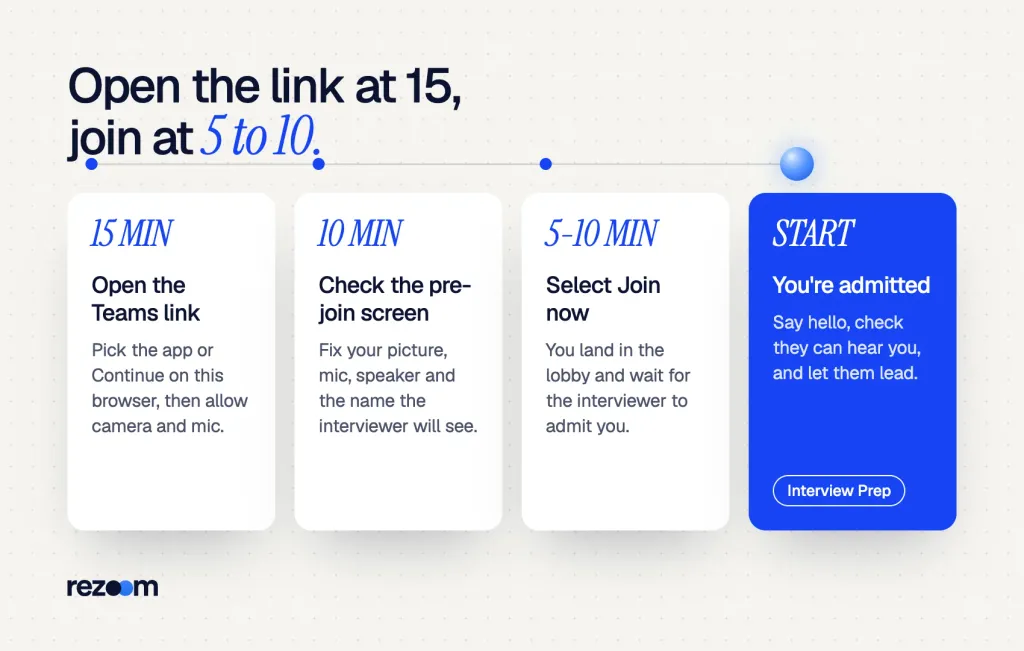
The first number is for setup. Microsoft says people joining without an account can enter the meeting up to 15 minutes before its start time1 to troubleshoot. The second number is for arrival, because the lobby is where you wait.
Why 5 to 10 minutes, not 30
Some employers ask for more. The British Columbia public service tells candidates to enter the call fifteen minutes prior5 to their Teams interview. If your invite names a time, follow it.
- Invite says "join 15 minutes early": Do exactly that.
- Invite says nothing: Click Join now 5 to 10 minutes early.
- Panel interview with several people: Join 10 minutes early, so a late link doesn't hold up the whole panel.
- Back-to-back interviews: Join at the time the coordinator gave you, not when the last one ended.
For the general rule across Zoom, Teams and Google Meet, see our guide on how early to log in for a virtual interview.
A 15-minute countdown for a 10:00 interview
This is Maya's plan. It fits any Teams interview, so swap in your own start time.
| Time | What to do | Why |
|---|---|---|
| 9:45 | Open the invite and select the join link | The browser or app prompt takes a minute |
| 9:47 | Pick the app or "Continue on this browser" | Allow camera and mic when asked |
| 9:49 | Check your picture, sound and background | You can fix it before anyone sees you |
| 9:52 | Select Join now | You enter the lobby or the meeting |
| 10:00 | Interviewer admits you | Smile, say hello, and start |
What happens when you join a Teams interview early?
You usually land in the lobby, a waiting area that keeps guests out until someone admits them. The interviewer gets a notice that you're there. Outside candidates almost always wait in the lobby, because the employer's settings let only staff skip it. So waiting is normal and says nothing about you.
The lobby is a feature, not a glitch. Microsoft says the lobby is there to "keep people from directly entering a meeting2" when they join.
Who waits in the lobby
The organizer picks who can skip the lobby. If the setting is "People in my org," then everyone outside the company waits, including guests. And people without a Teams account may still wait even under looser settings.
So as a candidate, assume you'll wait. The interviewer sees you under "Waiting in the lobby" and admits you with a check mark.
What you can do while you wait
You can't do much in the lobby, and that's fine. Microsoft notes that lobby guests can read lobby chat messages, but they "won't be able to send replies or reactions."
- Keep the camera on: The interviewer may admit you at any second.
- Keep the window open: Don't close the tab to "check something."
If you join as a guest, Teams shows the name you type on the pre-join screen. Use your full name as it appears on your application. Then the interviewer knows at a glance who is waiting in the lobby.
How early to log in for a virtual interview on Zoom, Teams or Google Meet: join 5 to 10 minutes early, test 30 minutes before, and how long to wait.
Should you join a Teams interview from the app or the browser?
Either works. The browser is the fastest for a one-time interview, and Microsoft supports Teams on the web in Edge and Chrome with no install. The desktop app adds a built-in test call. On a phone, use the Teams mobile app, because Teams does not support mobile web browsers.
When you open the link, Teams asks you to choose. Microsoft's wording is to "select Continue on this browser or Join on the Teams app1." You don't need to install anything to join.
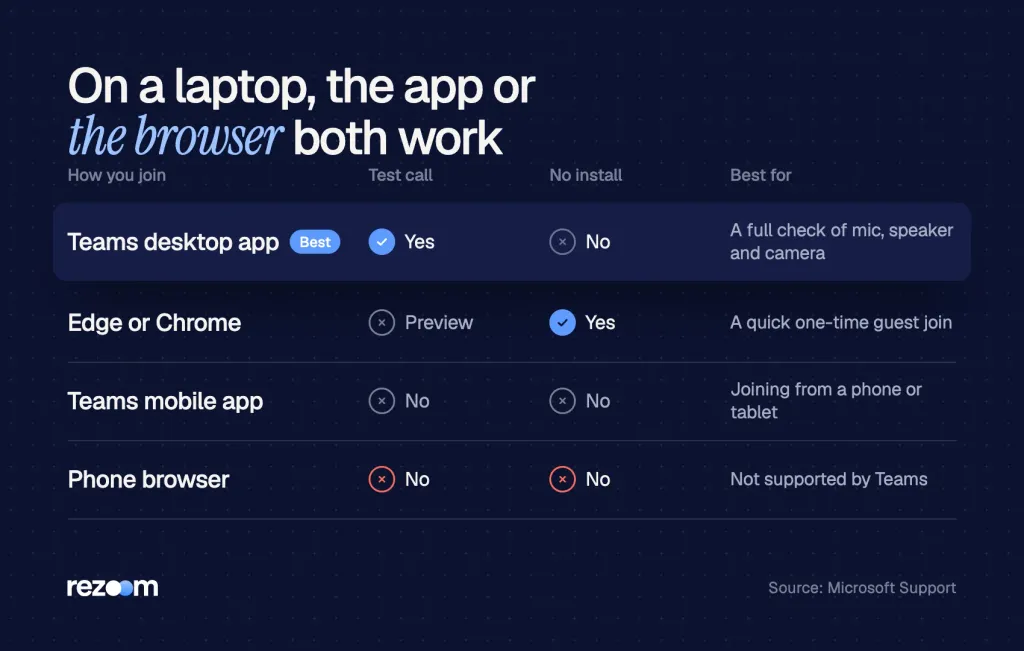
Pick by device
| Device | Best choice | Watch out for |
|---|---|---|
| Laptop, no Teams installed | Edge or Chrome | Allow camera and mic when the browser asks |
| Laptop with the Teams app | The desktop app | Sign in to the right account, or join as a guest |
| Work laptop from your current job | Your personal device | Your employer's account may join under your work name |
| Phone or tablet | The Teams mobile app | Mobile browsers aren't supported3 |
If you already use Teams at work, be careful. If you join from that account, the interviewer may see your current employer's name next to yours. So use a personal laptop or a private browser window.
Guest access and email checks
Some companies make guests verify an email first. In that case, Teams asks for your email, then sends a one-time code. Enter it, then select Join now.
That step can add a minute or two. It's one more reason to open the link 10 to 15 minutes early.
How do you test Teams before the interview?
In the Teams desktop app, go to Settings, then Devices, then Make a test call. A voice asks you to record a short message and plays it back, so you hear your mic and speakers. In the browser, use the pre-join screen: it shows your video and lets you pick your mic and speaker.
The test call is the best check, but it's only in the desktop app. Microsoft says it's "only available in Teams desktop app for Windows and Mac4." It also checks your camera, and Teams deletes the recording right after the call.
- Do a dry run the day beforeOpen the interview link once to see whether Teams asks for the app, the browser or a sign-in.
- Run a test callIn the desktop app, go to Settings, Devices, then Make a test call. In a browser, check the pre-join preview.
- Set your devicesPick the right mic, speaker and camera on the pre-join screen, then turn on background blur if you need it.
- Save a backupCopy the dial-in number or meeting ID from the invite and keep your phone charged.
Test with a real person
A test call checks your gear, not your setup. So ask a friend to join a short Teams call with you and tell you how you look and sound. The BC guide suggests the same: do "training/test calls with your friends5" to get comfortable on video.
For lighting, camera angle and eye contact, our Zoom interview tips apply to Teams too.
Before you click Join now
Mock interviews, out loud, with an AI voice coach.
How long should you wait in the Teams lobby?
Wait calmly until 5 minutes past the start, then email the recruiter once to say you're in the lobby. Stay in the lobby while you wait for a reply. Teams removes you if no one admits you within 30 minutes, and then shows a "no one has responded" message. If that happens, rejoin and email again.
But Teams has a hard limit. Microsoft says that if no one lets you in within 30 minutes, you're removed from the lobby.
If no one admits you within 30 minutes, you'll be removed from the lobby.
Microsoft Support, Join a meeting without an account
A wait plan by the minute
- 10:00 to 10:05: Wait. Don't email yet.
- 10:05 to 10:10: Send one short email to the recruiter or coordinator.
- 10:15: If still no reply, call the recruiter's number if you have it.
- Timed out: Rejoin from the same link, then email to say you're back in the lobby.
If you see "Sorry, no one has responded to your request to join," Microsoft says to check that you used the right link3, then contact the organizer. For the full timing rules and email templates, see how long to wait for a Zoom interview to start, which covers Teams too.
Subject: [Your name] – in the Teams lobby for [time] interview
Hi [recruiter name], I'm in the Teams lobby for my [time] interview for the [job title] role.
I'm ready whenever [interviewer name] is. If a new link is easier, I can join right away.
My phone is [number] if we need to switch to a call.
Thanks, [your name]
How long to wait for a Zoom interview to start: what to check at 5 minutes, what to send at 10, when to leave, and word-for-word emails to reschedule.
What if Teams won't let you join the interview?
Read the message on the screen, because Teams tells you the cause. "Sign in to join this meeting" means the link needs an account. "This meeting is locked" means the organizer must unlock it. "The meeting lobby is full" means wait a few minutes and retry. For anything else, email the recruiter with a screenshot.
Most join errors come from the employer's settings. So fix what you can in one try, then tell the recruiter.
| Message on screen | What it means | What to do |
|---|---|---|
| "Sign in to join this meeting" | The link needs a work or school account | Email the recruiter for a guest link |
| "Sign in with a different account" | You're signed in with the wrong account | Sign in with the account that got the invite |
| "This meeting is locked." | The organizer locked the meeting | Ask the recruiter to unlock it |
| "The meeting lobby is full right now." | Too many people are waiting | Wait a few minutes, then try again |
| "Sorry, no one has responded..." | The 30-minute lobby limit ran out | Rejoin and email the recruiter |
Keep a phone backup ready
Many Teams invites include a dial-in number and conference ID. Copy them before the interview, so you can join by phone if your video fails.
The BC guide also tells candidates: "If you lose your connection, wait to be called via phone5 for further instruction." So keep your phone close and the ringer on.
If Teams shows an error, take a screenshot before you do anything else. Then attach it to your email to the recruiter. It helps their IT team fix the link fast, and it shows you arrived on time.
What should you say when the interviewer lets you in?
Say hello, use their name, and confirm you can hear each other. Keep it to one or two lines, then let them lead. If they admit you late, don't mention the wait unless they do, and if they apologize, say it's no problem and move on to the interview.
"Hi Jordan, thanks for having me. Can you hear me okay?" "Great. I'm excited to talk about the customer service role."
"Hi Jordan, good to meet you. No problem at all about the wait." "I'm all set on my end, so I'm ready when you are."
What to say if they push back
Sometimes the interviewer asks about the wait, the setup or your audio. Keep each answer short and calm.
- "Sorry, were you waiting long?" Say: "Only a few minutes, no problem."
- "Your audio is cutting out." Say: "Let me switch to my phone audio. One moment."
- "Can you join from the app instead?" Say: "Sure, I'll rejoin from the app now."
- "We sent a new link." Say: "Got it, I'm joining now."
Interviewer: "Maya, I can see you, but I can't hear you."
"Sorry about that. I'll call in on the dial-in number now."
Interviewer: "Okay, the number is in the invite."
"I'm on the phone now. Can you hear me clearly?"
Do
- Open the link 10 to 15 minutes early.
- Type your full name on the guest screen.
- Stay in the lobby until 5 to 10 minutes past the start.
- Keep the dial-in number and recruiter's email on hand.
Don’t
- Join from your current employer's Teams account.
- Use a phone browser instead of the Teams app.
- Leave and rejoin the lobby every minute.
- Open with a long apology about the wait.
Make the minutes before count
Use the last few minutes to review your resume, not to fiddle with settings. Customer-facing jobs often use Teams for first-round interviews, so look over our administrative resume examples for how office and support roles show results.
Maya kept a copy of this customer service representative resume example open, so her stories matched her bullets.
Customer service representative resume example
See how to show call volume, satisfaction scores and problem solving in a few clear bullets.
If the role asks for a letter, our administrative cover letter examples show how to match it to your resume. And to warm up your answers before you join, try AI mock interview practice the day before.
Practice out loud with an AI voice coach.
Frequently asked questions
How early should I join a Teams interview?
Open the link 10 to 15 minutes early to set up, then click Join now 5 to 10 minutes before the start. If the invite gives a time, follow it.
Is it rude to join a Teams interview too early?
Not really, because you'll usually wait in the lobby. But joining 20 or 30 minutes early can push a reminder to the interviewer before they're ready, so 5 to 10 minutes is the sweet spot.
What does "waiting for someone to let you in" mean on Teams?
It means you're in the lobby. The interviewer has to admit you, so stay on the screen with your camera on.
How long can you stay in the Teams lobby?
Microsoft says you're removed if no one admits you within 30 minutes. Rejoin from the same link and email the recruiter.
Do I need a Teams account for a job interview?
Usually not. You can join as a guest in Edge or Chrome by picking "Continue on this browser," unless the employer's settings require a sign-in.
Can I join a Teams interview on my phone?
Yes, with the Teams mobile app. Mobile web browsers aren't supported, so install the app the night before.
How do I test my mic and camera on Teams?
In the desktop app, go to Settings, Devices, then Make a test call. In a browser, check the preview on the pre-join screen.
Sources
We opened and read each page below. The small numbers in the text point here. Pages that carry no publication date show n.d.
- Microsoft Supportn.d.
Guests can join in Edge or Chrome, enter up to 15 minutes early to troubleshoot, and are removed from the lobby after 30 minutes.
- Microsoft Supportn.d.
The Teams lobby keeps people from entering directly, and organizers choose who can bypass it.
- Microsoft Supportn.d.
Teams join errors include sign-in prompts, locked meetings, a full lobby and a 30-minute lobby timeout; mobile browsers are not supported.
- Microsoft Supportn.d.
The Teams test call checks your speakers, mic and camera and is only in the desktop app for Windows and Mac.
- Government of British Columbian.d.
Candidates should enter a Teams interview call fifteen minutes early and wait for a phone call if the connection drops.
Mohammad has spent more than ten years designing consumer products and leads product at Rezoom, deciding what gets built and what gets left out. His guides cover the whole job search, from resume sections and cover letters to interview answers and career moves.
Goodi, M. (2026, November 23). How Early to Join a Teams Interview: Lobby, App and Test Call. Rezoom. https://rezoom.io/how-early-to-join-a-teams-interview/